Sort by|

Golf Simulators in Golf Tech
Uses item details. Price when purchased online

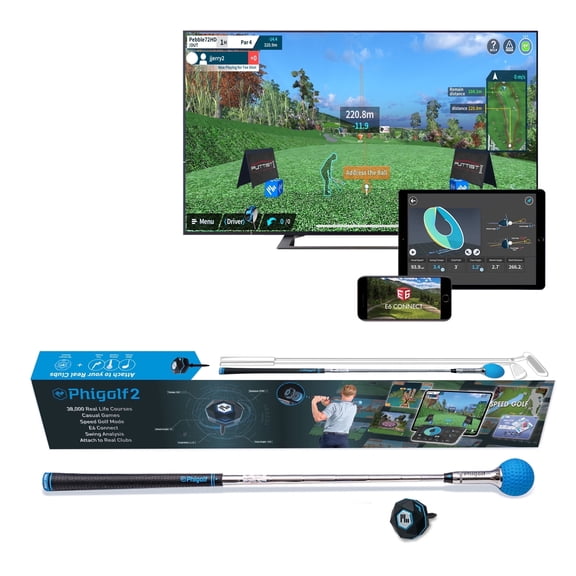
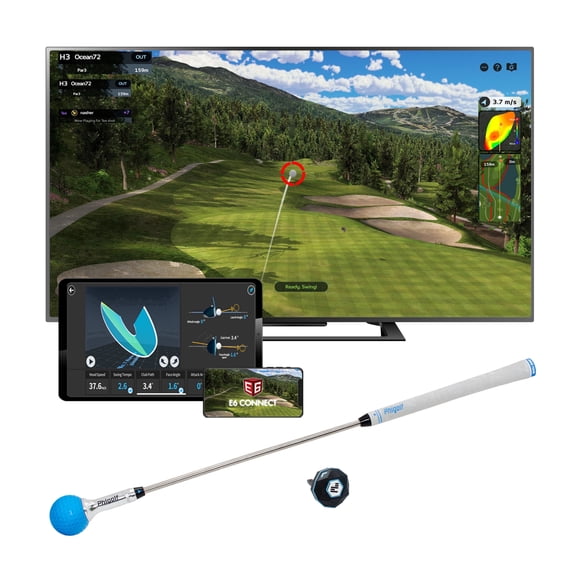
Black Friday Deal, PHIGOLF2 Flex Home Golf Simulator with Retractable Swing Stick, Motion Sensor & 3D Swing Analysis, E6 Connect Compatible, Works with Smart Devices, Price Now $230.30 Was $329.00

Black Friday Deal
PHIGOLF2 Flex Home Golf Simulator with Retractable Swing Stick, Motion Sensor & 3D Swing Analysis, E6 Connect Compatible, Works with Smart Devices
Sponsored
Price Now $230.30 Was $329.00
PHIGOLF2 Flex Home Golf Simulator with Retractable Swing Stick, Motion Sensor & 3D Swing Analysis, E6 Connect Compatible, Works with Smart Devices
3.8 out of 5 stars
3.8 out of 5 Stars. 69 reviews
Save withWalmart plus
Free shipping, arrives in 3+ days

Black Friday Deal, PHIGOLF2 Flex Home Golf Simulator with Retractable Swing Stick, Motion Sensor & 3D Swing Analysis, E6 Connect Compatible, Works with Smart Devices, Price Now $230.30 Was $329.00

Black Friday Deal
PHIGOLF2 Flex Home Golf Simulator with Retractable Swing Stick, Motion Sensor & 3D Swing Analysis, E6 Connect Compatible, Works with Smart Devices
Price Now $230.30 Was $329.00
PHIGOLF2 Flex Home Golf Simulator with Retractable Swing Stick, Motion Sensor & 3D Swing Analysis, E6 Connect Compatible, Works with Smart Devices
3.8 out of 5 stars
3.8 out of 5 Stars. 69 reviews
Save withWalmart plus
Free shipping, arrives in 3+ days

PHIGOLF Home Golf Game Simulator: Enjoy Interactive Golf with Motion Sensor & Swing Stick for Indoor & Outdoor Fun 38,000+ Courses Worldwide, Compatible with Android, iOS, App & E6 Connect, Price $299.99

PHIGOLF Home Golf Game Simulator: Enjoy Interactive Golf with Motion Sensor & Swing Stick for Indoor & Outdoor Fun  38,000+ Courses Worldwide, Compatible with Android, iOS, App & E6 Connect
Price $299.99
PHIGOLF Home Golf Game Simulator: Enjoy Interactive Golf with Motion Sensor & Swing Stick for Indoor & Outdoor Fun 38,000+ Courses Worldwide, Compatible with Android, iOS, App & E6 Connect
3.8 out of 5 stars
3.8 out of 5 Stars. 69 reviews
Free shipping, arrives in 3+ days

Swing Caddie SC300 Portable Golf Launch Monitor, Price $499.99

Swing Caddie SC300 Portable Golf Launch Monitor
Price $499.99
Swing Caddie SC300 Portable Golf Launch Monitor
3 out of 5 stars
3 out of 5 Stars. 6 reviews
Free shipping, arrives in 3+ days

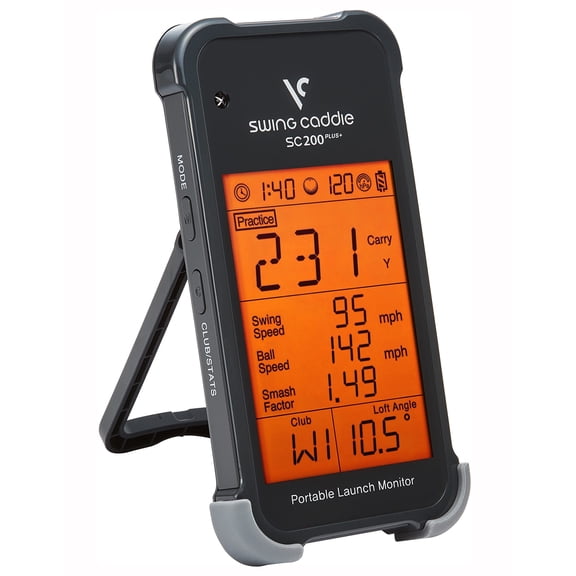
SC200 PLUS Swing Caddie Portable Golf Launch Monitor, Price Now $234.99 Was $279.99

SC200 PLUS Swing Caddie Portable Golf Launch Monitor
Price Now $234.99 Was $279.99
SC200 PLUS Swing Caddie Portable Golf Launch Monitor
3.9 out of 5 stars
3.9 out of 5 Stars. 19 reviews
Save withWalmart plus
Free shipping, arrives Fri, Nov 27

About Golf Simulators in Golf Tech - Walmart.com

You can build a practical practice space with a golf simulator that fits your room, your routine, and your setup goals. You’ll find options for shared garages, dedicated bays, and portable sessions that support repeatable swings at home.

When you compare this category, you should focus on ceiling height, enclosure format, and the floor space you can dedicate. You’ll also want to match your setup with launch monitor compatibility, mat size, and indoor or backyard use.

How to choose a golf simulator

You should start by measuring your available width, depth, and ceiling clearance before you compare formats. You’ll need enough room for your backswing, ball flight, and a comfortable follow-through.

If your space is shared, you may prefer a golf simulator portable format that you can move after practice. If your space stays dedicated, you may prefer a bay or net setup with a fixed hitting area.

You’ll notice that different formats change how quickly you can set up and store your space. You can expect inflatable and portable options to support quick setup, while framed bay enclosures suit more permanent assembly.

  • You can choose inflatable formats when you want a lighter structure and easier transport.
  • You can choose bay styles when you want a defined hitting zone and a more permanent room layout.
  • You can choose net setups when you want a smaller footprint and simpler ball containment.
  • You can choose larger mats when you want more stance room and placement flexibility.

Choosing between blow up golf simulator, portable, bay, and net formats

You should compare Type and Format first because that choice affects setup time, storage, and room layout. You’ll usually see different tradeoffs across inflatable, portable, bay, and net designs.

If you want a blow up golf simulator setup, you should look for quick inflation, stable anchoring, and enough depth behind the screen. You may like this format when you need a temporary practice area for a garage or backyard.

If you’re considering an inflatable golf simulator, you should also check enclosure dimensions and how the frame handles repeated ball contact. You’ll want a shape that keeps the screen centered and the sidewalls clear of your swing path.

When you compare a permanent bay with a portable kit, you should think about how often you’ll move it. You may prefer a fixed bay if you practice often and want a consistent hitting position.

What to look for in screens, fabrics, and sound control

You should compare enclosure materials because they influence ball impact feel, image clarity, and room noise. You’ll commonly see impact screen, nylon, and polyester construction across this category.

If you want projected visuals, you should look for an impact screen that handles repeated shots and presents a clean image. You’ll usually get a dedicated strike surface that supports simulator software and launch monitor sessions.

If you want a lighter enclosure, you may consider nylon or polyester panels around the hitting zone. You should compare how each material manages rebound feel, foldability, and everyday setup convenience.

You should also think about noise level when you practice indoors near shared rooms or later in the day. You’ll often notice that screen tension, backing layers, and mat density influence the sound of each strike.

Choosing the right 10x10 golf mat and hitting area

You should match mat size to your stance width, club length, and available floor plan. You’ll see compact mats for tighter spaces, while larger surfaces support flexible foot placement.

If a 10x10 golf mat fits your room, you can create a wider practice zone with extra space around the ball. You may appreciate that room when you switch clubs, reposition tees, or share the space.

If your room is tighter, you can still practice effectively with a 5x5 or compact mat. You should check whether the mat leaves clear walking space and enough distance from walls.

You’ll also want a surface that pairs well with your launch monitor position and hitting style. You should compare turf thickness, tee options, and how the mat aligns with your intended ball placement.

Setting up your indoor driving range

You can create an indoor driving range feel when you plan around clearance dimensions and tracking placement. You should measure room height carefully so your driver swing stays comfortable from address through finish.

You’ll also want to compare system requirements before you choose software-enabled components. You should check device compatibility, display connections, and whether your tracking setup needs extra room behind or beside you.

If tracking accuracy matters for your practice data, you should review sensor placement and latency. You’ll notice lower latency feels more natural because your shot data appears with less delay.

You can also build a backyard or outdoor station when you want more swing freedom and seasonal flexibility. You should look for formats that move easily and pair with mats, nets, or an enclosure for open-air sessions.

When you choose with your room size, mat dimensions, and simulator format in mind, you can create a setup that feels consistent each session. You’ll get a practical practice space that supports cleaner ball striking and more useful feedback.

FAQ

What room size do I need for a home golf simulator setup?

Setting up a golf simulator at home requires enough space to swing comfortably and accommodate the equipment. Generally, a room with at least 10 feet wide, 12 feet long, and 9 feet high is recommended. This allows for a full golf swing and proper ball flight tracking. Higher ceilings help avoid interference with your backswing. Also, consider extra space for the simulator screen, projector, and seating if desired. Measuring your available area before purchasing can help ensure the simulator fits well and provides an enjoyable experience.

How accurate are golf simulators in measuring shot distance?

Golf simulators use advanced sensors and cameras to estimate shot distance, club speed, and ball trajectory. While many models offer highly reliable distance measurements, accuracy can vary based on factors like calibration, lighting, and sensor quality. Portable launch monitors may have slight variations compared to professional-grade systems. Regular calibration and using the simulator in recommended conditions can help improve precision. Keep in mind that simulators provide useful data for practice and improvement, but results might not exactly match outdoor play.

What should I look for when choosing a golf simulator for home use?

Choosing the right golf simulator involves considering several factors to match your needs and space. Key points include:

  • Space requirements: Ensure your room can accommodate the simulator dimensions and ceiling height.
  • Accuracy and features: Look for launch monitors that track key data like ball speed, spin, and shot shape.
  • Compatibility: Check if the simulator works with your devices and popular golf software.
  • Portability: Decide if you want a fixed setup or a portable option for use indoors and at driving ranges.
  • Budget: Balance features with cost to find the best value for your practice goals.

Can I use a golf simulator outside or only indoors?

Many golf simulators are designed primarily for indoor use to control lighting and environmental factors that affect sensor accuracy. However, some portable launch monitors are built to be used outdoors, such as at driving ranges or in your backyard. When using a simulator outside, consider weather conditions, sunlight interference, and stable surfaces for setup. Always check the product specifications to confirm if outdoor use is supported and follow any guidelines to protect the device and maintain accurate readings.

How do I maintain and clean my golf simulator equipment?

Proper maintenance helps keep your golf simulator functioning well and extends its lifespan. Here are some tips:

  • Clean sensors and cameras: Use a soft, dry microfiber cloth to gently wipe lenses and sensors to avoid dust buildup.
  • Screen care: If your simulator has a projection screen, clean it with a mild cleaner and soft cloth to prevent damage.
  • Keep the area tidy: Remove debris and golf balls from the hitting area regularly.
  • Store accessories properly: Keep cables and components organized and protected when not in use.

Following these steps can help maintain accuracy and performance over time.