Find auto parts that fit

Let’s search for parts that fit your vehicle.
*Required fields
Sample license plate
This info is secure and only used to identify your vehicle

Right Hand Drive Conversion Kit

Uses item details. Price when purchased online
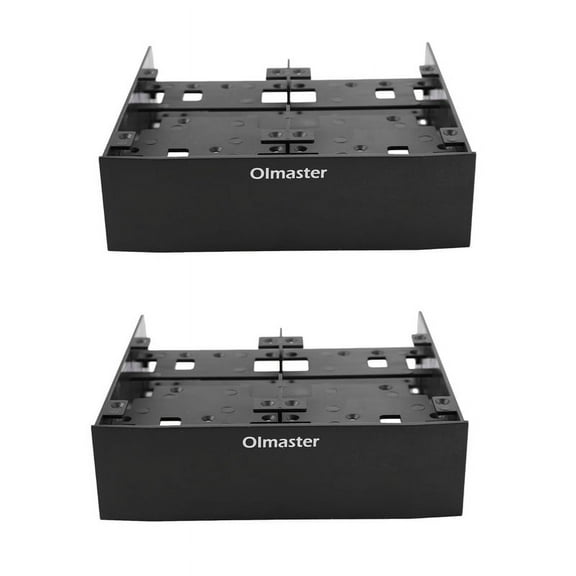
2X Hard Drive Conversion Rack Standard 5.25 Inch Device Comes with 2.5 Inch / 3.5 Inch HDD Mounting Screw From $6.14

2X Hard Drive Conversion Rack Standard 5.25 Inch Device Comes with 2.5 Inch / 3.5 Inch HDD Mounting Screw
Beige, variant on 2X Hard Drive Conversion Rack Standard 5.25 Inch Device Comes with 2.5 Inch / 3.5 Inch HDD Mounting Screw
Black, variant on 2X Hard Drive Conversion Rack Standard 5.25 Inch Device Comes with 2.5 Inch / 3.5 Inch HDD Mounting Screw
Black & Red, variant on 2X Hard Drive Conversion Rack Standard 5.25 Inch Device Comes with 2.5 Inch / 3.5 Inch HDD Mounting Screw
Black & silver, variant on 2X Hard Drive Conversion Rack Standard 5.25 Inch Device Comes with 2.5 Inch / 3.5 Inch HDD Mounting Screw
From$614

2X Hard Drive Conversion Rack Standard 5.25 Inch Device Comes with 2.5 Inch / 3.5 Inch HDD Mounting Screw

5 out of 5 stars
5 out of 5 Stars. 2 reviews

FAQ

what does a hard drive conversion rack do?

A hard drive conversion rack lets you install a 2.5-inch or 3.5-inch hard drive into a standard 5.25-inch drive bay in your desktop computer. This is especially useful if you want to add extra storage or upgrade your system without replacing your existing drives.

  • Flexible Compatibility: It supports different hard drive sizes, making it easier to use older or newer drives.
  • Easy Installation: Most racks come with mounting screws and clear instructions for a straightforward setup.
  • Better Organization: Helps keep your computer’s internal components tidy and secure.

how do I install a hard drive conversion rack?

To install a hard drive conversion rack, start by powering off your computer and unplugging it.

  1. Open your computer case and locate an empty 5.25-inch bay.
  2. Slide the conversion rack into the bay and secure it with the provided screws.
  3. Mount your 2.5-inch or 3.5-inch hard drive onto the rack using the included hardware.
  4. Connect the necessary power and data cables to the drive.
  5. Close your case, plug in your computer, and power it on.
Always follow your device’s safety guidelines and consult your computer’s manual for specific instructions.

can I use this rack for SSDs and HDDs?

Yes, most hard drive conversion racks are designed to fit both SSDs (solid state drives) and HDDs (hard disk drives) in 2.5-inch or 3.5-inch sizes.

  • Versatility: You can mix and match different drive types depending on your storage needs.
  • Secure Mounting: The included screws help keep your drives firmly in place, reducing vibration and potential damage.
  • Upgrade Options: This makes it easy to upgrade your computer’s storage without needing specialized tools or adapters.
Always check your rack’s specifications to confirm compatibility with your drives.

do I need special tools to set up a conversion rack?

For most hard drive conversion racks, you’ll only need a standard Phillips-head screwdriver to secure the rack and your drives.

  • Included Hardware: Mounting screws are typically provided with the rack.
  • No Advanced Tools: No need for specialized equipment or advanced technical skills.
  • Quick Setup: The process is straightforward, making it accessible for most users.
If you’re unsure, refer to the instructions that come with your rack or your computer’s manual for guidance.

how do I keep my drives cool in a conversion rack?

Keeping your drives cool is important for performance and longevity.

  • Good Airflow: Make sure your computer case has proper ventilation and isn’t crowded with cables.
  • Use Case Fans: If possible, add or adjust case fans to direct airflow over your drives.
  • Monitor Temperatures: Use software tools to keep an eye on drive temperatures, especially if you’re adding multiple drives.
Proper installation and regular cleaning can also help prevent overheating.

Related Products