

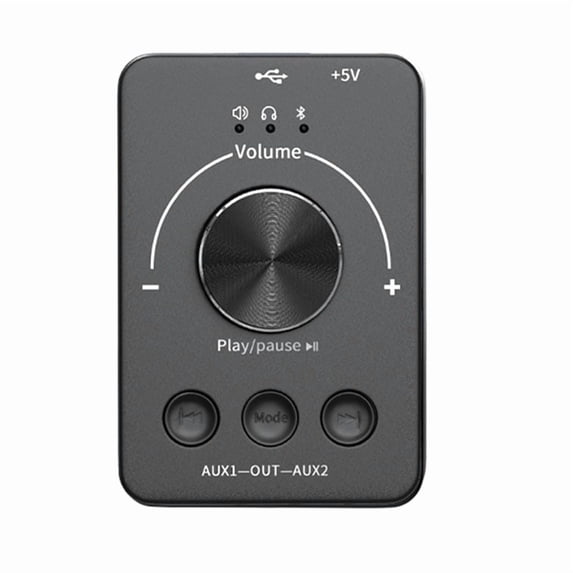
Hero image 0 of Desk Bluetooth Volume Controller with 3 Volume Modes, One-Click Mute, Knob, USB Powered, 0 of 7
Desk Bluetooth Volume Controller with 3 Volume Modes, One-Click Mute, Knob, USB Powered
(No ratings yet)
Key item features
- A. Sound control :The red ON, the knob adjusts the volume of the computer, -key mute, the song up/down song switch. B. 3.5mm audio output : Blue ON, wired earphone is inserted into AUX OUT hole, computer voice is output from earphone. C. Bluetooth-Compatible Transmit: When the green ON, long press the MODE button to enter
- Bluetooth-Compatible search, and the green light flashes quickly to automatically match around. Bluetooth-Compatible headset, Bluetooth-Compatible speaker and other devices, the green light is steady on after successful pairing
- Bluetooth-Compatible version: Bluetooth-Compatible 5.1. Bluetooth-Compatible protocol: A2dp/avctp/avdtp/avrcp/hfp/spp/smp/att /gatt/rfcomm//l2cap. Music format: MP3, WMA, APE, FLAC, AAC, MP4, M4A, WAV, AIF, AIFC
- Signal to noise ratio: ≥ 90dB. Compatible system: for Win XP 7 8 10, for os, plug and play, no driver required. Bluetooth-Compatible Transmit. 1) . press the mode button to enter the Bluetooth-Compatible transmission mode, and the green light flashes slowly (connecting) It automatically reconnect the Bluetooth-Compatible headset / speaker that was paired successfully last time.
- 2) . For new Bluetooth-Compatible headset, press the mode button for 3s, the green light flashes quickly. To enter the Bluetooth-Compatible search mode, automatically search and connect a new Bluetooth-Compatible headset/speaker. If not the correct Bluetooth-Compatible headset, continue to press the mode button to search and pair Bluetooth-Compatible headset.
Specs
Video game platform, PlayStation
Accs type, Video Game Security
Brand, Unbranded
Has written warranty, No
Video game platform
PlayStation
Accs type, Video Game Security
Accs type
Video Game Security
Brand, Unbranded
Brand
Unbranded
Has written warranty, No
Has written warranty
No
About this item
Product details
3).Press and hold the mode key to access the Bluetooth-Compatible headset from (A) to (B), (B) to (C), (C) to (D).
If you need to reconnect the Bluetooth-Compatible headset (A), you need to unplug and plug in the USB cable
Green light flashes slowly: reconnect (automatically connect the last Bluetooth-Compatible headset / speaker)
Green light fast: Bluetooth-Compatible search in progress (search and connect new Bluetooth-Compatible devices)
The green light is always on: it has been connected and paired successfully. (wait 10 seconds for sound transmission)
Bluetooth-Compatible switching: long press the mode key to automatically search and connect Bluetooth-Compatible device
Note: different Bluetooth-Compatible headsets / speakers use different schemes and protocols to search for connections ,The time be different.
If the search fails, please turn on Bluetooth-Compatible to check.
Turn on the Bluetooth-Compatible headset, unplug the USB cable and plug it in again.
Color: Black
Material: plastic
Package Contents:
1 * Volume Controller
Only the above package content, other products are not included.
Note: Light reflection and different displays may cause the color of the item in the picture a little different from the real thing. The measurement allowed error is +/- 1-3cm.
- A. Sound control :The red ON, the knob adjusts the volume of the computer, -key mute, the song up/down song switch. B. 3.5mm audio output : Blue ON, wired earphone is inserted into AUX OUT hole, computer voice is output from earphone. C. Bluetooth-Compatible Transmit: When the green ON, long press the MODE button to enter
- Bluetooth-Compatible search, and the green light flashes quickly to automatically match around. Bluetooth-Compatible headset, Bluetooth-Compatible speaker and other devices, the green light is steady on after successful pairing
- Bluetooth-Compatible version: Bluetooth-Compatible 5.1. Bluetooth-Compatible protocol: A2dp/avctp/avdtp/avrcp/hfp/spp/smp/att /gatt/rfcomm//l2cap. Music format: MP3, WMA, APE, FLAC, AAC, MP4, M4A, WAV, AIF, AIFC
- Signal to noise ratio: ≥ 90dB. Compatible system: for Win XP 7 8 10, for os, plug and play, no driver required. Bluetooth-Compatible Transmit. 1) . press the mode button to enter the Bluetooth-Compatible transmission mode, and the green light flashes slowly (connecting) It automatically reconnect the Bluetooth-Compatible headset / speaker that was paired successfully last time.
- 2) . For new Bluetooth-Compatible headset, press the mode button for 3s, the green light flashes quickly. To enter the Bluetooth-Compatible search mode, automatically search and connect a new Bluetooth-Compatible headset/speaker. If not the correct Bluetooth-Compatible headset, continue to press the mode button to search and pair Bluetooth-Compatible headset.
info:
We aim to show you accurate product information. Manufacturers, suppliers and others provide what you see here, and we have not verified it.
Specifications
Video game platform
PlayStation
Accs type
Video Game Security
Brand
Unbranded
Has written warranty
No
Warranty
Warranty information
Please be aware that the warranty terms on items offered for sale by third party Marketplace sellers may differ from those displayed in this section (if any). To confirm warranty terms on an item offered for sale by a third party Marketplace seller, please use the 'Contact seller' feature on the third party Marketplace seller's information page and request the item's warranty terms prior to purchase.
Customer ratings & reviews
0 out of 5 stars
This item does not have any reviews yet

Current price is USD$20.52
Price when purchased online
- Free shipping
 Free Holiday returns until Jan 31

Walmart Accident Plan by Allstate
How do you want your item?
Ships to
Arrives between Dec 7 - Dec 14
|
Sold and shipped by MMeadow
3.8333333333333335 out of 5 stars

Extended holiday returns
Free Holiday returns until Jan 31