
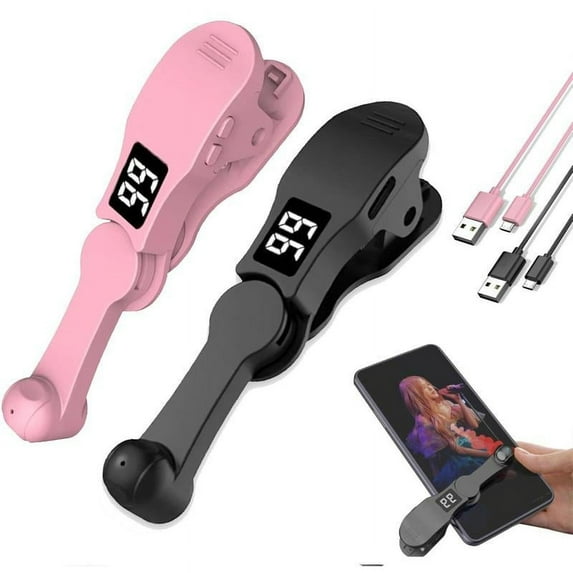
PPgejGEK Smart Automatic Screen Clicker Device, Mobile Phone Auto Tapper with LED Display, 108 Speed Settings, USB Powered for Gaming, Live Streaming, Silent Operation, 3.87x1.59x1.74in
Hero image 0 of PPgejGEK Smart Automatic Screen Clicker Device, Mobile Phone Auto Tapper with LED Display, 108 Speed Settings, USB Powered for Gaming, Live Streaming, Silent Operation, 3.87x1.59x1.74in, 0 of 9

PPgejGEK Smart Automatic Screen Clicker Device, Mobile Phone Auto Tapper with LED Display, 108 Speed Settings, USB Powered for Gaming, Live Streaming, Silent Operation, 3.87x1.59x1.74in

(No ratings yet)

Key item features

  • 【Advanced Silent 】This smartphone screen auto clicker utilizes cutting-spatial mapping technology, transitioning from the old mechanical click. This modernization ensures a silent function that completely eliminates any noise and guarantees a longer lifespan. With a commitment to breakthrough technology, it maintains the integrity of your phone's screen, providing better responsiveness and reliability.
  • 【Easy 】 Simply install the click head or use the screen clip to replicate the automatic finger click. Connect the USB connector to a power source for use, freeing your hands. Great for gaming, live streaming, and completing tasks efficiently.
  • 【Customizable Tapping Speed】Customize your mobile screen auto clicker to meet your exact needs. With 108 adjustable speed settings, you are to choose from a super-fast speed of 99 taps per second or a more leisurely speed of just 1 tap every 9 seconds. You can save your favorite speed and enjoy the finger-like irregular clicking pattern for an uninterrupted experience.
  • 【LED Display Convenience】With an integrated LED digital display, this allows you to view the number of clicks for easy and convenient . Use the smart digital interface to your experience and MAKE more user-friendly.
  • 【Instructions for Use】Activate BOOT Mode - First press the BOOT button to put the device into BOOT state, and then the screen will display the digital count. Then press the Start button to initiate the click , indicated by a flashing blue light. To modify the frequency in BOOT mode, simply press and hold the BOOT button to make extended adjustments.
Current price is $6.99
Price when purchased online
  • Free 30-day returns

How do you want your item?

How do you want your item?
Columbus, 43215
Arrives between Feb 9 - Feb 12
|
Shipping fee $4.99
Sold and shipped by LANXPING
2.5 stars out of 5, based on 2 seller reviews(2.5)
Report an issue with this seller
Free 30-day returns

About this item

Product details

Specifications

Warranty

Warnings

Customer ratings & reviews

0 ratings|0 reviews
This item does not have any reviews yet
