


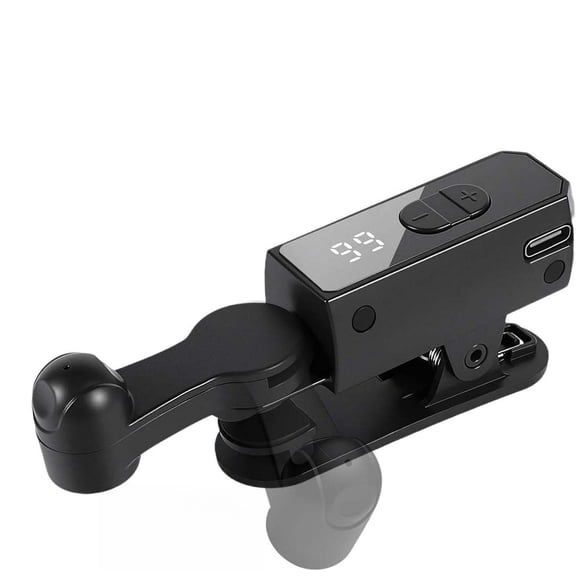
Hero image 0 of WWG Smart Automatic Screen Clicker Device, Mobile Phone Auto Tapper with LED Display, 108 Speed Settings, USB Powered for Gaming, Live Streaming, Silent Operation, 3.87x1.59x1.74in, 0 of 4
WWG Smart Automatic Screen Clicker Device, Mobile Phone Auto Tapper with LED Display, 108 Speed Settings, USB Powered for Gaming, Live Streaming, Silent Operation, 3.87x1.59x1.74in
WWG Smart Automatic Screen Clicker Device, Mobile Phone Auto Tapper with LED Display, 108 Speed Settings, USB Powered for Gaming, Live Streaming, Silent Operation, 3.87x1.59x1.74inPPgejGEK Smart Automatic Screen Clicker Device Mobile Phone Auto Tapper LED Display 108 Speed Settings USB Powered Gaming Live Streaming Silent OperaPPgejGEK Smart Automatic Screen Clicker Device Mobile Phone Auto Tapper LED Display 108 Speed Settings USB Powered Gaming Live Streaming Silent Opera
Actual Color:Black BK
Black BK, $7.97, was $8.97
$7.97$8.97
Pink PK, $7.97
$7.97
Key item features
- 【Advanced Silent 】This smartphone screen auto clicker utilizes cutting-spatial mapping technology, transitioning from the old mechanical click. This modernization ensures a silent function that completely eliminates any noise and guarantees a longer lifespan. With a commitment to breakthrough technology, it maintains the integrity of your phone's screen, providing better responsiveness and reliability.
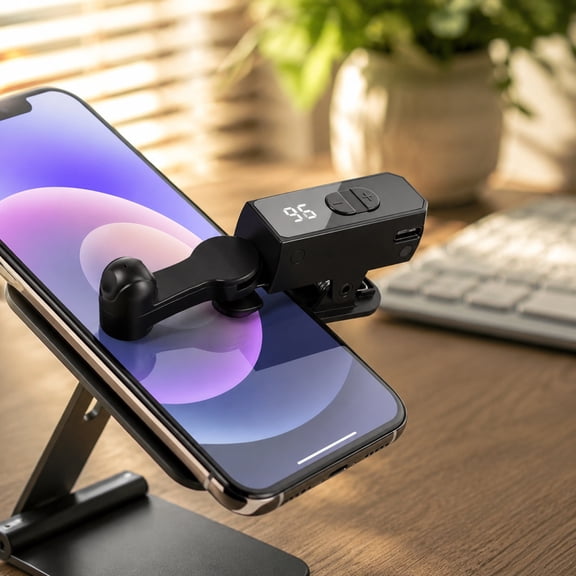
- 【Easy 】 Simply install the click head or use the screen clip to replicate the automatic finger click. Connect the USB connector to a power source for use, freeing your hands. Great for gaming, live streaming, and completing tasks efficiently.
- 【Customizable Tapping Speed】Customize your mobile screen auto clicker to meet your exact needs. With 108 adjustable speed settings, you are to choose from a super-fast speed of 99 taps per second or a more leisurely speed of just 1 tap every 9 seconds. You can save your favorite speed and enjoy the finger-like irregular clicking pattern for an uninterrupted experience.
- 【LED Display Convenience】With an integrated LED digital display, this allows you to view the number of clicks for easy and convenient . Use the smart digital interface to your experience and MAKE more user-friendly.
- 【Instructions for Use】Activate BOOT Mode - First press the BOOT button to put the device into BOOT state, and then the screen will display the digital count. Then press the Start button to initiate the click , indicated by a flashing blue light. To modify the frequency in BOOT mode, simply press and hold the BOOT button to make extended adjustments.
Specs
Works with, Mobile Phone
Accessories, USB Cable
Connection, USB
Electronic end connection 1, USB
Inputs & outputs, USB
Material, Plastic
Works with
Mobile Phone
Accessories, USB Cable
Accessories
USB Cable
Connection, USB
Connection
USB
Electronic end connection 1, USB
Electronic end connection 1
USB
Inputs & outputs, USB
Inputs & outputs
USB
Material, Plastic
Material
Plastic
About this item
Product details
Smart Automatic Screen Clicker Device Mobile Screen Clicker Intelligent Plug-in Clicker Plastic Connector Live Streaming Assistant Mute Product Description: What can be more boring and tiresome than a task that requires repetitive clicking or tapping? An auto clicker is a tool to your that takes over this duty and performs repetitive clicks and taps of the user. It replaces manual clicking/tapping with fast and ceaseless automatic clicking/tapping. 【Advanced Silent 】This smartphone screen auto clicker utilizes cutting-spatial mapping technology, transitioning from the old mechanical click. This modernization ensures a silent function that completely eliminates any noise and guarantees a longer lifespan. With a commitment to breakthrough technology, it maintains the integrity of your phone's screen, providing better responsiveness and reliability. 【Easy 】 Simply install the click head or use the screen clip to replicate the automatic finger click. Connect the USB connector to a power source for use, freeing your hands. Great for gaming, live streaming, and completing tasks efficiently. 【Customizable Tapping Speed】Customize your mobile screen auto clicker to meet your exact needs. With 108 adjustable speed settings, you are to choose from a super-fast speed of 99 taps per second or a more leisurely speed of just 1 tap every 9 seconds. You can save your favorite speed and enjoy the finger-like irregular clicking pattern for an uninterrupted experience. 【LED Display Convenience】With an integrated LED digital display, this allows you to view the number of clicks for easy and convenient . Use the smart digital interface to your experience and MAKE more user-friendly. 【Instructions for Use】Activate BOOT Mode - First press the BOOT button to put the device into BOOT state, and then the screen will display the digital count. Then press the Start button to initiate the click , indicated by a flashing blue light. To modify the frequency in BOOT mode, simply press and hold the BOOT button to make extended adjustments. Specifications: Name: Auto Screen Clicker Function: like fast, game cycle Size: about 98.4*20.5*44.3mm / 3.87*1.59*1.74in Click the Gear: once in 9 seconds - 99 times in 1 second Packing List: 1* Auto Screen Clicker; 1* USB Cable Includes: 1x clicker
- 【Advanced Silent 】This smartphone screen auto clicker utilizes cutting-spatial mapping technology, transitioning from the old mechanical click. This modernization ensures a silent function that completely eliminates any noise and guarantees a longer lifespan. With a commitment to breakthrough technology, it maintains the integrity of your phone's screen, providing better responsiveness and reliability.
- 【Easy 】 Simply install the click head or use the screen clip to replicate the automatic finger click. Connect the USB connector to a power source for use, freeing your hands. Great for gaming, live streaming, and completing tasks efficiently.
- 【Customizable Tapping Speed】Customize your mobile screen auto clicker to meet your exact needs. With 108 adjustable speed settings, you are to choose from a super-fast speed of 99 taps per second or a more leisurely speed of just 1 tap every 9 seconds. You can save your favorite speed and enjoy the finger-like irregular clicking pattern for an uninterrupted experience.
- 【LED Display Convenience】With an integrated LED digital display, this allows you to view the number of clicks for easy and convenient . Use the smart digital interface to your experience and MAKE more user-friendly.
- 【Instructions for Use】Activate BOOT Mode - First press the BOOT button to put the device into BOOT state, and then the screen will display the digital count. Then press the Start button to initiate the click , indicated by a flashing blue light. To modify the frequency in BOOT mode, simply press and hold the BOOT button to make extended adjustments.
info:
We aim to show you accurate product information. Manufacturers, suppliers and others provide what you see here, and we have not verified it.
Specifications
Works with
Mobile Phone
Accessories
USB Cable
Connection
USB
Electronic end connection 1
USB
Warranty
Warranty information
Warranty information
Please be aware that the warranty terms on items offered for sale by third party Marketplace sellers may differ from those displayed in this section (if any). To confirm warranty terms on an item offered for sale by a third party Marketplace seller, please use the 'Contact seller' feature on the third party Marketplace seller's information page and request the item's warranty terms prior to purchase.
Please be aware that the warranty terms on items offered for sale by third party Marketplace sellers may differ from those displayed in this section (if any). To confirm warranty terms on an item offered for sale by a third party Marketplace seller, please use the 'Contact seller' feature on the third party Marketplace seller's information page and request the item's warranty terms prior to purchase.
Warnings
Similar items you might like
Based on what customers bought
Auto Clicker Tapper Liker for Smart Phone Fast Click Cell Phone Screen Tapper Screen Clicker Spare Part $7.92
 $792current price $7.92
Auto Clicker Tapper Liker for Smart Phone Fast Click Cell Phone Screen Tapper Screen Clicker Spare Part
XUBIYM Wireless Auto Clicker for Iphone,Bluetooth Phone Screen Tapper with Battery for Hands Free,Silent&Adjustable Speed Finger Clicker for Tiktok Live Broadcasts Likes,Gaming,Reward Task $11.08
 $1108current price $11.08
XUBIYM Wireless Auto Clicker for Iphone,Bluetooth Phone Screen Tapper with Battery for Hands Free,Silent&Adjustable Speed Finger Clicker for Tiktok Live Broadcasts Likes,Gaming,Reward Task
Best seller, Powertek USB-C to USB-C Cable, Fast Charging Type-C Charger Cord, Durable Tangle-Resistant Sync Cable, Pink Glitter, 6FT $7.97
Best seller


 $797current price $7.97
Powertek USB-C to USB-C Cable, Fast Charging Type-C Charger Cord, Durable Tangle-Resistant Sync Cable, Pink Glitter, 6FT
7214.5 out of 5 Stars. 721 reviews4.5 out of 5 starsKUMEE Screen Auto Clicker Tapper for Live Iphone Ipad Android, 107 Speeds Autoclicker Autotapper Rechargeable - Tapper & Tapper for (Black) | Automatic Screen Clicking $11.98
 $1198current price $11.98
KUMEE Screen Auto Clicker Tapper for Live Iphone Ipad Android, 107 Speeds Autoclicker Autotapper Rechargeable - Tapper & Tapper for (Black) | Automatic Screen Clicking
Automatic Screen Clicker for Mobile Devices 108 Speed Settings USB Powered for Gaming Live Streaming Mute Operation $5.38
 $538current price $5.38
Automatic Screen Clicker for Mobile Devices 108 Speed Settings USB Powered for Gaming Live Streaming Mute Operation
Clearance, 1 PCS Auto Clicker For Smart Phone | Automatic Screen Tapper For Smartphone Type C Recharging Speed Click For Game Playing Live Stream Shopping Live Broadcasts - Black $5.00 Was $6.36
Clearance 2 optionsAvailable in additional 2 options$500current price $5.00, Was $6.36$6.36
1 PCS Auto Clicker For Smart Phone | Automatic Screen Tapper For Smartphone Type C Recharging Speed Click For Game Playing Live Stream Shopping Live Broadcasts - Black
15 out of 5 Stars. 1 reviews5 out of 5 starsGJX Auto Clicker Tapper for Tiktok Live Smartphone, Rechargeable Cordless – 107 Adjustable Speed, Auto Screen Tapper for Live Stream Likes, Games, Repetitive Task, Purchases $12.43
 $1243current price $12.43
GJX Auto Clicker Tapper for Tiktok Live Smartphone, Rechargeable Cordless – 107 Adjustable Speed, Auto Screen Tapper for Live Stream Likes, Games, Repetitive Task, Purchases
Best seller, Scosche MPLTMSPCH2-SP1 MagicRing™ Magnetic Adapter Ring for MagSafe-Compatible Car Phone Mounts & Wireless Charging $8.38
Best seller $838current price $8.38
Scosche MPLTMSPCH2-SP1 MagicRing™ Magnetic Adapter Ring for MagSafe-Compatible Car Phone Mounts & Wireless Charging
1214.3 out of 5 Stars. 121 reviews4.3 out of 5 starsWireless Auto Clicker for Smart Phone, Built-in Battery Rechargeable Screen Tapper with Adjustable Speed & Digital Display, Quiet Auto Tap for for Live Stream Likes, Social Media Tasks, Games $11.99
 $1199current price $11.99
Wireless Auto Clicker for Smart Phone, Built-in Battery Rechargeable Screen Tapper with Adjustable Speed & Digital Display, Quiet Auto Tap for for Live Stream Likes, Social Media Tasks, Games
15 out of 5 Stars. 1 reviews5 out of 5 starsAuto Clicker for Phone Screen Simulated Finger Tapping Device Plug in Portable Screen Clicker for Continuous Tapping Tasks $1.99


 $199current price $1.99
Auto Clicker for Phone Screen Simulated Finger Tapping Device Plug in Portable Screen Clicker for Continuous Tapping Tasks
15 out of 5 Stars. 1 reviews5 out of 5 starsSmart Auto Disconnect Charger with USB-C Cable, 140W PD3.1 Fast Charger with Auto Shut Off for Phones, Laptops and Tablets $7.23
 $723current price $7.23
Smart Auto Disconnect Charger with USB-C Cable, 140W PD3.1 Fast Charger with Auto Shut Off for Phones, Laptops and Tablets
15 out of 5 Stars. 1 reviews5 out of 5 starsUSB Auto Screen Clicker, Continuous Refreshing Adjustable Speed Physical Clicker for Likes, Live Broadcasts $11.92
2 optionsAvailable in additional 2 options$1192current price $11.92USB Auto Screen Clicker, Continuous Refreshing Adjustable Speed Physical Clicker for Likes, Live Broadcasts
Clearance, Rongsi 14" Screen Magnifier for Cell Phone HD Screen Enlarger for Movies, Videos, Gaming – Foldable Phone Stand with Screen Amplifier–Compatible with All Smartphones, Adjustable Angle for Families $15.99 Was $26.99
Clearance $1599current price $15.99, Was $26.99$26.99
Rongsi 14" Screen Magnifier for Cell Phone HD Screen Enlarger for Movies, Videos, Gaming – Foldable Phone Stand with Screen Amplifier–Compatible with All Smartphones, Adjustable Angle for Families
903.6 out of 5 Stars. 90 reviews3.6 out of 5 starsReduced price, Auto Clicker for Smart Phone, Automatic Phone Screen Tapper Video Live Streaming Gadget Simulated Finger Continuous Clicking for Game, Shopping, Giving A Like $6.84 Was $8.06
Reduced price 8 optionsAvailable in additional 8 options$684current price $6.84, Was $8.06$8.06
Auto Clicker for Smart Phone, Automatic Phone Screen Tapper Video Live Streaming Gadget Simulated Finger Continuous Clicking for Game, Shopping, Giving A Like
Clearance, Auto Clicker for Smart Phone, Phone Screen Device Speed Clicker for Phone Apps,Smart Automatic Screen Clicker,Simulation Finger Continuous Click for Live Broadcasts Likes, Games, Tasks $8.99 Was $11.86
Clearance $899current price $8.99, Was $11.86$11.86
Auto Clicker for Smart Phone, Phone Screen Device Speed Clicker for Phone Apps,Smart Automatic Screen Clicker,Simulation Finger Continuous Click for Live Broadcasts Likes, Games, Tasks
14 out of 5 Stars. 1 reviews4 out of 5 starsRollback, OADUKQ Magnetic Phone Cooler, Semiconductor Cooling Clip with Magnetic, Gaming and Live Streaming, White, 2.46 X 2.46 X 1.09 in $6.46 Was $8.12
Rollback 2 optionsAvailable in additional 2 options$646current price $6.46, Was $8.12$8.12
OADUKQ Magnetic Phone Cooler, Semiconductor Cooling Clip with Magnetic, Gaming and Live Streaming, White, 2.46 X 2.46 X 1.09 in
Outoloxit Phone Cooler with Wireless Charging, High Power Cooling Fan, Back Clip & Turbo Cool for Gaming and Video Streaming $8.99
 $899current price $8.99
Outoloxit Phone Cooler with Wireless Charging, High Power Cooling Fan, Back Clip & Turbo Cool for Gaming and Video Streaming
Bluetooth 5.3 Mobile Camera Remote Control, Multi-Function Scroll/Volume/Shutter Controller, 10m Wireless Phone Clicker $3.79
 $379current price $3.79
Bluetooth 5.3 Mobile Camera Remote Control, Multi-Function Scroll/Volume/Shutter Controller, 10m Wireless Phone Clicker
Auto Screen Clicker, Phone Screen Tapper with Digital Display, USB Rechargeable Automatic Clicker for Games and Live Streams $8.49 Was $15.66
 $849current price $8.49, Was $15.66$15.66
Auto Screen Clicker, Phone Screen Tapper with Digital Display, USB Rechargeable Automatic Clicker for Games and Live Streams
OCCOA Auto Screen Clicker with Digital Display USB-C Rechargeable, Phone Automatic Tapper for Live Stream Likes Games, Physical Screen Tap Device, Black $6.97
 $697current price $6.97
OCCOA Auto Screen Clicker with Digital Display USB-C Rechargeable, Phone Automatic Tapper for Live Stream Likes Games, Physical Screen Tap Device, Black
Customer ratings & reviews
5 out of 5
5 out of 5 stars5 out of 5 stars
1 rating|0 reviews
Includes global ratings and reviews
How item rating is calculated
- 5 stars100% (1)1 rating are rated 5 stars, 100% of all ratings
- 4 stars0% (0)0 ratings are rated 4 stars, 0% of all ratings
- 3 stars0% (0)0 ratings are rated 3 stars, 0% of all ratings
- 2 stars0% (0)0 ratings are rated 2 stars, 0% of all ratings
- 1 star0% (0)0 ratings are rated 1 star, 0% of all ratings
Filtered and sorted results would be available on the new 'Customer ratings & reviews' page.
Sort by |
This item does not have any reviews yet

Current price is USDNow $7.97
You save $1.00
was $8.97$8.97
You save$1.00
Price when purchased online
 Free Holiday returns until Jan 31
How do you want your item?
Ships to
Arrives between Nov 23 - Nov 28
|Shipping fee $5.99

Sold and shipped by LANXPING
2.9726027397260273 out of 5 stars

Extended holiday returns
Free Holiday returns until Jan 31