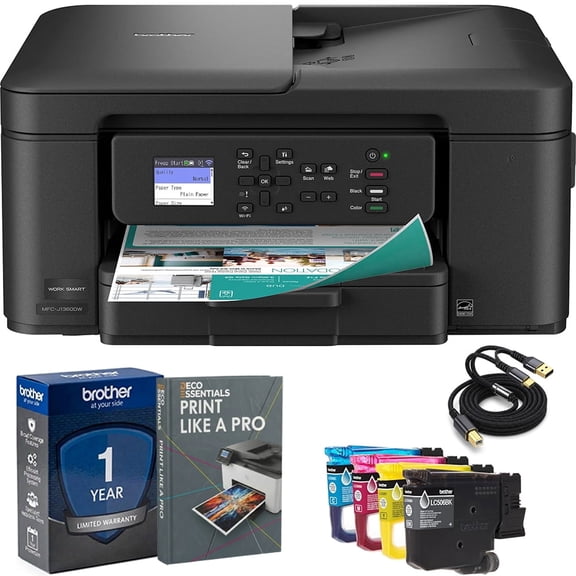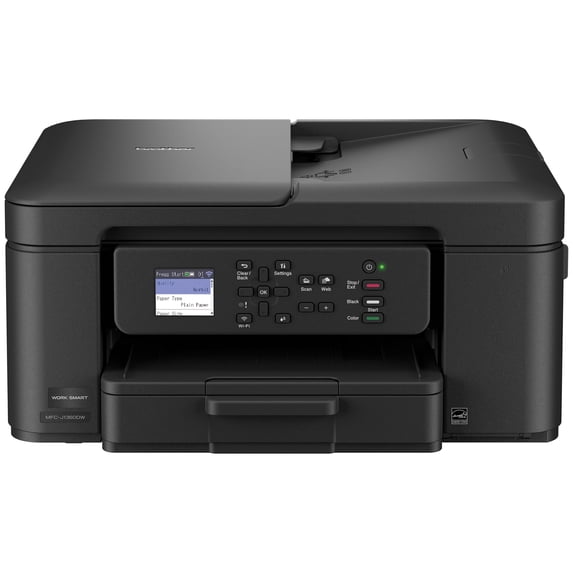
Brother MFC-J1360DW Work Smart Wireless All-in-One Color Inkjet Printer Black for Home Office
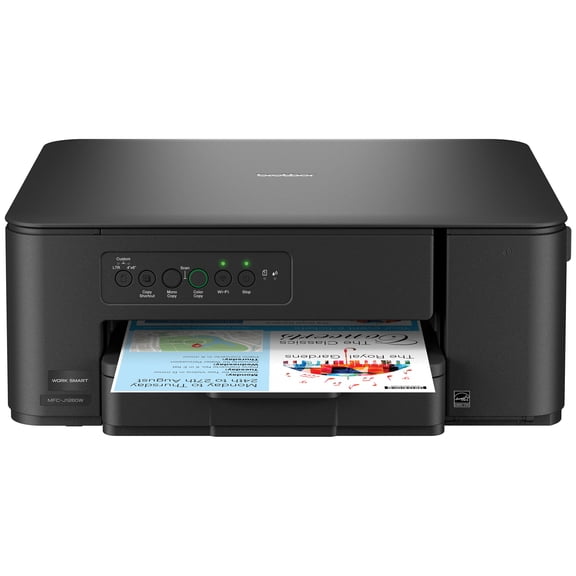
Brother MFC-J1360DW Work Smart Wireless All-in-One Color Printer – Prints on Both Sides, Copies and Scans Multiple Pages, Easy-to-Use Color Display
Hero image 0 of Brother MFC-J1360DW Work Smart Wireless All-in-One Color Printer – Prints on Both Sides, Copies and Scans Multiple Pages, Easy-to-Use Color Display, 0 of 12
Overall pick

Brother MFC-J1360DW Work Smart Wireless All-in-One Color Printer – Prints on Both Sides, Copies and Scans Multiple Pages, Easy-to-Use Color Display

|354 ratings

Key item features

  • Efficient Printing: Automatically prints on both sides of the paper, saving time and reducing paper usage.
  • Multi-Page Handling: Features a built-in top feeder for easily copying or scanning stacks of documents.
  • Wireless Connectivity: Supports wireless printing from phones, tablets, laptops, and desktops via Wi-Fi, and offers USB for direct connection.
  • Cloud Integration: Allows scanning documents directly to popular cloud services like Google Drive, Dropbox, Box, and OneDrive.
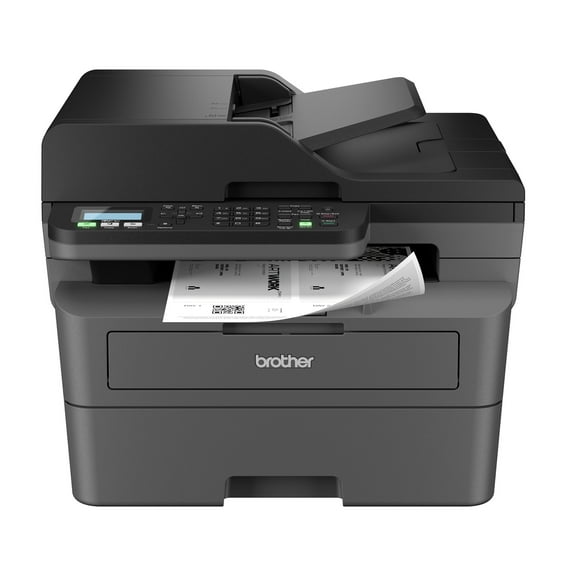
  • Intuitive Display: Equipped with a 1.8-inch color screen for starting copies or scans, changing settings, connecting to Wi-Fi, and checking ink levels.
  • Fast Performance: Delivers print speeds of up to 16 pages per minute in black and 9 pages per minute in color.
  • Mobile Management: The Brother Mobile Connect app enables printing, scanning, copying, and printer management from mobile devices.
  • Ample Capacity: Includes a 150-sheet paper tray to reduce the frequency of paper refills.
Generated by AI

Specs

Brand, BrotherPrinting tech, InkjetPrinter functions, PrintPages per min., 16 ppmMono color, ColorPaper size, letter, legal

About this item

Product details

Looking for a reliable printer that’s easy to use? The Brother Work Smart 1360 Wireless All-in-One Color Printer makes everyday printing simple. It prints on both sides automatically, copies or scans stacks of pages for you, and connects easily to your Wi-Fi so you can print from your phone, tablet, or computer using the color screen on the printer. Whether you’re printing to-do lists, schoolwork, or work documents, you’ll get sharp black text and bright color prints at fast speeds. The printer also monitors your ink levels, so you know when it’s time to replace the cartridge. Setup is quick with the Brother Mobile Connect app(1), and once you’re connected, you can print from almost anywhere. For best results, use Brother Genuine LC501 Ink for consistent, dependable printing.

Brother MFC-J1360DW Inkjet Printer Helpful Product Details

What is the Brother MFC-J1360DW?
The Brother MFC-J1360DW is a wireless color inkjet all-in-one printer that can print, scan, and copy in one machine.

Can the Brother MFC-J1360DW print on both sides of the paper?
Yes. The Brother MFC-J1360DW inkjet printer automatically prints on both sides, which helps save paper and reduce printing costs.

Can the Brother MFC-J1360DW scan or copy multiple pages at once?
Yes. You can place a stack of pages in the top tray, and the Brother MFC-J1360DW will scan or copy them automatically instead of one page at a time.

Can I print from my phone or computer with the Brother MFC-J1360DW?
Yes. The Brother MFC-J1360DW inkjet printer lets you print wirelessly from your phone, tablet, laptop, or desktop computer using Wi-Fi1, and also lets you scan documents directly to popular cloud services like Google Drive™ and Dropbox2.

What is the 1.8” Color Display screen for the Brother MFC-J1360DW inkjet printer?
The color screen on the Brother MFC-J1360DW inkjet printer lets you start copying or scanning, change settings, connect to Wi-Fi, and check ink levels directly on the printer without using a computer.

Is the Brother MFC-J1360DW good for home or small office use?
Yes. The Brother MFC-J1360DW color inkjet printer is designed for home offices, remote workers, students, and families who need reliable everyday printing.

Why choose a Brother inkjet printer?
Brother is a brand you can count on. With a long history of making reliable products, Brother designs printers that are dependable, easy to use, and made to last. This focus on consistent, everyday performance is why many people trust Brother.

Why choose an inkjet or laser printer?
Inkjet and laser printers are designed for different printing needs. Inkjet printers are great for everyday home use, offering vibrant color, photo-quality prints, and low-cost color printing, especially if you print regularly. Laser printers are ideal for fast & high-volume document printing, delivering sharp text, quick speeds, and consistent results for home offices and small businesses use.

What kind of customer support do I get when I purchase a Brother product?
Brother offers reliable customer support to help you get the most out of your machine. Customers have access to product support resources, including user manuals, online help, and dedicated customer service for setup and troubleshooting questions. For additional assistance, please contact Brother Customer Service at 1-877-552-6255.

  • Save time & paper: Automatically prints on both sides, so you use less paper.
  • Handle multi-page jobs easily: Built-in top feeder lets you copy or scan stacks of pages instead of one page at a time.¹
  • Print from your phone or computer: Wireless printing works with phones, tablets, laptops, and desktops using Wi-Fi.²
  • Scan to the cloud: Send scanned documents directly to popular cloud services like Google Drive™, Dropbox, Box, and OneDrive for easy storage and sharing.³ 
  • All-in-one convenience: Print, copy, and scan from one compact inkjet printer with quick setup.
  • Fast everyday printing: Prints up to 16 pages per minute in black and up to 9 pages per minute in color¹
  • Clear, reliable results: Produces crisp black text and vibrant color for homework, work documents, and everyday printing.
  • Easy to use color screen: 1.8″ color display lets you start copies or scans, change settings, connect to Wi-Fi, and check ink levels.
  • Multiple ways to connect: Use Wi-Fi for wireless printing or USB for a direct connection.² 
  • Print and manage from your phone: Brother Mobile Connect app lets you print, scan, copy, and manage the printer from your mobile device. (6)
  • Less refilling, fewer interruptions: 150-sheet paper tray holds more paper so you reload less often.¹
  • Know when ink is low: Page Gauge tracks ink usage and helps you avoid running out unexpectedly.⁴
  • Designed for Brother ink: Works best with Brother Genuine LC501 ink cartridges for consistent performance.  We engineer our ink cartridges to work seamlessly with your Brother printer. Choose Brother Genuine LC501 Ink, the only brand we recommend for use with your printer.
  • www.brother-usa.com/support
  • Condition: New
info:
We aim to show you accurate product information. Manufacturers, suppliers and others provide what you see here, and we have not verified it.  

Specifications

Brand

Brother

Printing tech

Inkjet

Printer functions

Print

Pages per min.

16 ppm

Warranty

Warranty information

Please be aware that the warranty terms on items offered for sale by third party Marketplace sellers may differ from those displayed in this section (if any). To confirm warranty terms on an item offered for sale by a third party Marketplace seller, please use the 'Contact seller' feature on the third party Marketplace seller's information page and request the item's warranty terms prior to purchase.

Customer ratings & reviews

4.1 out of 5 stars
stars
354 ratings102 reviews
Includes global ratings and reviews
How item rating is calculated
Filtered and sorted results would be available on the new 'Customer ratings & reviews' page.
Sort by |

Showing 1-3 of 102 reviews

Nov 6, 2026
Reviewer name: Em
Item details
Configuration: Printer
5 out of 5 stars
5 out of 5 stars review

Verified Purchase

easy to install

easy to operate, good color. works well with pc and mobile

Helpful?2VG49DV7T6IW17627810964
Oct 28, 2026
Reviewer name: BUSINESS OWNER
2 out of 5 stars
2 out of 5 stars review

POORLY EXPLAINED SETUP

I have not had a Brother product for a long time, since my sewing machine jammed incessantly. I read some good things about one of the printers. I needed to replace mine for work. This printer I only bought because no one had the other in stock. There is not direct site for the setup.brother.com. There are dozens of sites that say they will help you, but trying to avoid scammers. When I finally found it indirectly, it was a chore just to find the driver or where to download it. When I finally found that and put in my model number, it does not work. There is no live chat I can get to immediately. It is stuck where you put in your model number and nothing happens!

Review from brother-usa.com
Helpful?2VG49DV7T6IW17627810964
reply from Brother

We are sorry to hear about your experience and understand how frustrating this must be for you. At Brother, customer satisfaction is our highest priority, and setting up your device should never be a hassle. We have two main websites to assist you: www.brother-usa.com and www.support.brother.com To better serve our customers, we offer several channels of support, including live chat, phone, and email. If you are still experiencing difficulties, please contact us at your earliest convenience. https://www.brother-usa.com/support

Oct 3, 2026
Reviewer name: Anthony
Item details
Configuration: Printer
1 out of 5 stars
1 out of 5 stars review

Verified Purchase

Very hard to setup,such a small disply scree,

This is the worst printer to buy,very hard to setup with no instruction and The screen is so small,and you need a flash light to se the black arrow buttons.

Helpful?2VG49DV7T6IW17627810964
reply from Brother

We’re sorry to hear that the setup and display on your Brother MFC-J1360DW were difficult to use. Please visit Brother Customer Support: https://www.brother-usa.com/support for assistance.

Current price is $99.99
Price when purchased online
5 free offers, including Apple Music up to 2 months Free
  • Free shipping
  • Free Holiday returns until Jan 31
$99.99
Out of stock
Walmart Protection Plan by Allstate

(Only one option can be selected at a time)

How do you want your item?

Try 30 days for just $1! Choose a plan at checkout.
How do you want your item?
Ships to
Arrives by Tomorrow
.
Order within 3 hr 24 min
Sold and shipped by Walmart.com
Extended holiday returns
Free Holiday returns until Jan 31
This item is gift eligible

More seller options (5)

Starting from $112.24
walmart plus

Try 30 days of Walmart+ for just $1!

T&C apply.