Logitech MX Creative Console Keypad & Dial Keyboard 920-012660
Hero image 0 of Logitech MX Creative Console Keypad & Dial Keyboard 920-012660, 0 of 17

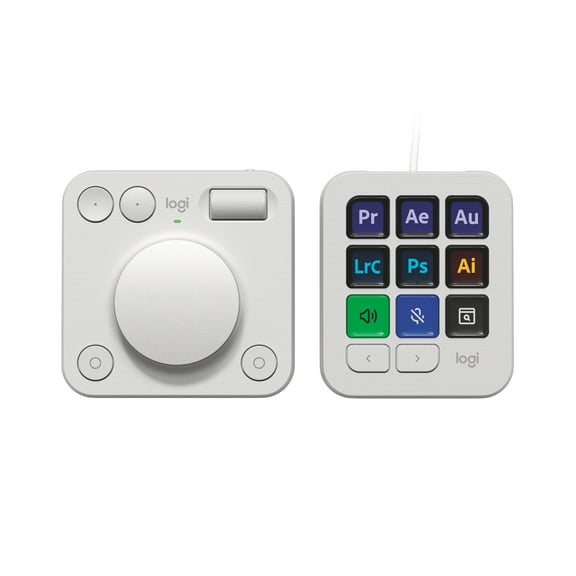
Logitech MX Creative Console Keypad & Dial Keyboard 920-012660

Key item features

  • Streaming Console for macOS/Windows
  • 9 Customizable Buttons with LCD Screens
  • Bluetooth Dial Pad
  • Native App Integration
  • Logi Options+ App
  • Adobe Creative Cloud 3-Month Membership
  • USB-C Cable, Desktop Stand
Current price is Now $159.99
You save $40.00
was $199.99
$159.99/oz
Price when purchased online
  • Free shipping
  • Free 30-day returns
Walmart Protection Plan by Allstate

(Only one option can be selected at a time)

How do you want your item?

Try 30 days for just $1! Choose a plan at checkout.
How do you want your item?
Ships to
Arrives by Sun, Jun 7
.
Order within 4 hr 57 min
Sold and shipped by Walmart.com
Free 30-day returns
This item is gift eligible

More seller options (10)

Starting from $188.99
walmart plus

Try 30 days of Walmart+ for just $1!

T&C apply.

About this item

Product details

Specifications

Warranty

Warnings

Customer ratings & reviews

3.9 out of 5 stars
stars73 ratings57 reviews
How item rating is calculated

Reviews summary

Pros

  • : Streamlines workflows across multiple apps.
  • : Offers fine control with precision when needed.
  • : Features a contemporary and comfortable look.
  • : Allows creation of personalized shortcuts for various programs.

Neutral

  • : Can be quick, but may require technical expertise.
  • : Offers smooth customization, but can be unintuitive in use.
Generated by AI

Customer photos

  • +36 images
Filtered and sorted results would be available on the new 'Customer ratings & reviews' page.
Sort by |

Showing 1-3 of 57 reviews

Nov 11, 2025
Matt L
5 out of 5 stars review

Seller Verified Purchase

INCREDIBLE for design students

The creative console has been incredible for my graphic design classes, especially considering I injured my mouse hand and have been struggling a bit. I got it with a student discount and it came with 3 months of Adobe CC which I already needed for class. It take some time and consideration setting up the hotkeys and icons just how you like, but it's definitely worth it in the end

Review from Logitech
Helpful?2NYOXIMQEPP612126755088
Nov 18, 2025
DGoulian
5 out of 5 stars review

Seller Verified Purchase

Great productivity booster

The more I use the MX Creative Console, the more I like it. I mainly use it in Final Cut Pro where I can quickly skim the timeline and size it to what I'm doing way faster than using a mouse and keyboard. But the real power is how customizable it is. If there is no profile for the app you're using, its super easy to create one and add all kinds of shortcuts to boost productivity. I'm getting very addicted to it!

Review from Logitech
Helpful?2NYOXIMQEPP612126755088
Nov 29, 2025
The Designer
4 out of 5 stars review

Seller Verified Purchase

Over all, very nice!!

Over all it work really well but I have noticed it picks your apps and compiles them in a list. My Adobe recently updated the Creative Cloud app and the icon populated to pick from doesn't work now. I have had to use a work around by using the “open file” command instead. It would be nice to be able to just pick your app if it is not in the list or maybe a new short cut after an update.

Review from Logitech
Helpful?2NYOXIMQEPP612126755088