

Nintendo Switch Consoles Accessories Games


![i-Blason for Nintendo Switch 2 Case with Stand Dockable [Foldable Joycon Holder] [Card Storage Slots] [Ergonomic Design] Comfortable Grip Uni-Body Protective Bumper Cover for Switch 2 (2025) (Silver)](https://i5.walmartimages.com/seo/i-Blason-Nintendo-Switch-2-Case-Stand-Dockable-Foldable-Joycon-Holder-Card-Storage-Slots-Ergonomic-Design-Comfortable-Grip-Uni-Body-Protective-Bumper_3c61f48d-e1da-44ab-b2dc-4cbe6e71b1c9.2f1333fa572411da7cff6edd6214dbcf.jpeg?odnHeight=288&odnWidth=288&odnBg=FFFFFF)



















![My Universe Pet Clinic, Maximum Games, Nintendo Switch, [Physical]](https://i5.walmartimages.com/seo/My-Universe-Pet-Clinic-Nintendo-Switch_54c476be-49de-4206-91cb-2e1adbf1863d.d225e540beee6fa547ba7c13a39abdbf.jpeg?odnHeight=288&odnWidth=288&odnBg=FFFFFF)

About Nintendo Switch Consoles Accessories Games - Walmart.com
Nintendo Switch consoles help you play at home or on the go with model options built around screen type, storage, and play style. You can compare OLED, Standard, and Lite systems in one place, so your next handheld gaming console is easier to choose.
How to choose Nintendo Switch consoles
You should start by thinking about where you play frequently and how you like to switch between portable and TV sessions. You can narrow your choice by comparing display type, play modes, storage capacity, and package contents.
For some shoppers, a hybrid system fits daily routines that include the couch, travel, and shared screens. For others, a lighter handheld-only format feels simpler for commutes, backpacks, and quick gaming breaks.
You can make the decision faster when you compare a few key details first. Consider screen size, built-in storage, TV compatibility, and whether the box includes extras you already want.
- You can choose OLED, Standard, or Lite based on screen and play style.
- You can compare 32GB and 64GB storage before adding digital games and screenshots.
- You can check whether your console supports TV mode, tabletop mode, or handheld mode.
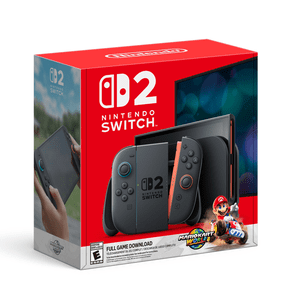
- You can review whether Nintendo Switch bundles include a game or themed edition.
Choosing between Nintendo Switch OLED, Standard, and Lite
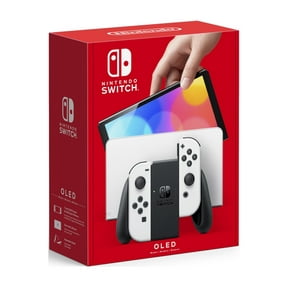
You should compare the display first because it shapes how games look during portable sessions. You may notice that Nintendo Switch OLED models offer a seven-inch OLED screen, while Standard and Lite models use LCD screens.
During handheld play, you can expect richer color and stronger contrast from OLED options. If you want hybrid flexibility, you can focus on Standard or OLED models instead of handheld-only choices.
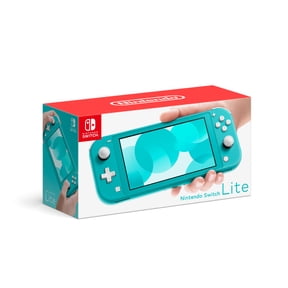
If TV play is part of your routine, you should compare Standard and OLED systems closely. If compact carry is your main priority, you may prefer Nintendo Switch Lite for portable gaming.
You should also consider battery expectations in simple terms before choosing a model. Your play time can vary by game, but you can use this comparison to match your routine more closely.
What to look for in storage capacity and expansion
You should check built-in storage before you start downloading games, updates, screenshots, and clips. You’ll usually compare 32GB and 64GB options, and that difference matters when you prefer digital purchases.
If you want more room for a growing library, you can expand storage with a compatible microSD card. You should compare card capacity and transfer speed, because faster cards can make downloads and file moves feel smoother.
You don’t need to memorize every technical detail to make a smart choice. You just need enough space for your games, updates, captures, and extra content.
If you buy physical games frequently, you may feel comfortable starting with lower built-in storage. If you download many titles, you should plan for extra expandable storage sooner.
Choosing play modes for your routine
You should match your console to the way you actually play during a typical week. You can compare TV mode, tabletop mode, and handheld mode, because not every model supports all three.
If you want living room sessions on a larger screen, you should choose a system that supports TV mode. If you share gaming time with family or friends, you may also appreciate a hybrid setup.
When you travel, you may prefer tabletop mode for quick matches at a desk or table. If you play mostly away from home, you may want a handheld gaming console that stays compact.
If your routine is fully portable, you should focus on handheld mode first. You can keep the decision simple by comparing Lite options with your daily carry needs.
How to compare Nintendo Switch bundles and editions
You should compare a standalone console with Nintendo Switch bundles before making your final choice. You may find packages that include a physical game, a digital game, or a themed system design.
If you already know which title you want first, you should check the box contents carefully. You can use that detail to decide whether a bundle or standard edition fits your setup plans.
You should also compare edition details when appearance is part of your decision. You may prefer themed colors, printed graphics, or matching accessories that change the overall look.
If you want a simpler starting point, you may choose a standard edition console instead. You can then pick games, controllers, and accessories separately based on your own setup.
Matching the right console to real gaming scenarios
If you split your time between family gaming in the living room and weekend travel, you should compare Standard and OLED models first. You can use both hybrid options for TV sessions and portable play.
If your routine centers on campus breaks, commutes, or everyday carry, you may prefer Lite. You can keep gaming simple with a smaller format designed around handheld use.
If screen quality is one of your key priorities during portable play, you should look closely at Nintendo Switch OLED options. You may appreciate the larger display and richer color presentation during long sessions.
If you download many titles and keep a rotating digital library, you should prioritize storage planning from the start. You can pair built-in capacity with a compatible microSD card for a smoother setup.
If you’re choosing a gift, you should compare bundle contents and edition details with extra attention. You can make the pick feel more complete when the console includes a game or themed finish.
Nintendo Switch consoles make more sense when you match the model to your screen preferences, storage habits, and play modes. You can choose with greater confidence when your console fits the way you actually play.