

Trucker Bluetooth Headset(1)
Uses item details. Price when purchased online
Doublel 2-in-1 Mini Flip Phone with Bluetooth Headset – Dual SIM, Ultra Compact Keypad Mobile, Hands-Free Calling, Portable Travel/Emergency Phone for Seniors & Outdoor Use (Blue) From $13.37


From$1337
Doublel 2-in-1 Mini Flip Phone with Bluetooth Headset – Dual SIM, Ultra Compact Keypad Mobile, Hands-Free Calling, Portable Travel/Emergency Phone for Seniors & Outdoor Use (Blue)
FAQ
How do I pair a Bluetooth headset with my phone?
Pairing your Bluetooth headset is usually straightforward.
- First, make sure both your headset and phone are fully charged.
- Turn on the headset and activate its Bluetooth function, typically by pressing and holding a button.
- On your phone, open the Bluetooth settings and search for new devices.
- When you see your headset’s name pop up, tap to connect.
- If prompted, confirm the pairing or enter any code displayed.
What makes a headset good for long drives?
For long drives, comfort and usability make a real difference. Look for a headset with:
- Cushioned ear pads or lightweight design
- Hands-free calling to keep your focus on the road
- Long battery life that can last through extended trips
- Noise-canceling features to block out background sounds
Can I use this headset with two phones?
Many Bluetooth headsets allow connection to multiple devices, sometimes called "multi-point" connectivity. Steps to use with two phones:
- Pair the headset with your first phone following regular instructions.
- Then, go to the second phone’s Bluetooth settings and pair with the same headset.
How do I keep my headset clean?
Keeping your Bluetooth headset clean helps maintain performance. Here’s how:
- Use a soft, dry cloth to wipe down the exterior after daily use.
- If there’s visible dirt or sweat, slightly dampen the cloth with water (never soak).
- For ear pads, gently remove any debris, and avoid using harsh cleaners.
- Don’t submerge the headset in water, as electronics can be damaged.
What should I do if the headset won’t charge?
If your headset isn’t charging, try these steps:
- Check if the charging cable and port are free from debris.
- Use a different cable or charger to rule out cable issues.
- Plug into a known working power source (like a computer).
- If it still doesn’t charge, restart the headset following manufacturer instructions.
Popular in Shop Trucker Bluetooth Headset Cell Phone Accessories
Related Products
Bluetooth Headset V5.4, Wireless Bluetooth Earpiece, 65H Talk Time with LED Charging Case, Hands Free Noise Canceling Headphones, Wireless Headset with Mute Button for Cell Phones/Trucker/Home/Office
 Bluetooth Headset V5.4, Wireless Bluetooth Earpiece, 65H Talk Time with LED Charging Case, Hands Free Noise Canceling Headphones, Wireless Headset with Mute Button for Cell Phones/Trucker/Home/Office$29.99current price $29.99
Sports Earphones Wireless Headphones for Motorola Razr (2023), Edge (2023) - Hands-free Mic Folding Retractable Neckband Headset Earbuds
 Sports Earphones Wireless Headphones for Motorola Razr (2023), Edge (2023) - Hands-free Mic Folding Retractable Neckband Headset Earbuds$68.03current price $68.03
Bluetooth Headset V5.3, Wireless Earpiece with 1000mAh Charging Case, 96H Talktime, Hands Free Noise Canceling Headphones with Dual-Mic for Computer Cell Phones Trucker Home Office Work
 Bluetooth Headset V5.3, Wireless Earpiece with 1000mAh Charging Case, 96H Talktime, Hands Free Noise Canceling Headphones with Dual-Mic for Computer Cell Phones Trucker Home Office Work$49.98current price $49.98
Car and Driver Trucker Bluetooth Headset, Wireless Headset Noise Canceling Headphones with Microphone, Home Office, Zoom, Call Center, Clear Highway | Siri, Alexa, Google Compatible
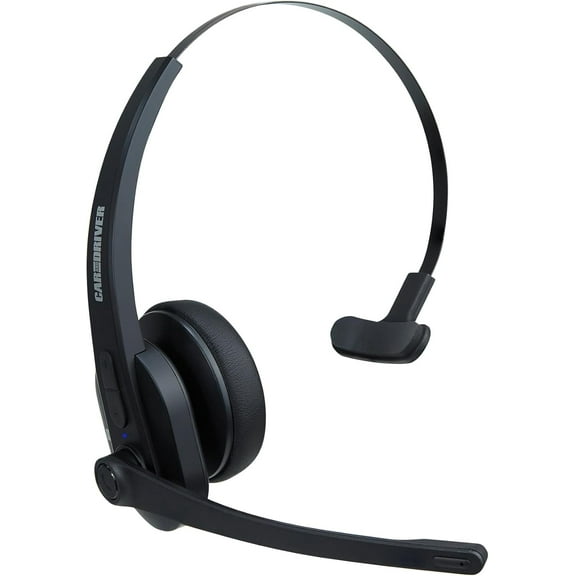 Car and Driver Trucker Bluetooth Headset, Wireless Headset Noise Canceling Headphones with Microphone, Home Office, Zoom, Call Center, Clear Highway | Siri, Alexa, Google Compatible$41.99current price $41.99
BLUEPARROTT B450XT B450-XT PREMIUM NOISE-CANCELING BLUETOOTH HEADSET
 BLUEPARROTT B450XT B450-XT PREMIUM NOISE-CANCELING BLUETOOTH HEADSET$189.99current price $189.99