

Walmart Wellness Benefits

Use your benefits to the max
Add your card to shop thousands of eligible must-have items.
How to shop

Online at Walmart.com
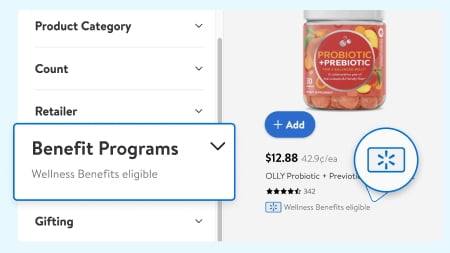

Look for this badge on eligible items

Add them to your cart
By app
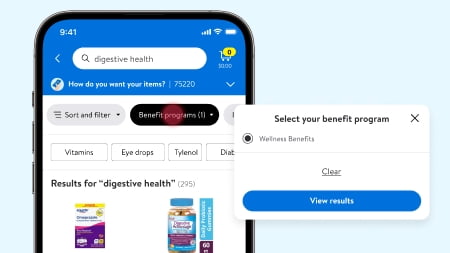

Open the app & go to the “Benefits Program Center”

Enter the item ID/name of the products you would like in the top search bar

Add the eligible item you searched for to your cart
In-store
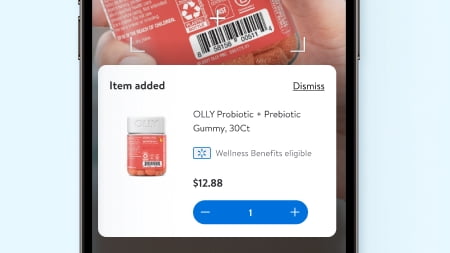

Check the price & eligibility of an item using the Walmart app

Swipe your Walmart Benefits Card at any register during checkout
Frequently Asked Questions
About Walmart Wellness Benefits - Walmart.com
You can use wellcare spendables at Walmart for eligible OTC items, healthy foods, and personal care essentials through approved benefit programs. You can get a clear path to plan acceptance, item eligibility, and online or in-store redemption.
If you’re comparing benefit options, you should start with your program, your card type, and your shopping channel. You should also want simple steps for activation, balance checks, and eligible item review before checkout.
How to use your wellcare spendables card online
You can use your spendables card online when your plan supports digital redemption through Walmart. You should sign in to your benefits portal first, then confirm your card details and available balance.
If your plan uses mybenefitscenter com, you can review your balance and linked card information before shopping. You can also check whether your plan directs you through healthy benefits plus or another approved portal.
When you’re ready to complete your order, you should look for eligible items marked for benefit use. You can then apply your approved card at checkout if you connect your account and plan.
- You can confirm whether your program supports shop online, in-store use, or both.
- You can review your available balance before you build your cart.
- You can focus on eligible OTC medicine, healthy foods, and personal care items.
- You can use the otc app when your plan includes app-based account access.
Choosing your benefit program and wellness benefit card
You may shop through different benefit programs, and your eligibility depends on your specific plan setup. You should compare whether your card issues for Wellcare, Healthy Benefits Plus, or another supported program.
Your card type also matters because a spendables card, wellness benefit card, and OTC card may follow different rules. You should check your issued materials so your card matches the program linked to your account.
If you’re asking whether Walmart accepts your insurance-linked benefit, you should verify plan participation first. You can usually confirm acceptance through your member portal, your card materials, or your program dashboard.
Understanding the wellcare spendables catalog and eligible items
You can use the wellcare spendables catalog to understand what can count toward your approved benefit purchase. You should review eligible categories carefully because coverage often depends on your program rules.
If you’re searching wellcare spendables what can i buy, you usually start with OTC medicine, healthy foods, and personal care. You can narrow your choices by the items listed in your plan portal or linked shopping experience.
Your eligibility may vary by brand, package size, or item type within the same shelf category. You should check the marked item details before checkout so your card applies correctly.
You may find that some benefits focus on pantry staples, while others include wellness basics like toothpaste or bandages. You can also see different category access based on your plan’s approved shopping list.
How to compare redemption channels
You should compare redemption channels because some plans support online use, while others focus on in-store payment. You should confirm whether your card works through Walmart.com, store checkout, or an otc app.
If you prefer digital shopping, you can use wellcare spendables shop online when your plan includes online redemption. You should make sure you connect your account before you add eligible items to your cart.
If you prefer store shopping, you can bring your wellness benefit card and review eligible items before checkout. You can keep your trip simple by checking your balance and item rules ahead of time.
How to check activation, balance, and account access
You should activate your card according to the instructions included with your plan materials. You can then review your balance through the listed portal, phone line, or account dashboard.
If your program references wellness incentives.com or mybenefitscenter com, you should use the exact portal your plan names. You can avoid confusion by following the activation steps tied to your issued card.
Your balance matters because eligible items can only process up to your available amount and plan rules. You should check that amount before checkout so your order matches your current benefits.
Matching card features to your shopping needs
You may want a spendables card if your plan includes several approved categories in one benefit. You can often cover OTC basics, selected food items, and personal care products with one linked card.
You may prefer a wellness benefit card when your plan centers on broad wellness card benefits across approved essentials. You should compare your plan guide so you know which categories your card supports.
If your card features a label as an OTC card, you should expect a strong focus on approved over-the-counter products. You can still check whether your plan also includes healthy foods or personal care access.
Common questions about your wellness benefit card
If you’re asking what can i purchase with my wellcare spendable card, you should start with your plan’s eligible item list. You can then shop within approved categories and review item markings before checkout.
If you’re comparing portals, you should use the one your plan documents name and your card instructions match. You can see different account paths for healthy benefits plus, mybenefitscenter com, or other partner systems.
You can feel more confident when your program, your card type, and your shopping channel all match before payment. You can move through checkout with fewer surprises and a clear view of your eligible benefits.