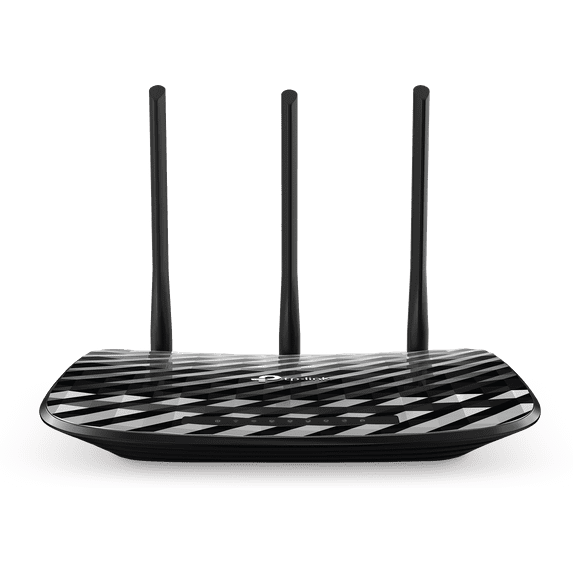
TP-Link AC900 Wireless WiFi Dual Band Gigabit Router (Archer C900)
Hero image 0 of TP-Link AC900 Wireless WiFi Dual Band Gigabit Router (Archer C900), 0 of 4

TP-Link AC900 Wireless WiFi Dual Band Gigabit Router (Archer C900)

|3 ratings

Key item features

Upgrade to reliable AC Wi-Fi for streaming and fast downloads • Enjoy AC900 Wi-Fi over dual 5GHz (433Mbps) and 2.4GHz (450Mbps) bands • Fast wired connections using four Gigabit Ethernet Ports • Free TP-Link DDNS Service lets you assign a domain name and easily access connected devices while away from home • Set time limits and keep children safe with parental controls • Guest Network provides visitors with Wi-Fi access separate from your main network • Quick, one-touch WPS button setup lets you easily connect devices to Wi-Fi • Set-up and adjust Wi-Fi settings even while away from home using the Tether app (Android, iOS)

About this item

Product details

Specifications

Warranty

Customer ratings & reviews

4 out of 5 stars
stars
3 ratings3 reviews
How item rating is calculated
Filtered and sorted results would be available on the new 'Customer ratings & reviews' page.
Sort by |

Showing 1-3 of 3 reviews

Apr 4, 2019
Reviewer name: Carlos
5 out of 5 stars
5 out of 5 stars review

This router is really good for range with 2.4ghz and extremely good. I pay for 100mgps and only get 20 on my old router. But the new tplink ac 900 got me to speeds up to 89mgps with 5g.

Helpful?4LXUZJRNW8N7683170751
Jun 27, 2017
Reviewer name: 1010101
4 out of 5 stars
4 out of 5 stars review

Excellent budget home Wi-Fi router

If you are looking for a solid and cheap Wi-Fi router, then this is a very good choice. Although most Wi-Fi routers at this price point seem to be the same, the antenna design seems to be the biggest improvement on the C900. Most similar Wi-Fi routers only come with two antennas, whereas this C900 Wi-Fi router comes with 3 (very long) antennas. Two antennas are for the 2.4GHz frequency, and one antenna is dual band (5GHz & 2.4GHz frequencies). As a result the 2.4GHz frequency on this Wi-Fi router is faster compared to similar Wi-Fi routers (450mbps vs 300Mbps). This design change also means it works better and has greater Wi-Fi reach in small to medium sized homes. Setup was a breeze. This Wi-Fi router is also compatible with TP-Link's Tether app. I only use the Tether app for basic settings/management. For more advanced options, I use the Web GUI. These include setting up guest networks, access controls, VPN connections, QOS, and Port Forwarding (very useful for IP cameras). I have many connected devices (including smart devices) attached, and I have had zero issues with this Wi-Fi router. The range is excellent, the signal strength is excellent, and the reliability is excellent! The four Ethernet ports are Gigabit speed, which is great if you want to hardwire more demanding connections. As another bonus, I was impressed by how much power this Wi-Fi router uses! It is very low powered and is only rated at 2V/1A. My only complaint is there is no built-in USB port. I was a little surprised considering even the older and cheaper C2 comes with one. This is useful for setting up a media server, storage sharing, or a printer server. Submitted as part of a free sample program.

Helpful?4LXUZJRNW8N7683170751
Apr 7, 2019
Reviewer name: Purchaser
3 out of 5 stars
3 out of 5 stars review

Not overly Impressed Maybe good for some uses.

Got this cheap as discontinued item. Tried to use it to extend the range of my primary router. It keep dropping the signal and reconnecting. It ended us as a paper weight collecting dust.

Helpful?4LXUZJRNW8N7683170751
reply from Supplier Response

Hi, Thank you for your review. The Archer C900 is designed to provide reliable, dual-band AC900 WiFi for the modern home, and is intended to be used as your primary router. Depending on how you intended to extend your network (via Ethernet or WDS), we would be happy to follow up with you and help provide assistance. At your earliest convenience, please send an e-mail with your contact information and a link to this review to USSupportTeam@TP-Link.com and we'll have a Support Agent follow up with you directly. Best Regards, TP-Link Support USSupportTeam@TP-Link.com https://community.tp-link.com

Price when purchased online
Not Available

How do you want your item?

How do you want your item?
Not available