Product Description
Previous page
Next page 1 Atomic Clock with WWVB 2 2 Power Supply Methods 3 4 Levels of Backlight 4 USB Charging Function
Tips
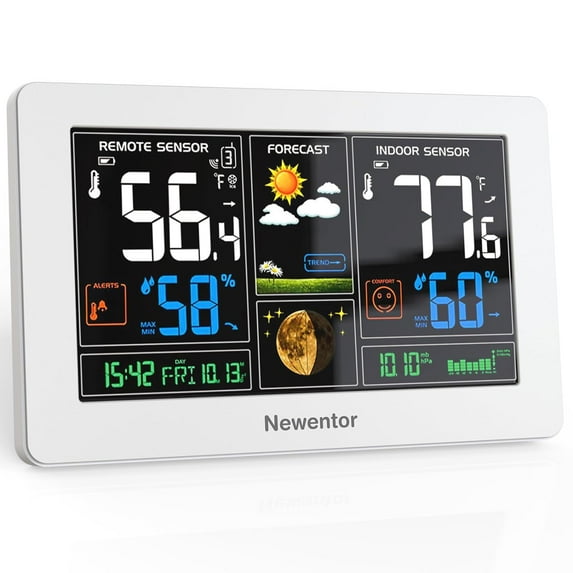
Indoor Weather Station
Main power requires a 5.0V power adapter(included) for adjustable brightness settings (High - Medium - Low - Off).
If using batteries only, the screen lights up for 15 seconds by pressing the top button, the backlight settings (High - Medium - Low - Off) will not work as it is a power saving feature.
Suggestion: insert the batteries as a backup while using the power adapter, to keep the memory in case of accidental power loss.
Wireless Remote Sensor
It is recommended to mount the sensor vertically in a sheltered location away from direct sunlight and with good ventilation. The wireless transmission distance is 328ft in open air, please note that metal siding, stucco and some types of glass will greatly reduce the range of the signal.
The Main Functions
Full color display with adjustable brightness (requires 5.0V power adapter)
Wireless indoor outdoor temperature (F/C) & humidity (%RH) with 24hr MIN/MAX recorded data
Self setting accurate atomic clock(-8 PST, -7 MST, -6 CST, -5 EST) & alarm clock & calendar & moon phase
Weather forecast & absolute barometric pressure (allow 7-10 days for barometric calibration to ensure accurate personal forecast for your location)
Temperature alerts
Indoor comfort level
Trend indicators
How long does the weather clock take to learn and calibrate when you use it for the first time?
1) It usually takes 7-10 days to calibrate.
2) If it is moved from one environment to another (such as bringing the sensor from outside to inside in winter), a calibration time of several hours may be required.
Is the sensor waterproof?
No.If the detection chip is added with a waterproof layer, it cannot be fused with the air directly, which will result in poor detection sensitivity & inaccurate humidity. Our chip detects the air directly, with higher accuracy & better flexibility.
The reason why the clock goes wrong automatically?
The default time zone of the weather clock is PST and the DST is OFF, you only need to simply set your standard time zone and ON/OFF DST according to the instructions when you use it for the first time. Then the clock won't be wrong.
The screen goes blank for 7 minutes while the weather station is searching for a WWVB signal, is this normal?
Yes. Since the WWVB signal is susceptible to interference from many factors, turning off the screen during the search can shield some interference factors.
Product Specifications
Indoor Thermometer Dimension 8L X 5.1H inches
Hygrometer Inside & Outside 20-95%
Inside Temperature 14.2°F(-9.9℃) - 122°F(50°C)
outside Temperature -4°F(-20°C) - 140°F(60°C)
Indoor Thermometer Power 5.0V power charger (included), 2 x AA battery(not included)
Remote Sensor Power 2 x AA battery(not included)
Temperature Accuracy +/- 1.8°F
Humidity Accuracy +/- 5%
Color White