

Galaxy Note 9 in Galaxy Note Series


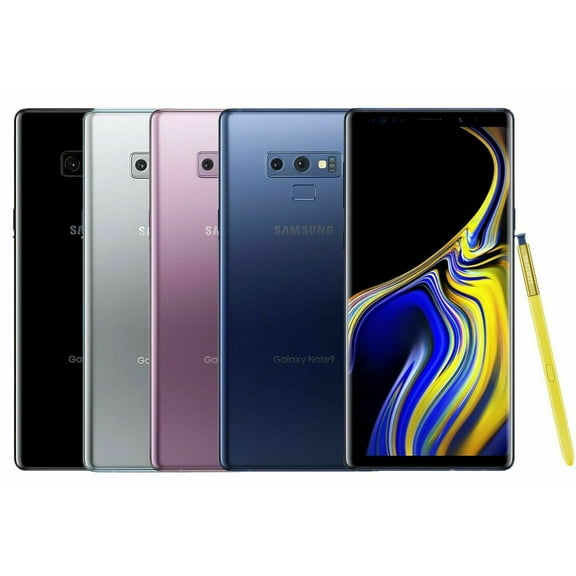

About Galaxy Note 9 in Galaxy Note Series - Walmart.com
When you compare samsung galaxy note 9 options, you can focus on S Pen productivity, large-screen viewing, and carrier flexibility. You can also sort through restored, refurbished, and pre-owned listings with clearer decision points.
If you want a legacy phone built for notes, you’ll appreciate the Note 9’s stylus workflow and roomy display. You can narrow choices faster when you compare storage, condition, carrier status, color, and whether your listing includes the S Pen.
How to compare samsung galaxy note 9 options
You should start with carrier compatibility because that choice shapes activation and everyday setup. You’ll want to check whether your phone is unlocked or matched to AT&T, T-Mobile, Verizon, or US Cellular.
An unlocked model gives you more flexibility when you switch plans or activate on an eligible network. A carrier-specific model can fit you well if you already use that network and want a direct match.
You should also compare condition labels carefully because they explain prior use and resale preparation. You may see restored, refurbished, or pre-owned options, and your listing can outline cosmetic wear and included accessories.
- You can choose unlocked models if you want broader network flexibility.
- You can choose carrier-specific models if you want a direct fit for your current plan.
- You can compare restored, refurbished, and pre-owned conditions based on appearance and included items.
- You can check whether your listing includes the Bluetooth S Pen for writing, tapping, and remote controls.
- You can match 128GB or 512GB storage to your photo library, apps, and video habits.
You’ll notice the condition decision affects both appearance expectations and setup confidence. You should read each product page for battery details, grading notes, charging accessories, and lock status.
Choosing samsung galaxy note 9 price and condition
When you compare samsung galaxy note 9 price details, you should look beyond the headline number. You’ll get a clearer picture when you weigh condition, storage size, carrier status, and whether your listing includes the S Pen.
A restored or refurbished listing may suit you if you want a phone that technicians checked and prepared for resale. A pre-owned listing may fit you if you’re comfortable reviewing cosmetic details and included components closely.
You may also care about battery health when you buy an older device, and that’s a practical checkpoint. You should look for listing notes about battery capacity, tested functions, and charging readiness before you decide.
If you use your phone all day, you’ll want battery details explained in plain language. You can feel more prepared when you confirm charging behavior, cable inclusion, and overall function in the listing.
What to look for in storage, color, and the S Pen
You should compare storage first if you keep lots of photos, videos, downloaded playlists, or large apps. You may find 128GB fits everyday use, while 512GB gives you more room for heavy media libraries.
If you record video often or keep years of files on your phone, you’ll benefit from more onboard space. You can avoid frequent cleanups when your storage lines up with your daily habits.
Color can matter too because you may want a finish that feels classic or stands out in your hand. You can often compare Ocean Blue, Midnight Black, Lavender Purple, and Metallic Copper across available listings.
You should also check whether your listing includes the S Pen because that accessory shapes the Note experience. You can write quick notes, sketch ideas, and navigate select tasks more naturally when your listing includes the pen.
The original Bluetooth S Pen matters if you want remote shutter control and presentation-style clicks. You should confirm inclusion in the product details instead of assuming every listing has the pen.
Choosing samsung galaxy note 9 us cellular and unlocked models
If you travel between plans or replace phones often, you may prefer an unlocked model for added flexibility. You can review compatibility notes carefully before activation, especially when you use a specific network feature.
If you already use one carrier, a matched phone can simplify your comparison process. You should still verify model details, network support, and account requirements before you complete your choice.
A samsung galaxy note 9 us cellular option can make sense if you want a listing aligned with that network. You can use that filter as a shortcut when your carrier choice is already settled.
If you want a phone for notes, calendar updates, and document markups, you should prioritize S Pen inclusion. You can also pair larger storage with that workflow when you keep many files, screenshots, and downloads.
If you want a backup phone, you may focus on reliable basics like storage, battery notes, and charging accessories. You can keep your comparison practical by checking condition language and carrier status first.
When you evaluate samsung galaxy note 9 price now, you should balance current needs with long-term convenience. You’ll make a smarter pick when your storage, carrier, color, and S Pen details match how you actually use your phone.
You can compare this category with more confidence when you review carrier fit, battery notes, storage, and stylus inclusion. You’ll land on a Note 9 that supports your network, your files, and your pen-based tasks.