Online at Walmart.com

 Pickup or delivery?Pickup or delivery?
Add your Everyday Choice program card to shop 1,000s of eligible must-have items
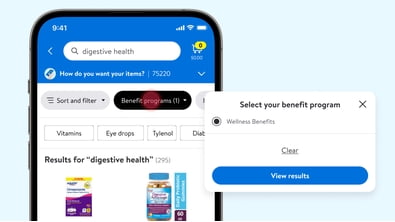
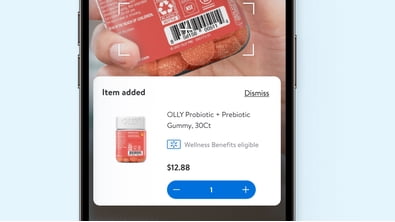
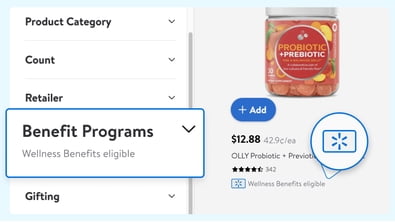
Your wellness card can help you buy eligible everyday essentials on Walmart.com with a clearer path from card setup to checkout. You'll find practical guidance here on card compatibility, eligible categories, and the steps that help you complete your order online.
If you're using Wellcare, Humana, UnitedHealthcare, or a generic wellness program, you need clear instructions before you shop. You'll also want guidance that reflects monthly allowances, quarterly OTC allowances, and healthy food benefits.
You should start by confirming your card program name, issuer, and payment network before you add items to your cart. You'll reduce checkout confusion when you compare those details with your plan materials and your card information.
Next, you can sign in to your Walmart account and add your card during checkout when an eligible payment option appears. You'll move efficiently when you keep your card number, expiration date, and billing details nearby.
Before you place your order, you should review your cart for eligible items and your remaining balance. You'll complete checkout more smoothly when your selected items match your program rules and available funds.
You may see terms like everyday benefits card, spendables card, or wellness card, and your plan documents explain which term applies to you. You'll want to match the card name on your materials to the program linked to your allowance.
If you're searching wellcare spendables shop online or looking for a wellcare spendable card guide, you likely want checkout instructions and eligible item details. You'll benefit from checking whether your plan supports Walmart online shopping, app purchases, or in-store checkout.
Card program type matters because your allowance rules can vary by issuer, plan, and benefit period. You'll often see differences between monthly allowance funds, quarterly OTC benefits, and healthy food benefits.
You should compare eligible product categories before you build your cart because approval depends on your specific program. You'll often focus on over-the-counter medicine, healthy groceries, personal care, first aid, and eye care.
You should remember that not every card covers every category in the same way. You'll make informed choices when you review your plan list before you shop for multi-item orders.
Some programs separate healthy food benefits from OTC allowances, even when both benefits appear on one card. You'll want to check whether your balance applies to groceries, wellness items, or both.
You should confirm card compatibility first because issuer, program name, and network compatibility are decision-critical details. You'll reduce delays when you verify that your card works for the redemption channel you plan to use.
If your plan supports Walmart online shopping, you can focus on digital checkout steps and eligible online assortments. If your plan supports the Walmart app, you'll want to check the same card details before mobile checkout.
You may also use in-store checkout for some programs, but your online process can differ from store transactions. You'll get a smoother experience when you review channel rules before you split purchases across online and in-store orders.
You should check your balance before shopping so your cart lines up with your current allowance. You'll avoid removing items later when you know how much remains in your monthly or quarterly benefit.
Your plan materials or card portal usually explain where you can view your available funds and benefit timing. You'll want to confirm whether unused funds expire at the end of a month, quarter, or other benefit period.
When you know your balance, you can prioritize essentials in covered categories first. You'll keep your order focused on approved items and the funds currently available to you.
If you're replenishing household basics, you can compare OTC items, personal care products, and first aid essentials in one order. You'll simplify routine shopping when your eligible categories support those purchases together.
If your plan includes healthy food benefits, you can build a grocery order around approved pantry staples and fresh options. You'll want to review your eligible list first because food coverage can vary by program.
When you're shopping from home, you can use Walmart online shopping or the Walmart app if your plan supports digital redemption. You'll appreciate that step-by-step checkout guidance helps you move from card setup to completed payment.
If you're managing a well care spendable card for recurring household needs, you can plan purchases around your allowance cycle. You'll stay organized when you match each order to your monthly or quarterly benefit window.
You need more than a product grid when you're shopping with a wellness card and trying to use plan funds correctly. You'll shop with more confidence when you understand compatibility, eligible categories, balance checks, and checkout steps.
With that clarity, you can turn your allowance into approved everyday essentials with fewer checkout surprises. You'll get a more efficient path to the items your program covers.