Find auto parts that fit
Let’s search for parts that fit your vehicle.
Pl2303hx(1)
USB to TTL Serial Adapter Cable, 37.4 in / 95 cm PL2303HX RS232 Upgraded COM Port Converter Cord with 4-Pin Color-Coded Wire Leads for STC Microcontroller Programming and Debugging, Black $8.00
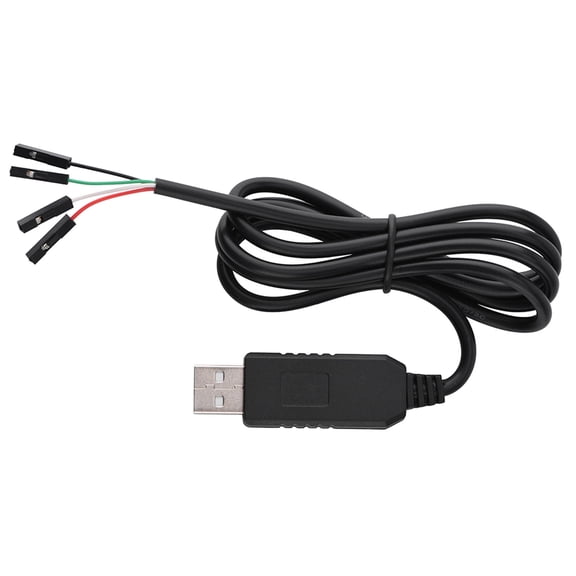
USB to TTL Serial Adapter Cable, 37.4 in / 95 cm PL2303HX RS232 Upgraded COM Port Converter Cord with 4-Pin Color-Coded Wire Leads for STC Microcontroller Programming and Debugging, Black
FAQ
What does a USB to TTL adapter do?
A USB to TTL adapter lets you connect devices that use TTL serial communication to your computer's USB port. This is handy when you're working with microcontrollers or other electronics that need a serial interface.
- It converts USB signals to TTL (Transistor-Transistor Logic) levels.
- It's often used for programming, debugging, or communicating with embedded systems.
- The adapter usually comes with color-coded wire leads for easy setup.
Using one can simplify connecting your projects to modern computers that lack traditional serial ports.
How do I connect the adapter to my microcontroller?
To connect a USB to TTL adapter to your microcontroller, you'll need to match the adapter's wire leads to your device's pins.
- Identify the adapter's wires: typically labeled for TX (Transmit), RX (Receive), VCC (Power), and GND (Ground).
- Connect TX to the RX pin on your microcontroller, and RX to TX.
- Attach GND to your microcontroller's ground and VCC to its power input if required.
Double-check your microcontroller's documentation for correct pin assignments before powering on.
Can I use this adapter for programming devices?
Yes, USB to TTL adapters are commonly used for programming and debugging microcontrollers or similar electronics. They make it possible to send code or commands from your computer to the device.
- Ensure your target device supports TTL serial communication.
- Install any necessary drivers for the adapter on your computer.
- Use programming software compatible with your microcontroller.
Always refer to your device's manual for specific programming instructions and connection details.
Do I need special drivers for the adapter?
Most USB to TTL adapters require drivers so your computer can recognize and communicate with them properly.
- Check if your computer's operating system automatically installs the driver.
- If not, visit the manufacturer's website for the latest version.
- Follow installation instructions provided with the adapter.
Having the correct driver helps avoid connection issues and ensures smooth operation with your electronics projects.
What can I use the color-coded wires for?
The color-coded wires on a USB to TTL adapter make it easier to identify and connect each lead to your device's pins.
- Each color typically corresponds to a function like transmit, receive, ground, or power.
- This reduces the chance of wiring errors when setting up your project.
- Check the included manual or wire labels to confirm each wire's purpose.
Using the color codes correctly can help you set up your connections quickly and safely.
Popular in Shop PL2303HX Cell Phone Serial Adapter Cables
Related Products
Samsung USB TypeC Cable 1m White EPDN975BWEGWW EPDN975BWEGCA
 Samsung USB TypeC Cable 1m White EPDN975BWEGWW EPDN975BWEGCA$9.89current price $9.89
Cable Builders 6' USB Type A to USB Mini B Cable, Black, 2 Pack
 Cable Builders 6' USB Type A to USB Mini B Cable, Black, 2 Pack$11.99current price $11.99
OMNIHIL 6.5FT USB Type A to Type C Cable Compatible with Matco Tools Triple Head Worklight-MWLWL2
 OMNIHIL 6.5FT USB Type A to Type C Cable Compatible with Matco Tools Triple Head Worklight-MWLWL2$13.96current price $13.96
OMNIHIL 5 Feet 3.0 High Speed USB-A to C Compatible with Sony SRS-XB501G
 OMNIHIL 5 Feet 3.0 High Speed USB-A to C Compatible with Sony SRS-XB501G$13.96current price $13.96
SAMSUNG Original USB Type-C Data Cable (EP-DG930MBEGWW) Pack of 2, Black
 SAMSUNG Original USB Type-C Data Cable (EP-DG930MBEGWW) Pack of 2, Black$10.99current price $10.99
OMNIHIL 10FT USB Type-A /Male to USB-Type C / 3.0 Cable Compatible with MINIX NEO T5
 OMNIHIL 10FT USB Type-A /Male to USB-Type C / 3.0 Cable Compatible with MINIX NEO T5$14.96current price $14.96
Authentic Samsung Galaxy S8 USB to Type-C Charging and Transfer Cable. (Black / 4ft) (Bulk Packaging)
Authentic Samsung Galaxy S8 USB to Type-C Charging and Transfer Cable. (Black / 4ft) (Bulk Packaging)
Monoprice USB-C to USB-C Silicone Charging Cable - USB 2.0, 240W PD, Ultra Flexible, 10ft, Blue
Monoprice USB-C to USB-C Silicone Charging Cable - USB 2.0, 240W PD, Ultra Flexible, 10ft, Blue