Easycap(1)
NUZYZ Pro USB 2.0 Video Easycap TV DVD VHS Capture Card Audio AV Adapter for Computer $8.50 Was $10.71

NUZYZ Pro USB 2.0 Video Easycap TV DVD VHS Capture Card Audio AV Adapter for Computer
Other options to consider(2)
Tnarru USB 2.0 Video Card Adapter Grabber RCA VHS to DVD Converter, for PC Computer Component, 4 RCA Component Connectors $19.99
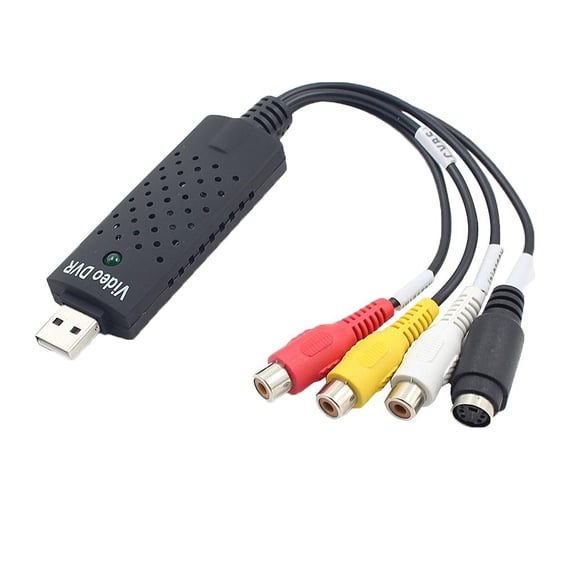
Tnarru USB 2.0 Video Card Adapter Grabber RCA VHS to DVD Converter, for PC Computer Component, 4 RCA Component Connectors
Video Capture Card Audio Video Adapter DVD Converter Plug and Play for Windows XP Vista 7 Laptops and PC $16.99

Video Capture Card Audio Video Adapter DVD Converter Plug and Play for Windows XP Vista 7 Laptops and PC
FAQ
How do I connect an EasyCap to my computer?
Connecting an EasyCap video capture device is pretty straightforward. Here’s a quick guide:
- Plug the EasyCap’s USB connector into an available USB port on your computer.
- Attach your video source (like a VHS player or camcorder) to the EasyCap using the RCA or S-Video cables.
- Install any required drivers or software that comes with your device. Most adapters include a CD or a download link.
- Open the video capture software and select the EasyCap as your input device.
Following these steps can help you get started with digitizing your old videos.
Can I use EasyCap with a laptop?
Yes, you can use an EasyCap video capture adapter with most laptops that have a USB port. Here’s what you’ll need to do:
- Ensure your laptop runs a compatible operating system, such as Windows XP, Vista, 7, or newer.
- Install the necessary drivers and video capture software provided with your EasyCap device.
- Connect your video source to the adapter, then plug the adapter into your laptop’s USB port.
This setup lets you transfer and save analog video content directly to your laptop for editing or archiving.
What types of video can EasyCap capture?
EasyCap adapters are designed to capture analog video signals. Here’s what you can typically record:
- VHS tapes from VCRs
- Footage from camcorders with RCA or S-Video outputs
- Content from DVD players or gaming consoles with composite connections
Keep in mind, EasyCap works with standard definition analog signals, so it’s ideal for preserving older media formats by converting them to digital files on your computer.
Do I need special software to use EasyCap?
Most EasyCap devices come with video capture software, but you can also use other compatible programs. Here’s what to consider:
- Install the drivers and software included with your EasyCap for best compatibility.
- Some third-party video editing or capture programs may also work, as long as they recognize USB video input devices.
- Check the product details or manual for recommended software options.
Having the right software helps you record, edit, and save your videos easily.
How do I improve video quality when using EasyCap?
To get the best possible video quality with your EasyCap adapter, try these tips:
- Use high-quality RCA or S-Video cables for a better signal.
- Clean your VHS tapes or camcorder heads before playback to reduce static or distortion.
- Adjust the capture settings in your software, such as resolution and brightness, to match your source material.
- Keep your devices and connections secure to avoid signal loss.
While EasyCap captures analog video, these steps can help you get clearer results from your recordings.
Popular in Easycap USB Video Capture Devices Electronics
Related Products
DIGITNOW Video Capture Card Device, Capture Analog Video to Digital for Your Mac or Windows 10 PC, iPad and iPhone, VHS to DVD
 DIGITNOW Video Capture Card Device, Capture Analog Video to Digital for Your Mac or Windows 10 PC, iPad and iPhone, VHS to DVD$19.99current price $19.99
ClearClick Video to USB Lite - USB Audio Video Capture Device - Input AV, RCA, S-Video, VCR, VHS, Camcorder, Video8, Hi8, DVD, Retro Gaming Systems - USB-C Plug & Play
 ClearClick Video to USB Lite - USB Audio Video Capture Device - Input AV, RCA, S-Video, VCR, VHS, Camcorder, Video8, Hi8, DVD, Retro Gaming Systems - USB-C Plug & Play$49.95current price $49.95
ClearClick Video to USB 1080P USB Audio Video Capture & Live Streaming Device - Input 4K HDMI, AV, RCA, S-Video (VCR, VHS, Camcorder, Video8, Hi8, DVD, Gaming Systems) - USB-C Plug & Play
 ClearClick Video to USB 1080P USB Audio Video Capture & Live Streaming Device - Input 4K HDMI, AV, RCA, S-Video (VCR, VHS, Camcorder, Video8, Hi8, DVD, Gaming Systems) - USB-C Plug & Play$69.95current price $69.95
USB 2.0 Video Capture Card Device Converter, Easy to Use Capture, Edit and Save Analog Video to Digital Files for Your Mac OS X or Windows 7 8 10 PC, One Touch VHS VCR TV to DVD
 USB 2.0 Video Capture Card Device Converter, Easy to Use Capture, Edit and Save Analog Video to Digital Files for Your Mac OS X or Windows 7 8 10 PC, One Touch VHS VCR TV to DVD$19.99current price $19.99
DIGITNOW 4K Audio Video Capture Card, HDMI USB 3.0 Video Capture Device, Full HD 1080P for Game Recording, Live Streaming Broadcasting-Black
 DIGITNOW 4K Audio Video Capture Card, HDMI USB 3.0 Video Capture Device, Full HD 1080P for Game Recording, Live Streaming Broadcasting-Black$21.99current price $21.99
VIXLW VHS TO Digital Converter, USB Video Capture Card, Video Capture Device, RCA TO USB Converter
 VIXLW VHS TO Digital Converter, USB Video Capture Card, Video Capture Device, RCA TO USB Converter$30.08current price $30.08
VHS to Digital Converter,Video Capture Card USB 2.0 Audio Video Capture Card Device Old VHS Mini DV Hi8 DVD VCR to Digital Converter for Mac,PC Support Windows 2000/10/8/7/Vista/XP/Android
 VHS to Digital Converter,Video Capture Card USB 2.0 Audio Video Capture Card Device Old VHS Mini DV Hi8 DVD VCR to Digital Converter for Mac,PC Support Windows 2000/10/8/7/Vista/XP/Android$11.97current price $11.97
ClearClick HD Capture Box Platinum - Capture and Stream Video from HDMI, RCA, AV, VGA, YpbPr, VHS, VCR, DVD, Camcorders, Hi8
 ClearClick HD Capture Box Platinum - Capture and Stream Video from HDMI, RCA, AV, VGA, YpbPr, VHS, VCR, DVD, Camcorders, Hi8$149.95current price $149.95
USB 2.0 Audio/Video Converter - Digitize and Edit Video from Any Analog Source Including VCR, VHS, DVD
 USB 2.0 Audio/Video Converter - Digitize and Edit Video from Any Analog Source Including VCR, VHS, DVD$12.99current price $12.99
4K HDMI Video Capture Card for Streaming Gaming, 1080P 60FPS Audio Video Recorder USB 3.0 Interface, Compatible with PC, Camera, TV, Game Device
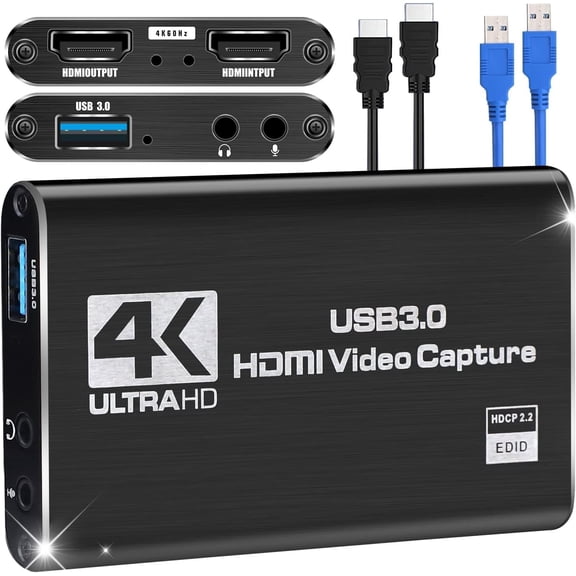 4K HDMI Video Capture Card for Streaming Gaming, 1080P 60FPS Audio Video Recorder USB 3.0 Interface, Compatible with PC, Camera, TV, Game Device$16.49current price $16.49
Video Capture Card, AV to USB Convert, Old VHS VCR Mini DV Hi8 DVD to Digital, VHS to Digital Converter for VHS Play/VCR Play/Camcorder, RCA to USB-Convert Analog to Digital for MAC Windows Vista
 Video Capture Card, AV to USB Convert, Old VHS VCR Mini DV Hi8 DVD to Digital, VHS to Digital Converter for VHS Play/VCR Play/Camcorder, RCA to USB-Convert Analog to Digital for MAC Windows Vista$13.99current price $13.99