

All Laptop ComputersComputer AccessoriesCreator & Media LaptopsEssential LaptopsGeneral Electronic AccessoriesGoogleGrades 6-12 ElectronicsHPLaptop AccessoriesLaptopsLaptops by Operating SystemRestored TechShop Computers by BrandShop Laptops By BrandShop Laptops by TypeWork & Business Laptops
Sort by|
Npfc(2)
Uses item details. Price when purchased online
HP ZBook Firefly 14 G9 14" Mobile Workstation - WUXGA - 1920 x 1200 - Intel Core i5 12th Gen i5-1240P Dodeca-core (12 Core) - 16 GB Total RAM - 256 GB SSD - Intel Chip - Windows 11 Pro - Intel Ir $1,502.60 Was $1,800.52

Sponsored
Now$1,50260
current price Now $1,502.60, Was $1,800.52$1,800.52
HP ZBook Firefly 14 G9 14" Mobile Workstation - WUXGA - 1920 x 1200 - Intel Core i5 12th Gen i5-1240P Dodeca-core (12 Core) - 16 GB Total RAM - 256 GB SSD - Intel Chip - Windows 11 Pro - Intel Ir
New HP WAE009 18W nPFC w/Duck Head AC Adapter 794797-001 795552-001 w/Power Cord $20.40

$2040
current price $20.40New HP WAE009 18W nPFC w/Duck Head AC Adapter 794797-001 795552-001 w/Power Cord
FAQ
What does npfc mean for laptop accessories?
NPFC refers to a specific compatibility or product type, often associated with adapters and power cords for laptops or workstations. When shopping for laptop accessories, you'll see 'npfc' in item descriptions for products designed to fit certain models.
- Check your device's model number to ensure the accessory fits.
- NPFC items usually include AC adapters and power cords for specific computers.
- If you’re unsure, review your device’s manual or contact support before purchase.
Can I use a duck head adapter with any laptop?
Duck head AC adapters aren't universal and must match your device’s requirements.
- Always check the voltage and connector type of your laptop.
- Duck head adapters are designed for certain models, often noted in the product description.
- Using the wrong adapter can impact performance or damage hardware.
How do I know if an npfc power cord fits my device?
To check compatibility,
- Locate your device's model number (usually on the bottom or in the settings).
- Compare with the product listing, which will specify compatible models or connector types.
- Look for details like connector size (for example, 4.5mm NSLIM) and output wattage.
What should I do if my laptop charger stops working?
If your charger isn’t working, try these steps:
- Unplug both ends and securely reconnect to rule out a loose connection.
- Check for visible wear or damage.
- Test with another compatible charger if possible.
- Consult your laptop’s manual for recommended replacement parts.
Are there tips for keeping my laptop adapter in good shape?
Yes, caring for your adapter can extend its lifespan.
- Keep cords untangled and avoid bending them sharply.
- Store adapters somewhere cool and dry when not in use.
- Unplug the charger once your laptop’s battery is full to minimize wear.
- Inspect connectors regularly for dust or debris.
Popular in npfc Electronics Power Adapters and Chargers Online
Related Products
Motor Genic 19V 2.37A 4.0MM*1.35MM Laptop Charger Power Supply AC adapter For ASUS N45W-01
 Motor Genic 19V 2.37A 4.0MM*1.35MM Laptop Charger Power Supply AC adapter For ASUS N45W-01$12.60current price $12.60
12V 2A Replacement AC Adapter Compatible with Gateway GWTC116-2BL GWTN156-11BK GWTC116-2BK GWNC21524-BL GWTC116 GWTN156 GWTN116 Laptop Power Supply
 12V 2A Replacement AC Adapter Compatible with Gateway GWTC116-2BL GWTN156-11BK GWTC116-2BK GWNC21524-BL GWTC116 GWTN156 GWTN116 Laptop Power Supply$16.99current price $16.99
EDO Tech 19V Wall Charger for Gateway GWTN156-1BK GWTN156-1GR GWTN156-1BL GWTN156-1BK GWTN156-1GR GWNR71517BK GWNC31514BL GWNC31514BK FHD Ultra Slim Notebook Laptop
 EDO Tech 19V Wall Charger for Gateway GWTN156-1BK GWTN156-1GR GWTN156-1BL GWTN156-1BK GWTN156-1GR GWNR71517BK GWNC31514BL GWNC31514BK FHD Ultra Slim Notebook Laptop$14.00current price $14.00
150W Gaming Laptop Charger for HP Victus 15 16 17, Pavilion 15 17 x360, Omen 16 17, Compatible with HP ZBook 15 16 17, Studio G3 G5, Fury, Envy 15 17 AC Power Adapter
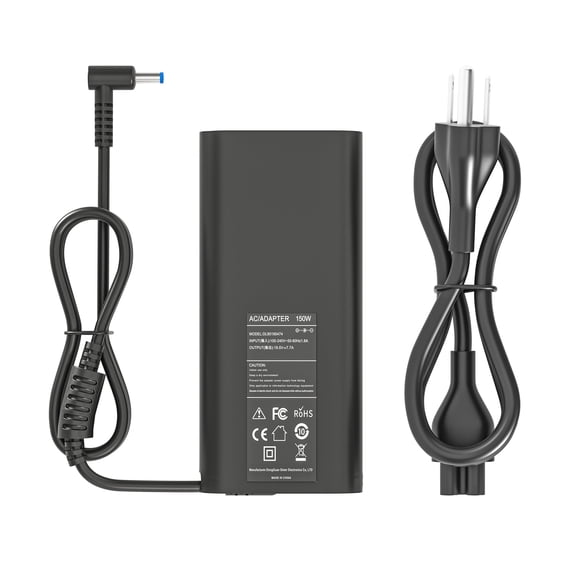 150W Gaming Laptop Charger for HP Victus 15 16 17, Pavilion 15 17 x360, Omen 16 17, Compatible with HP ZBook 15 16 17, Studio G3 G5, Fury, Envy 15 17 AC Power Adapter$25.99current price $25.99
HP 15V 3A 45W USB-C Type-C AC Adapter Laptop Charger Power Cord for Chromebook ENVY Elite Fortis OmniBook Pavilion Spectre x2
 HP 15V 3A 45W USB-C Type-C AC Adapter Laptop Charger Power Cord for Chromebook ENVY Elite Fortis OmniBook Pavilion Spectre x2$15.98current price $15.98
Laptop Charger AC Power Adapter For Chuwi Corebook Xpro CW1530, EVOO EVC141-12SL, EVC-141-12SL New Power Supply Cord
 Laptop Charger AC Power Adapter For Chuwi Corebook Xpro CW1530, EVOO EVC141-12SL, EVC-141-12SL New Power Supply Cord$16.85current price $16.85
Laptop Charger AC Power Adapter For Gateway P-7805u P-7807u P-7808u P-7809u P-7811 P-7811u P7815 New Power Supply Cord
 Laptop Charger AC Power Adapter For Gateway P-7805u P-7807u P-7808u P-7809u P-7811 P-7811u P7815 New Power Supply Cord$16.95current price $16.95
Laptop Charger AC Power Adapter For Gateway MT6728 MT6724B MT6729 MT6730 MT6821 MT6823B MT6825B New Power Supply Cord
 Laptop Charger AC Power Adapter For Gateway MT6728 MT6724B MT6729 MT6730 MT6821 MT6823B MT6825B New Power Supply Cord$16.95current price $16.95
Laptop Charger AC Power Adapter For MSI CR620-691US, CR620-031US, CR620-692US, CR630,CR630-228US New Power Supply Cord
 Laptop Charger AC Power Adapter For MSI CR620-691US, CR620-031US, CR620-692US, CR630,CR630-228US New Power Supply Cord$16.85current price $16.85
19V Replacement AC/DC Adapter Compatible with Gateway PA6A MX8734 MX8711 MX8715 MP8708 MP8700 Laptop Notebook PC Power Supply
 19V Replacement AC/DC Adapter Compatible with Gateway PA6A MX8734 MX8711 MX8715 MP8708 MP8700 Laptop Notebook PC Power Supply$14.25current price $14.25
iTEKIRO 180W AC Adapter Charger for Asus GL702VM-DB71, GL702VM-DB74, GL702VM-DS74, GL703VM, GL703VM-DB74, GL703VM-NH74, GL703VM-WB71, G752VL, G752VL-BHI7N32, P1801 PC Station
 iTEKIRO 180W AC Adapter Charger for Asus GL702VM-DB71, GL702VM-DB74, GL702VM-DS74, GL703VM, GL703VM-DB74, GL703VM-NH74, GL703VM-WB71, G752VL, G752VL-BHI7N32, P1801 PC Station$94.99current price $94.99
65w Ac Laptop Adapter Charger for Gateway MD7818U MD7820U NE56 NE56R10U NE56R11U NE56R12U NE56R13U NE56R15U NE56R27U NE56R31U NE56R34U NE56R37U NE56R41U NE56R42U NE71B06U Power Supply Cord
 65w Ac Laptop Adapter Charger for Gateway MD7818U MD7820U NE56 NE56R10U NE56R11U NE56R12U NE56R13U NE56R15U NE56R27U NE56R31U NE56R34U NE56R37U NE56R41U NE56R42U NE71B06U Power Supply Cord$15.00current price $15.00
19V 4.74A 90W Replacement AC Adapter Compatible with Toshiba PA3714U-1ACA PA3822U-1ACA PA3917U-1ACA Laptop Power Supply
 19V 4.74A 90W Replacement AC Adapter Compatible with Toshiba PA3714U-1ACA PA3822U-1ACA PA3917U-1ACA Laptop Power Supply$15.98current price $15.98
Laptop Charger AC Power Adapter For Gateway MX6438 MX6437 MX6439 MX6440 MX6442 MX6445 MX6446 New Power Supply Cord
 Laptop Charger AC Power Adapter For Gateway MX6438 MX6437 MX6439 MX6440 MX6442 MX6445 MX6446 New Power Supply Cord$16.95current price $16.95
Laptop Charger AC Power Adapter For Gateway MX3142M MX3210 MX3212 MX3215 MX3228h MX3230 MX3230h New Power Supply Cord
 Laptop Charger AC Power Adapter For Gateway MX3142M MX3210 MX3212 MX3215 MX3228h MX3230 MX3230h New Power Supply Cord$16.95current price $16.95
HFLRZZ Laptop Charger 19V Power Supply 3.42A 65W AC Power Adapter for U56E X550C X551M R554L Laptop Cord Adapter 5.5x2.5mm(Not 4.5*3.0mm)
 HFLRZZ Laptop Charger 19V Power Supply 3.42A 65W AC Power Adapter for U56E X550C X551M R554L Laptop Cord Adapter 5.5x2.5mm(Not 4.5*3.0mm)$14.49current price $14.49
iTEKIRO 45W AC Adapter Charger for Asus UL30A-A2, UL30A-A2B, UL30A-A3B, UL30A-QX050V, UL30A-QX094V, UL30A-QX130X, UL30A-QX131X, UL30A-QX194V, UL30A-Vt, UL30A-X1, UL30A-X2, UL30A-X3
 iTEKIRO 45W AC Adapter Charger for Asus UL30A-A2, UL30A-A2B, UL30A-A3B, UL30A-QX050V, UL30A-QX094V, UL30A-QX130X, UL30A-QX131X, UL30A-QX194V, UL30A-Vt, UL30A-X1, UL30A-X2, UL30A-X3$38.98current price $38.98