

Kamrui(2)
New, Mini Desktop Computer 4K Mini PC Intel Pentium Silver N5030 (up to 3.1GHz) Mini PC,12GB RAM 256GB M.2 SSD, Windows 11, 4K UHD, WiFi5 From $199.99
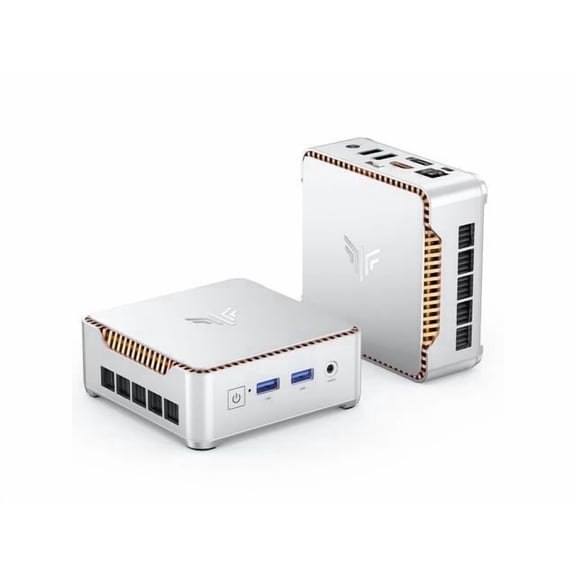
Mini Desktop Computer 4K Mini PC Intel Pentium Silver N5030 (up to 3.1GHz) Mini PC,12GB RAM 256GB M.2 SSD, Windows 11, 4K UHD, WiFi5
AC Adapter Charger For KAMRUI AK1 Pro Mini PC Intel 11th Gen N5105 Windows 11 Pro Power Supply Cord Mains PSU $15.99
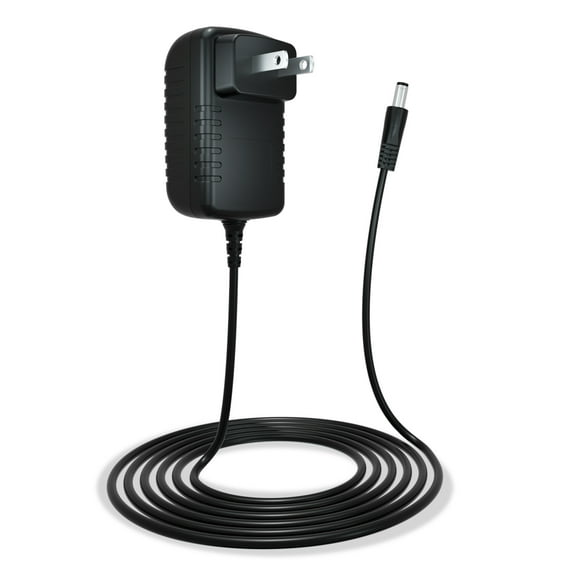
AC Adapter Charger For KAMRUI AK1 Pro Mini PC Intel 11th Gen N5105 Windows 11 Pro Power Supply Cord Mains PSU
FAQ
Why am I seeing ACEMAGIC instead of Kamrui?
If you're searching for Kamrui products on Walmart.com and only see ACEMAGIC results, it's likely because ACEMAGIC is the available option in this category at the moment. Product availability can change based on inventory and supplier partnerships. You might want to check back later or use the search filters to explore similar devices. If you're looking for a specific brand or model, keeping an eye on the site for updates can help you find what you need.
How can I compare laptops on Walmart?
- Start by using the search bar to find laptops that interest you.
- Use filters for screen size, memory, storage, and operating system to narrow down your options.
- Read product descriptions and customer reviews for more details.
- Check the specifications listed for each device to see how they stack up.
- Comparing features side-by-side can help you decide which laptop fits your needs best.
What should I look for in a laptop for work?
When shopping for a work laptop, consider these factors:
- Memory (RAM): More RAM helps with multitasking.
- Storage: Choose a size that fits your files and projects.
- Processor: A newer processor can support faster performance.
- Screen size: Pick a display that's comfortable for your daily tasks.
- Operating system: Make sure it supports the programs you need.
Reading product details and reviews can help you make an informed choice.
Can I return a laptop if it doesn’t meet my needs?
Walmart offers a return policy for most electronics, including laptops. If your purchase doesn’t fit your requirements, you can typically return it within the specified window. Be sure to keep the original packaging and receipt, and check Walmart’s online return policy for any specific details or exceptions. If you have questions, customer service is always ready to help guide you through the process.
How do I find support for my laptop after buying?
- Visit Walmart’s support page for help with recent purchases.
- Check the manufacturer’s website for troubleshooting guides and warranty information.
- Look for user manuals or FAQs included with your device.
- If you need hands-on help, Walmart’s customer service team can assist with returns or warranty claims.
- Keeping your receipt handy makes support requests easier.
Popular in Kamrui
Related Products
Restored BTO Desktop Computer PC Quad-Core i5-6500 – 16GB DDR4 Ram – 512GB SSD – New 24 inch Monitor – Webcam – RGB KB & Mouse – Windows 11 Pro – WiFi (Refurbished)
 Restored BTO Desktop Computer PC Quad-Core i5-6500 – 16GB DDR4 Ram – 512GB SSD – New 24 inch Monitor – Webcam – RGB KB & Mouse – Windows 11 Pro – WiFi (Refurbished)$344.99current price $344.99
Restored Dell OptiPlex Desktop Computer | Intel Core i3 6th gen | 8GB RAM | 500GB HDD | Windows 10 | Wireless Keyboard and Mouse (Refurbished)
 Restored Dell OptiPlex Desktop Computer | Intel Core i3 6th gen | 8GB RAM | 500GB HDD | Windows 10 | Wireless Keyboard and Mouse (Refurbished)$179.99current price $179.99
Pre-Owned Windows 11 Pro Dell OptiPlex 3020 Desktop Computer, Intel Corei5 Dual-core (2 Core) 3.50 GHz, 16GB RAM DDR3 240SSD HDD, Small Form Factor with (Monitor Not Included)
 Pre-Owned Windows 11 Pro Dell OptiPlex 3020 Desktop Computer, Intel Corei5 Dual-core (2 Core) 3.50 GHz, 16GB RAM DDR3 240SSD HDD, Small Form Factor with (Monitor Not Included)$249.89current price $249.89
Restored Dell OptiPlex Desktop Computer with a Intel Core i3 3.9GHz 7th gen Processor, choose Memory, Hard drive, and LCD Options - Windows 10 PC (Refurbished)
 Restored Dell OptiPlex Desktop Computer with a Intel Core i3 3.9GHz 7th gen Processor, choose Memory, Hard drive, and LCD Options - Windows 10 PC (Refurbished)$254.99current price $254.99
Pre-Owned Dell Optiplex 5040 Desktop Computer PC, 3.20 GHz Intel i5 Quad Core Gen 6, 8GB DDR3 RAM, 240GB SSD Hard Drive, Windows 10 Home 64 bit, No Screen Screen Used
 Pre-Owned Dell Optiplex 5040 Desktop Computer PC, 3.20 GHz Intel i5 Quad Core Gen 6, 8GB DDR3 RAM, 240GB SSD Hard Drive, Windows 10 Home 64 bit, No Screen Screen Used$229.99current price $229.99
Pre-Owned Dell OptiPlex Desktop Computer Intel i5 Processor, 16GB RAM, 240SSD HD, DVD, Wi-Fi & (Monitor Not Included), Windows 10 Used PC
 Pre-Owned Dell OptiPlex Desktop Computer Intel i5 Processor, 16GB RAM, 240SSD HD, DVD, Wi-Fi & (Monitor Not Included), Windows 10 Used PC$234.80current price $234.80
Restored Dell OptiPlex Desktop Computer | Intel Core i7 6th Gen | 16GB RAM | 1TB HDD | Wireless Keyboard and Mouse | Windows 10 Pro | 24" LCD (Refurbished)
 Restored Dell OptiPlex Desktop Computer | Intel Core i7 6th Gen | 16GB RAM | 1TB HDD | Wireless Keyboard and Mouse | Windows 10 Pro | 24" LCD (Refurbished)$278.00current price $278.00