


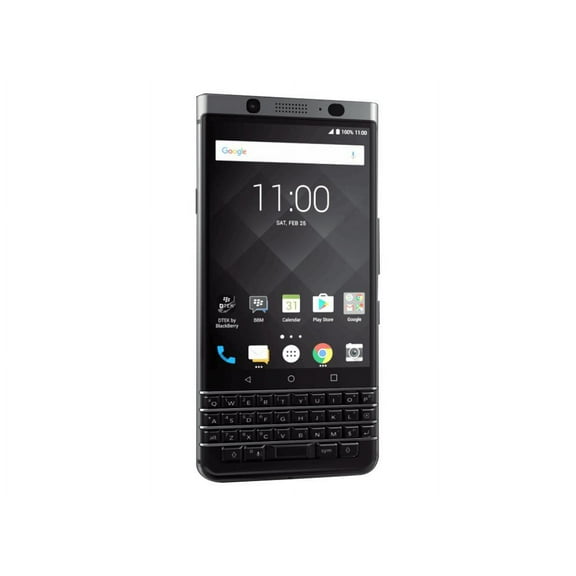
BlackBerry KEYone 32 GB Smartphone, 4.5" LCD, 3 GB RAM, Android 7.1 Nougat, 4G, Black
Key item features
- Ample Storage: Features 32 GB of built-in memory, providing substantial space for entertainment and personal data.
- Compact Display: Equipped with a 4.5-inch In-plane Switching (IPS) Technology screen, offering convenient portability and content display.
- High-Resolution Camera: Includes a 12-megapixel rear-facing camera, capable of capturing high-quality HD photos and videos.
- Intuitive OS: Runs on Android 7.1 Nougat OS, delivering a dependable and user-friendly interface for efficient app usage and productivity.
- Seamless Sharing: Supports NFC technology, enabling easy sharing of content with other NFC-capable devices through simple tapping.
- Robust Connectivity: Provides 4G connectivity for fast mobile data access.
- Efficient Performance: Boasts 3 GB of RAM, contributing to impressive performance.
Specs
 Model nameKEYone
 Screen size4.5 in
 HD capacity32 GB
 Ram memory3 GB
- Free shipping
 Free 15-day returns

(Only one option can be selected at a time)
How do you want your item?


About this item
Product details
Specifications
Model name
Screen size
HD capacity
Ram memory
Warranty
Warranty information
Similar items you might like
In 500+ people's carts Straight Talk Apple iPhone 16e, 5G, 128GB, Black - Prepaid Smartphone [Locked to Straight Talk] $349.00
In 500+ people's carts![Straight Talk Apple iPhone 16e, 5G, 128GB, Black - Prepaid Smartphone [Locked to Straight Talk]](https://i5.walmartimages.com/asr/5b5f561d-cc21-4628-944b-1ae4e75275ee.338459a61962d13d9ee5dd93c253708f.jpeg?odnHeight=576&odnWidth=576&odnBg=FFFFFF) $34900current price $349.00
$34900current price $349.00Straight Talk Apple iPhone 16e, 5G, 128GB, Black - Prepaid Smartphone [Locked to Straight Talk]
18474.3 out of 5 Stars. 1847 reviewsBlackBerry KEYone 32 GB Smartphone, 4.5" LCD, 3 GB RAM, Android 7.1 Nougat, 4G $399.00
 $39900current price $399.00
BlackBerry KEYone 32 GB Smartphone, 4.5" LCD, 3 GB RAM, Android 7.1 Nougat, 4G
1374.5 out of 5 Stars. 137 reviewsRollback AT&T Samsung Galaxy A16 5G, 128GB, Blue Black - Prepaid Smartphone $49.88 Was $79.00
Rollback $4988current price $49.88, Was $79.00$79.00
AT&T Samsung Galaxy A16 5G, 128GB, Blue Black - Prepaid Smartphone
21024 out of 5 Stars. 2102 reviewsBlackBerry Passport - Silver Edition - 4G BlackBerry smartphone - RAM 3 GB / Internal Memory 32 GB - microSD slot - LCD display - 4.5" - 1440 x 1440 pixels - rear camera 13 MP - front camera 2 MP - silver $499.00
 $49900current price $499.00
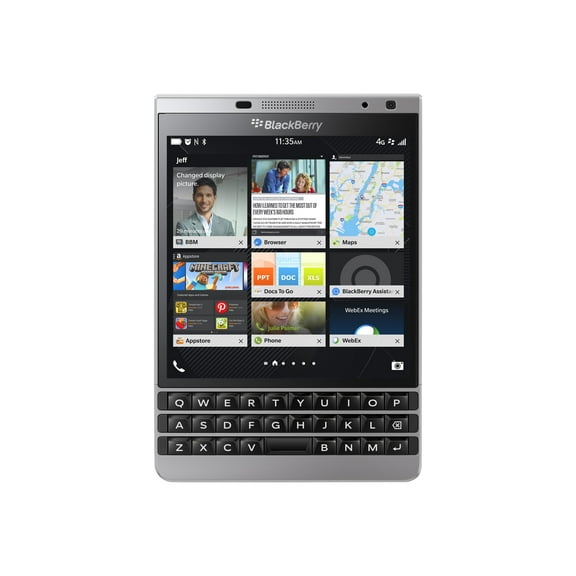
BlackBerry Passport - Silver Edition - 4G BlackBerry smartphone - RAM 3 GB / Internal Memory 32 GB - microSD slot - LCD display - 4.5" - 1440 x 1440 pixels - rear camera 13 MP - front camera 2 MP - silver
33.7 out of 5 Stars. 3 reviewsBest seller Restored Apple iPhone 16e - Carrier Unlocked - 128 GB Black (Refurbished) $357.00
Best seller 6 optionsAvailable in additional 6 options$35700current price $357.00
Restored Apple iPhone 16e - Carrier Unlocked - 128 GB Black (Refurbished)
No Plan-Unlocked Device Samsung Galaxy S23 Cell Phone 128GB 8GB RAM Cream $359.88
 $35988current price $359.88
No Plan-Unlocked Device Samsung Galaxy S23 Cell Phone 128GB 8GB RAM Cream
523.3 out of 5 Stars. 52 reviewsRestored Apple iPhone 15 - AT&T - 128 GB Black (Refurbished) $369.97
 15 optionsAvailable in additional 15 options$36997current price $369.97
Restored Apple iPhone 15 - AT&T - 128 GB Black (Refurbished)
1013.9 out of 5 Stars. 101 reviewsBest seller Restored Apple iPhone 14 Plus - Carrier Unlocked - 512GB Midnight (Refurbished) $390.37
Best seller $39037current price $390.37
Restored Apple iPhone 14 Plus - Carrier Unlocked - 512GB Midnight (Refurbished)
12383.9 out of 5 Stars. 1238 reviewsBlackberry Passport SQW100-1 Unlocked GSM Phone w/ 3-row keyboard - White $399.00
 $39900current price $399.00
Blackberry Passport SQW100-1 Unlocked GSM Phone w/ 3-row keyboard - White
Best seller Restored Apple iPhone 14 Pro - Carrier Unlocked - 256GB Space Black (Refurbished) $440.98
Best seller $44098current price $440.98
Restored Apple iPhone 14 Pro - Carrier Unlocked - 256GB Space Black (Refurbished)
18593.8 out of 5 Stars. 1859 reviewsBlackberry keyone 32GB Smartphone (Unlocked), Silver $330.00
 $33000current price $330.00
Blackberry keyone 32GB Smartphone (Unlocked), Silver
Best seller Restored Apple iPhone 13 - Fully Unlocked - 256 GB Midnight (Refurbished) $273.49 Was $499.99
Best seller $27349current price $273.49, Was $499.99$499.99
Restored Apple iPhone 13 - Fully Unlocked - 256 GB Midnight (Refurbished)
5473.9 out of 5 Stars. 547 reviewsPre-Owned Apple iPhone 15 A2846 128GB Pink (US Model) - Factory Unlocked Cell Phone $382.14
 $38214current price $382.14
Pre-Owned Apple iPhone 15 A2846 128GB Pink (US Model) - Factory Unlocked Cell Phone
Restored Apple iPhone 14 Pro Max - Carrier Unlocked - 128GB Deep Purple (Refurbished) $470.94

 $47094current price $470.94
Restored Apple iPhone 14 Pro Max - Carrier Unlocked - 128GB Deep Purple (Refurbished)
374 out of 5 Stars. 37 reviewsBlackBerry Passport 32 GB Smartphone, 4.5" LCD, 3 GB RAM, Blackberry OS 10.3, 4G, Black $399.00
 $39900current price $399.00
BlackBerry Passport 32 GB Smartphone, 4.5" LCD, 3 GB RAM, Blackberry OS 10.3, 4G, Black
BlackBerry KEYone 64GB Limited Editions Black BBB100-2 Single Sim - GSM ONLY, NO CDMA - International Version - No Warranty in the USA $480.49
 $48049current price $480.49
BlackBerry KEYone 64GB Limited Editions Black BBB100-2 Single Sim - GSM ONLY, NO CDMA - International Version - No Warranty in the USA
Pre-Owned Apple iPhone 14 Pro- Carrier Unlocked -128 GB Silver $439.00
 13 optionsAvailable in additional 13 options$43900current price $439.00
Pre-Owned Apple iPhone 14 Pro- Carrier Unlocked -128 GB Silver
12754.3 out of 5 Stars. 1275 reviewsPre-Owned Apple iPhone 15 128GB Black LTE Cellular MTLV3LL/A $399.00
 2 optionsAvailable in additional 2 options$39900current price $399.00
Pre-Owned Apple iPhone 15 128GB Black LTE Cellular MTLV3LL/A
23 out of 5 Stars. 2 reviewsRestored Samsung Galaxy S23 Ultra 256GB S918U Unlocked (Refurbished) $372.50
 $37250current price $372.50
Restored Samsung Galaxy S23 Ultra 256GB S918U Unlocked (Refurbished)
Best seller Unlocked for All Carriers, Apple, iPhone 14, Cell Phone, 256GB 3600 Ah RAM 256 GB, Midnight $273.44 Was $298.95
Best seller $27344current price $273.44, Was $298.95$298.95
Unlocked for All Carriers, Apple, iPhone 14, Cell Phone, 256GB 3600 Ah RAM 256 GB, Midnight
60463.9 out of 5 Stars. 6046 reviews
Customer ratings & reviews
Customer photos
Showing 1-3 of 4 reviews
Product Description Needs Update
I am delighted to receive this new phone. I ordered this phone from WalMart Online, on Saturday morning, Oct. 21 and it arrived today, Oct. 25th. However, the Product Description on WalMart's website needs to be updated. It shows this Black Edition with the same specs as the Silver Edition. that is incorrect. It came with 4GB RAM and 64GB memory. Product number is PRD-63116-039. Model # is BBB100-1. I will add more of a review after I have used it for a week, but I wanted to post this right away, as it was very confusing to me why WalMart is advertising this incorrectly. I took a chance that they may have been misinformed by their supplier, and I am happy to report that I received exactly what I was trying to buy...... There's a reason this model cost more than the Silver Edition.
Verified Purchase
Great phone, good price and nostalgic.
Had this model phone previously but my current model was damaged. It is reliable and durable. I like the manual keyboard because the on board keyboard doesn't work for me because of my large fingers and hard hands.
Upgraded from BlackBerry Classic
Pros: Fingerprint Sensor, Dtek Device Security Status, Google Play Store, Battery Life, Facial Recognition, Keyboard Shortcuts, BB Hub, USB-C Connector, Better Camera Cons:Andriod OS vs BB OS 10, No Blend, No Sound Profiles, No NFC Smart Tag Creator, Placement of Side Buttons, BlackBerry Content Transfer Loses Carriage Returns, No Trackpad I upgraded from a Blackberry Classic to the KeyOne Limited Edition Black on September 28, 2017 so my review is based on my daily use for the past few weeks. I also have a Samsung Galaxy S4 and iPhone 6s Plus for work so I have a range of different products to compare with. I don't think of myself as a BlackBerry fanboy since I own these other devices and I will give credit where credit is due. Each device has its own strengths and weaknesses and it's whether or not one device fits your needs more than the others. In my case, I prefer using the KeyOne for its security and physical keyboard. Security is my main concern and although I know Android is the least secure platform, I believe that BlackBerry has addressed that with the Dtek Device Security Status (I will try to keep mine at Excellent which is the most secure). The fingerprint sensor is not good for security but obviously good for convenience. Compared to the iPhone 6s, the KeyOne is faster. One other feature that is not good for security is the facial recognition feature. The KeyOne has this feature but it actually takes longer to unlock so it's not very useful in my opinion. You have to double tap the screen to wake it up and then make sure you look at the phone on the front (obviously). It was able to recognize me when my hair was a mess or when I wore a baseball cap. There were a few times that I used the facial recognition but the fingerprint sensor is my main method of unlocking the phone. It should be interesting when iPhone X is released to see how people deal with unlocking their iPhones. After trying to adjust to a virtual keyboard for the past few years with my work phones, I found it extremely frustrating especially with the lack of proper and updated word suggestions the more you use the phone. In a professional environment, it is imperative that my emails contain accurate spelling without taking forever to type. You can call me old but I think people who say they can type faster with a virtual keyboard than a physical one are full of it. I can tell when messaging to people who have virtual keyboards that they are not as fast as I am in responses that are more than a few words. Having been in IT a decade ago, I bought virtual computer keyboards because I thought they were cool because they were different. But the truth is they are just for show and not practical for everyday use. Even though smartphone virtual keyboards have come a long way, I still believe a physical keyboard is better than a virtual one. I'd like to see people, who say they can type faster with virtual keyboards on their phones, use virtual keyboards for their PC or Mac computers and see if they can honestly do away with a physical keyboard. The 52 keyboard shortcuts are certainly handy (quick press and long press on the alphabet keys). I mainly use them for telephone numbers but I'm sure I'll find other functions that I can assign in the near future as I get more familiar with the phone. Google Play Store is nice to have all the Android apps but I already had this on my Classic after I side-loaded it. Plus I don't really download a lot of apps as most of them are useless and I don't trust most of them if they need access to confidential stuff on my phone. I install those kind of apps on my work phones or certain tablets if I really want to try them or use them. The Battery Life is very very good as already noted from initial reviews. The trusted apps that I do use along with leaving Bluetooth on all the time leave me with about 50% battery life at the end of each day. I'm glad to see the BB Hub but I really miss BB Blend. Although I can't use Blend with my KeyOne, I still use my Classic to use this feature at work. Blend allows me to be more productive whenever I'm on a computer and I want to respond to emails, texts, and messages using my computer rather than the phone itself. Obviously it's better optics at work to not be seen playing with your phone but it's much faster to use your keyboard, mouse, and monitor (it's an extension of your phone onto your computer). To try and replace this feature, I purchased a Chromecast to display my KeyOne screen to my monitor and connected a Bluetooth keyboard and mouse. I have a KVM switch to change one of my monitors from PC to KeyOne but it's slow to switch so I think I'll stick with my Classic to continue to use Blend until it stops working on Windows. When that happens, I'll see if I can make it work by using a virtual machine with a version of Windows that it'll still work on (I use VMware Workstation for my virtual machines). One other feature of Blend that I really like is the Remote File Access (I can access my NAS from home without setting up a complicated system – VPN, remote desktop, etc). The USB-C connector is a welcome replacement of micro-USB. I must say that the iPhone lighting cable is a better connector idea since it seems less likely to break in the long run. I am able to buy adapters to allow me to keep using all the micro-USB cables I have for charging and data transferring. Although I don't use it much, the camera is nicer and faster than the one on the Classic. I still find that pictures are much nicer with a digital camera than any smartphone. Even though the iPhone 6s takes nicer pictures, one thing that always bothers me about the iPhone camera is the way it makes people look like aliens with elongated heads if you don't take the shot right in front of the camera straight on. This happens so often when taking pictures of toddlers at an angle because I don't crouch down to their height or with adults from above on a porch or stairs. The biggest disappointment for me is the discontinued support for BB OS 10. Nothing is more secure and most of the features that it had and not duplicated on the Android OS will be greatly missed. It's sad that a lot of people dismissed some of the great features it had that are all of a sudden making its way onto the iPhone (Predictive Words = QuickType, Time Shift = Live Photos, Swipe Up to replace Home Button). I miss using the smart tags I created for the Classic to adjust all my settings for my car, at work, and before going to bed. I know I can install apps to regain this ability but I don't like the fact that these apps want access to almost all the confidential info I have on my KeyOne. So this is why I leave Bluetooth on all the time and just assign the Ringer toggle to my convenience key. I'll manually adjust the other functions I had programmed for now unless I can find an NFC app that doesn't require access to so much confidential info on my phone. I think the placement of the side buttons is terrible if TCL is hoping to convert some people over from iPhone or Andriod phones. They are completely reversed on the KeyOne – power button on left side and volume and convenience keys on the right side. I know the Classic, Passport, Leap, Priv, Z10, etc (ie: all previous BlackBerry devices) all have the volume on the right side but they could have at least kept the power button on top (ideally recessed) if they're wanting to keep the BlackBerry tradition. Although I know most people would adapt to the button placements if they only have one phone, people who use two phones like me can get mixed up. The BlackBerry Content Transfer app has a flaw that is huge for me. Transferring most of the data from my Classic was simple enough but all the Notes I transferred over lost all of the carriage returns within each Note. I had to go into each Note and reformat them so they weren't all in one continuous line/sentence. Without a trackpad, I'm finding it difficult to adjust my typing for long sentences and paragraphs. Using the keypad as the trackpad will take a bit of time for me to get used to but from what I heard from people who have used the Passport and Q10, I should be able to at least type faster by using the swipe feature to select the predictive words. For adjusting long sentences and paragraphs, the extra step to get this function is by double-tapping the keypad and then scrolling with the keypad. Main difference between a trackpad and keypad is the ability to move the pointer in all directions with a trackpad. You can only move up/down/left/right with the keypad. I will see over the next few months if I can update my review and improve on some areas that I am slow to adapt on right now. 10-23-2017 Update: I wound up using NFC Tools and NFC Tasks to get back to using my smart tags. I figured out how to limit the info that these apps want access to. Now I can get in my car, place my KeyOne near my car smart tag to automatically adjust my settings, place the KeyOne in my car smartphone holder, then start driving. Now I need to ask my IT department at work to allow me to use my KeyOne to replace my keyfobs to open locked doors at work.
