Skip to Main Content
Walmart
All Departments
All Services
Customer ratings and reviews for
Epson EcoTank ET-3950 Wireless All-in-One Color Supertank Printer – White
4.1 out of 5 stars
stars
184 ratings113 reviews
  1. 5 stars67% (124)
  2. 4 stars8% (15)
  3. 3 stars7% (12)
  4. 2 stars2% (4)
  5. 1 star16% (29)
How item rating is calculated

Reviews summary

Pros

  • : Uses minimal amount of ink.
  • : Setup process takes only minutes.
  • : Features a simple refill system and overall design.
  • : Refillable tanks reduce long-term expenses.
  • : Connects devices via wi-fi for convenient printing.
  • : Produces sharp results for text and color documents.
Generated by AI

Customer photos

  • +82 images
Sort by |
Showing 1-10 of 113 reviews
Apr 13, 2026
Reviewer name: L D Bleam
5 out of 5 stars
5 out of 5 stars review

Seller Verified Purchase

Love My ET-3958

Received my ET-3958 in 3-4 days and I absolutely love it. It can do automatic 2-sided scanning and automatic 2-sided printing. And it’s faster than my old Epson Work Force Pro WF-4720, which I also loved. I don’t think there is a better printer made than Epson. And the Eco Tank is a lot better than buying cartridges at $50.00 or $60.00 each.

Review from epson.com
Helpful?3RKVE39NISAR16523013407
Apr 26, 2026
Reviewer name: Chrissam
5 out of 5 stars
5 out of 5 stars review

Seller Verified Purchase

Was expensive for me but Best decision so far

It’s an amazing printer, the print quality is amazing especially the pictures. It took me 4 days to research good printers and I’m happy that choosing this one didn’t disappoint when i used it. My advice is to never buy HP. Just buy an Eco tank like this one and you won’t regret it! I really hope it last unlike HP. Although I am disappointed though for that price, they could have at least included some paper or photo paper 😔

Review from epson.com
Helpful?3RKVE39NISAR16523013407
Apr 29, 2026
Reviewer name: Eduardo H
5 out of 5 stars
5 out of 5 stars review

Seller Verified Purchase

Great printer

Prints really fast when not doing duplex and with an impressive quality, it was easy to setup. I know it's not a photo printer but I'm printing anyway on glossy paper and I'm liking the results. On negative side the duplex printing feels slow because for every single paper sheet the printer pause for couple seconds before retrieving the paper and print on the other side also a tray slide to outside automatically to hold the printed jobs but it never retrieve back unless you press the button to do, also I miss a manual or second tray

Review from epson.com
Helpful?3RKVE39NISAR16523013407
Apr 13, 2026
Reviewer name: Ex HP Customer
5 out of 5 stars
5 out of 5 stars review

Seller Verified Purchase

Good so far…

The product integrates well with my iMac and iPhone. My only complaint: The set up instructions were confusing and turned out to be the most difficult part of the process. Either choose to setup via the printer display or use hevQR code to set up via your iPhone. I inadvertently ended up toggling between the two with confusing overlaps and redundancies. It took far longer to set up and initialize than it should have. I look forward to testing the claim of three years of printer ink based on normal usage. Initial filling of tanks was seamless. Make sure you top off AFTER you initialize…that will bring your inks levels up to capacity. It’s all in ge instructions.

Review from epson.com
Helpful?3RKVE39NISAR16523013407
Apr 7, 2026
Reviewer name: bbbean
5 out of 5 stars
5 out of 5 stars review

Seller Verified Purchase

Awesome little printer!

Really easy to set up and to use. Love the compact size and the thoughtful design features (e.g., the automatically extending paper tray). Plus the bottled ink is a game-changer! Super happy with my purchase and honestly glad my old printer broke down 😅

Review from epson.com
Helpful?3RKVE39NISAR16523013407
May 17, 2026
Reviewer name: MrPixure
3 out of 5 stars
3 out of 5 stars review

Seller Verified Purchase

GREAT Printer, but...

Wireless setup required strict adherence to specific steps - it's not forgiving, but that's ok because the speed, clarity and ease of all operations were easy and produced excellent results as expected. My only issue centers around its bias for mobile device use. Yes, I have a tablet and smart phone, but most of my printing, faxing, scanning, etc. is generated from my desktop...and to date, I still have not been able to make the printer and computer see each other, much less coordinate a print job. <sigh> but I do have a weekend to waste just ahead of me. We'll see what I can accomplish.

Review from epson.com
Helpful?3RKVE39NISAR16523013407
reply from The Epson Team

Dear MrPixure, we appreciate your business and are sorry to hear you are not completely satisfied with your purchase. Your Epson ET-3950 includes free technical support for the life of your product. Please reach out to our Epson Support Team for assistance at (562) 276-4382; Hours: Monday – Friday, 7 a.m. to 4 p.m. (PT). We’re here to help. Sincerely, Joseph – The Epson Team.

Mar 18, 2026
Reviewer name: Thrun
2 out of 5 stars
2 out of 5 stars review

Seller Verified Purchase

Total Frustration

It was difficult to set up with my mac. Every time I change paper is have to restart printer, computer and modem. The display screen on the computer is too small and it requires too many steps to make changes. I think the printer is designed to work with a smartphone or table. Bottom line, it's been a frustrating experience

Review from epson.com
Helpful?3RKVE39NISAR16523013407
reply from The Epson Team

Hi Thrun, we are sorry to hear you are having issues with your Epson printer. Your ET-3950 includes free technical telephone support for the life of your product. Our Epson Support Team would be happy to help you and can be reached at (562) 276-4382; Hours: Monday – Friday, 7 a.m. to 4 p.m. (PT). Sincerely, Joseph – The Epson Team.

Apr 24, 2026
Reviewer name: Mandysw
1 out of 5 stars
1 out of 5 stars review

Seller Verified Purchase

Not usable
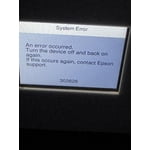
The printer on't stay connected to my phone or computer. Now it has an error message to turn it off. When I turn it back on, it has the same error.

Review from epson.com
Helpful?3RKVE39NISAR16523013407
reply from The Epson Team

Hi Mandysw, we are sorry to hear you are having issues with your Epson printer. Your ET-3958 includes a 1-year limited warranty plus free technical support for the life of your product. Our Epson Support Team would be happy to hear from you and can be reached at (562) 276-4382; Hours: Monday – Friday, 7 a.m. to 4 p.m. (PT). Sincerely, Joseph – The Epson Team.

May 5, 2026
Reviewer name: Walmart customer
1 out of 5 stars
1 out of 5 stars review

Seller Verified Purchase

Unreliable. None of the “features” work consistently.

The most unreliable printer. Nothing works smoothly. Paper jams every other print. Double sided jams. Scan is super low quality. WiFi inconsistencies. We bought it for a home school printer and my wife has to babysit the printer. If not, it will get stuck in the middle of a print. Who wants to do that when you are homeschooling 4 kids?

Review from epson.com
Helpful?3RKVE39NISAR16523013407
reply from The Epson Team

Hi Epson Customer, we apologize about the disappointing experience you are having with your Epson printer's Wi-Fi connection. Your ET-3958 includes free technical support for the life of your product. Please call and let our Epson Support Team assist. Our support number is (562) 276-4382. Our support hours of operation are Monday – Friday, 7 a.m. to 4 p.m. (PT). We’re here to help. Sincerely, Joseph – The Epson Team.​​​​​​​

May 28, 2026
Reviewer name: f brown
1 out of 5 stars
1 out of 5 stars review

Seller Verified Purchase

ink spilled

during initial setup black ink leaked out onto desktop and floor. when I contacted support I was castigated for squeezing the cartridge. this was my third set of cartridges from other epson printers, I did not squeeze or tilt the cartridge. I have not had any further contact from Epson on the matter

Review from epson.com
Helpful?3RKVE39NISAR16523013407
reply from The Epson Team

Dear f brown, we are sorry to hear that you are experiencing issues with your Epson printer. We want to make sure you reach our direct Epson Advanced Support Team. Please contact us at our toll free number: 1-800-241-5794; Hours: Monday – Friday, 6am – 8pm PT. Sincerely, Joseph – The Epson Team.