ACASIS 7-in-1 Thunderbolt 3 Hub 40Gbps, Expand to 8TB SSD, Dual DP 4K, 3×USB 10Gbps, Triple Cooling, TB4/USB4 Compatible
Hero image 0 of ACASIS 7-in-1 Thunderbolt 3 Hub 40Gbps, Expand to 8TB SSD, Dual DP 4K, 3×USB 10Gbps, Triple Cooling, TB4/USB4 Compatible, 0 of 19

ACASIS 7-in-1 Thunderbolt 3 Hub 40Gbps, Expand to 8TB SSD, Dual DP 4K, 3×USB 10Gbps, Triple Cooling, TB4/USB4 Compatible

4.2 stars out of 62 reviews
(4.2)|
62 ratings

Key item features

  • 40Gbps Ultra‑Fast Transfer – Thunderbolt 3 interface delivers blazing 40Gbps speeds for large files, 4K video, and real‑time editing.
  • Expandable Storage up to 8TB – Integrated M.2 NVMe SSD slot (supports 2280, M Key / B&M Key) lets you add up to 8TB of high‑speed storage.
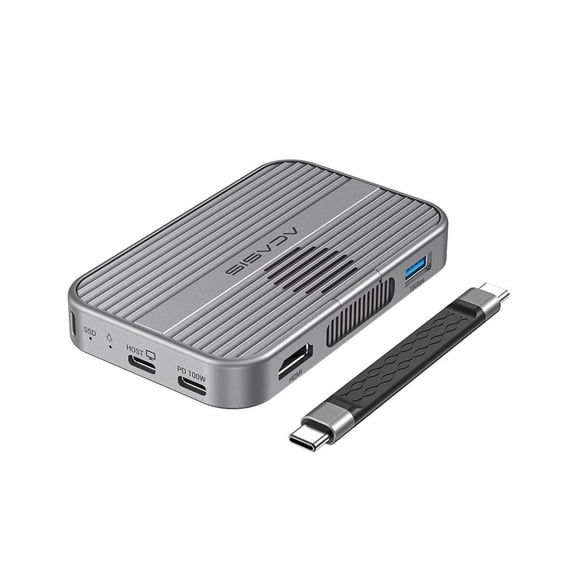
  • Triple‑Cooling System – CNC aluminum alloy shell + silent fan + silicone thermal pads effectively dissipate heat, ensuring stable performance and longer SSD lifespan.
  • Fully Thunderbolt & USB4 Compatible – Works seamlessly with Thunderbolt 3/4 and USB4 hosts; backward compatible with USB 3.2/3.1/3.0/2.0.
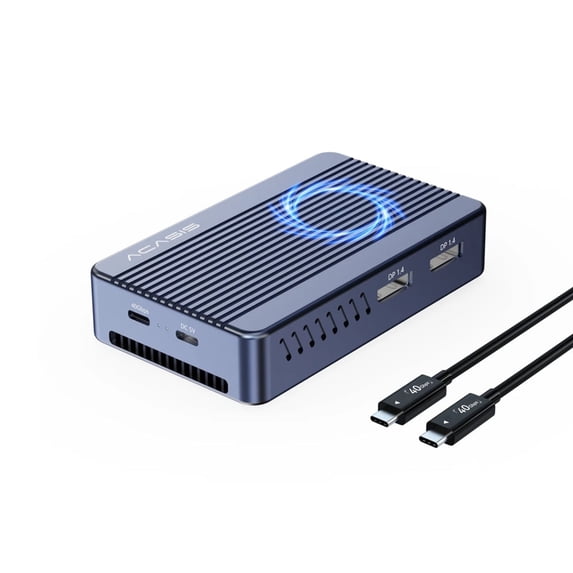
  • Dual 4K Display Output – Two DisplayPort 1.4 ports each support up to 3840×2160@60Hz for dual‑monitor productivity.
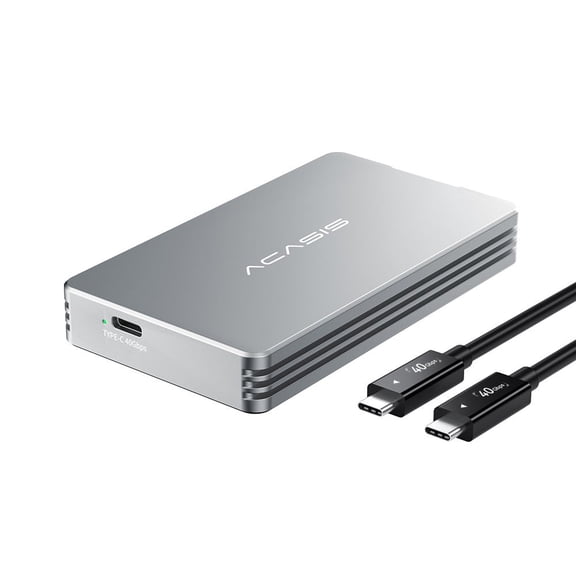
  • 7 Ports in 1 Hub – Includes: 1× Thunderbolt 3 host port (40Gbps), 2× DP (4K60Hz), 2× USB‑A 10Gbps, 1× USB‑C 10Gbps, 1× M.2 SSD slot, 1× DC 5.5 power input.
  • High‑Speed USB Expansion – Two USB‑A 3.2 Gen2 ports and one USB‑C 3.2 Gen2 port all deliver 10Gbps for fast external drives and peripherals.
  • Stable Power Delivery – Dedicated DC 5.5 port (5V/4A) provides ample power for the hub and connected SSD, ensuring reliable operation even with high‑capacity drives.
  • Premium CNC Aluminum Build – Phantom Grey, precision‑machined aluminum alloy housing offers durability, heat dissipation, and a sleek professional look.
  • Plug & Play – No driver installation required; included 500mm Thunderbolt 4 C‑to‑C cable connects directly to your host device.
  • Compact & Portable – Measures only 109×65×23mm and weighs 195g – easily fits into laptop sleeves or backpacks.
  • Complete Accessories – Comes with silicone thermal pads, SSD fixing rubber plug, fixing card board, user manual (English/Chinese), and conformity certificate.
Current price is Now $89.00
You save $50.00
was $139.00
Price when purchased online
  • Free shipping
  • Free 30-day returns
Walmart Accident Plan by Allstate

(Only one option can be selected at a time)

How do you want your item?

Try 30 days of Free Shipping with Walmart+! Choose plan at checkout.
How do you want your item?
Columbus, 43215
Arrives by Wed, Apr 22
.
Order within 31 min
Sold by Acasis Official StorePro Seller
Fulfilled by Walmart
4.335664335664336 stars out of 5, based on 144 seller reviews(4.3)
Report an issue with this seller
Free 30-day returns
walmart plus

Get free delivery, shipping and more*

*Restrictions apply

About this item

Product details

Specifications

Warranty

Customer ratings & reviews

4.2 out of 5 stars
stars62 ratings38 reviews
How item rating is calculated

Reviews summary

Pros

  • : Offers high speed at this price point.
  • : Made to last with a strong build.
  • : Operates with minimal noise.
  • : Supports nvme ssd speeds comparable to internal drives.
Generated by AI

Customer photos

Filtered and sorted results would be available on the new 'Customer ratings & reviews' page.
Sort by |

Showing 1-3 of 38 reviews

Aug 19, 2025
Robert
Item details
Color: Air only compatible with Thunderbolt 3/4 and USB 4.0
Sold byAcasis Official StoreDelivered byWalmart
5 out of 5 stars review

Verified Purchase

Fast external Gard Drive

At the price point of $45 this works very well, I added a 2tb SSD NVME and I get speeds in an external drive as fast as my internal drive on my Mac Mini M4. You must use the ; 40GPS port on the computer by a great way to expand your computers memory with out paying Apples insane pricing. It does get a bit warm while intensive use but works well.

Helpful?46IKTMF6SO865208319411
Dec 25, 2025
HonestReview
Top Reviewer
Item details
Color: Air only compatible with Thunderbolt 3/4 and USB 4.0
Sold and shipped byAcasis Official Store
5 out of 5 stars review

Verified Purchase

Make sure you do not plug this into one of the front ports on a Mac Studio they are USB only. This is an exceptional value and it is absolutely silent.

Helpful?46IKTMF6SO865208319411
Dec 18, 2025
HappySumo
Item details
Color: Pro with fan inside
Sold and shipped byAcasis Official Store
5 out of 5 stars review

Verified Purchase

Great Performing SSD Enclosure, quiet and cool

I bought this SSD enclosure paired with WD_Black SN7100X 2TB to go with my new Mac Mini M4. Installation was easy, although there is lack of instructions on how to apply two thermal pads (1.0mm and 0.5mm) and how its fan switch works. I reached out to Acasis Support and received timely response as below. Unless I am running some data intensive transfer applications, I typically leave fan off as it is running ~30 degrees Celsius, way below its temperature threshold before throttling IO performance. Hence, it runs quietly in the background. Even with fan turned on, the fan noise is very minimum. I measured IO speed using BlackMagic Disc Speed Test app and I was able to get close to 2600 MB/s on write and 2800 MB/s on read. Its form factor is quite small and very portable. Its aluminum body is well constructed. Instructions: 1. Regarding the Thermal Pads (0.5mm %26 1mm): Our recommended and most effective method is to use only one thermal pad, placed on top of the SSD. This transfers the heat directly to the enclosure's metal casing for optimal cooling. The purpose of providing two different thicknesses (1mm and 0.5mm) is to accommodate SSDs of varying thicknesses. You should choose the pad that best fills the gap between your specific SSD and the top cover to ensure good contact and heat transfer. 2. Regarding the Fan Control: The fan does not turn on or off automatically based on temperature. It operates in a manual mode: Upon first use, the fan is defaulted to ON. You can manually switch it off using the fan switch if desired. Important: If you turn the fan off during first time use, it will remain off by default during your next power-on. You will need to manually switch it on again if you want it to run.

Helpful?46IKTMF6SO865208319411