
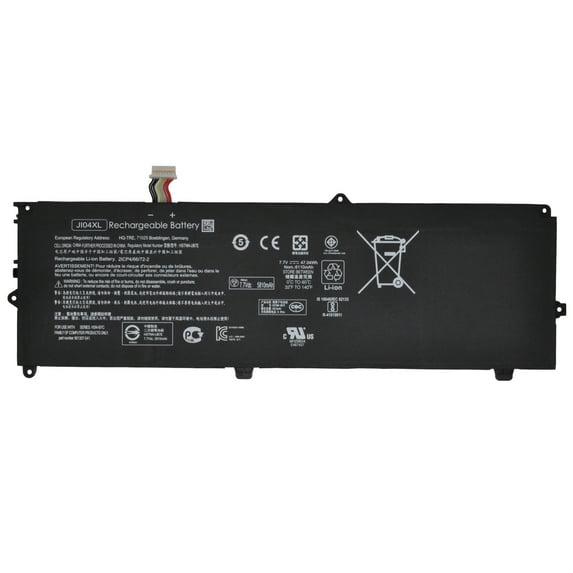
New JI04XL 7.7V 47.04Wh Laptop Battery Compatible with Hp Elite X2 1012 G2 G2-1LV76EA Series Notebook J104XL HSTNN-UB7E HSN-I07C 901307-541 901247-855 JI04047XL 6110mAh 4-Cell
Hero image 0 of New JI04XL 7.7V 47.04Wh Laptop Battery Compatible with Hp Elite X2 1012 G2 G2-1LV76EA Series Notebook J104XL HSTNN-UB7E HSN-I07C 901307-541 901247-855 JI04047XL 6110mAh 4-Cell, 0 of 7

New JI04XL 7.7V 47.04Wh Laptop Battery Compatible with Hp Elite X2 1012 G2 G2-1LV76EA Series Notebook J104XL HSTNN-UB7E HSN-I07C 901307-541 901247-855 JI04047XL 6110mAh 4-Cell

(No ratings yet)

Key item features

  • Installation steps: Matters needing attention Frequently Asked Question Solution:
  • You need to turn off your laptop and disconnect the power.
  • Disconnect the connection between the old battery and the motherboard to avoid unnecessary damage caused by disassembling the battery. Then unscrew the old battery screws one by one and carefully save each screw.
  • Remove the old battery, carefully install the new battery on the battery case, screw in the screw, and connect the wiring of the new battery.
  • If you don't understand the above steps, you can search for the video about laptop battery installation on YouTube. Maybe it will help you.
  • After installing the battery, you can try to calibrate the power management system. Discharge the new battery to 5% (not 0%), then charge and cycle 3-4 times to wake up the new battery.
  • During the use of the battery, it is best not to discharge to less than 5% or turn off the computer power.
  • Avoid man-made impact, disassembly, squeeze or puncture. Do not throw it into fire or water.Avoid using the battery in an environment where the temperature is too high or too low.
  • Make sure to charge the battery more than 80% per month.
  • Q: Why my computer didn't recognize this battery or I install this battery and it doesn't seem to work?
  • A: The reason is residual power stored in the laptop components that was preventing the battery from working properly. Please disconnecting the old battery, and holding down the power button for 20 seconds, then connect the new battery. This drains the residual or flea power and once the laptop is reassembled the battery will function properly.
Current price is $39.90
Price when purchased online
  • Free shipping
  • Free 30-day returns
Walmart Accident Plan by Allstate

(Only one option can be selected at a time)

How do you want your item?

How do you want your item?
Columbus, 43215
Arrives between Apr 11 - Apr 15
|
Sold and shipped by BESTDEAL STORE
4.1183206106870225 stars out of 5, based on 262 seller reviews(4.1)
Report an issue with this seller
Free 30-day returns

About this item

Product details

Specifications

Warranty

Customer ratings & reviews

0 ratings|0 reviews
This item does not have any reviews yet
