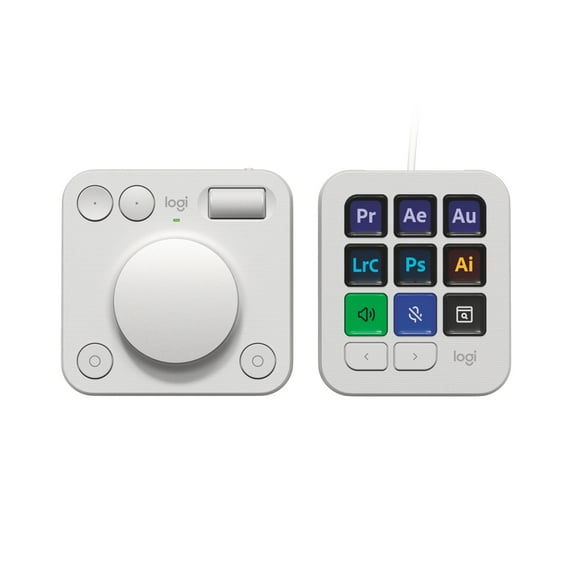
Logitech MX Creative Console, Programmable Keypad With 9 Customizable LCD Keys and Control Dial for Graphic Design, Video Editing, Photography, use with Adobe, Zoom, Spotify and more, Off-white
Hero image 0 of Logitech MX Creative Console, Programmable Keypad With 9 Customizable LCD Keys and Control Dial for Graphic Design, Video Editing, Photography, use with Adobe, Zoom, Spotify and more, Off-white, 0 of 16

Logitech MX Creative Console, Programmable Keypad With 9 Customizable LCD Keys and Control Dial for Graphic Design, Video Editing, Photography, use with Adobe, Zoom, Spotify and more, Off-white

Rating Pending

Key item features

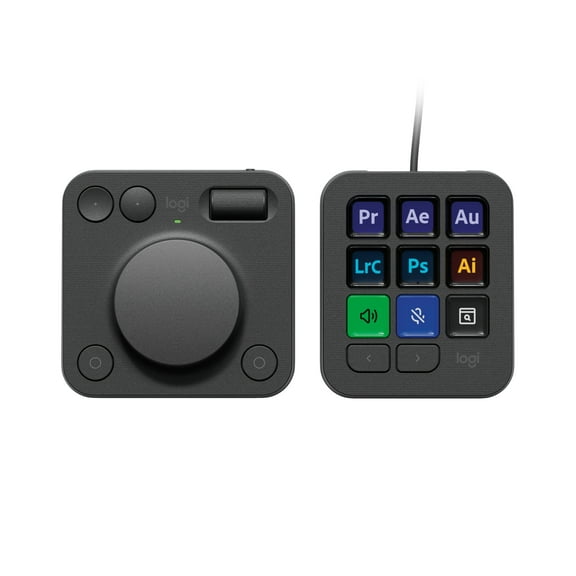
  • Creative Workflow: The Logitech MX Creative Console accelerates creative workflows by providing quick access to tools and actions within favorite applications, allowing users to maintain focus.
  • Extensive Integrations: Features app integrations with Adobe Photoshop, Premiere Pro, Illustrator, Lightroom, Final Cut Pro, Figma, Davinci Resolve, Spotify, Zoom, and more, with quick-start recommended profiles.
  • Tactile Controls: Offers precise adjustments via a low-friction control dial, navigation with a roller, and access to actions through a programmable keypad, including a stand for flexible placement.
  • Customizable Interface: Allows assignment of tools and actions to up to 15 keypad pages per profile, dial, and roller, with the option to upload custom icons to the customizable LCD display keys.
  • Digital Overlay: The Actions Ring provides a customizable on-screen overlay for accessing tools, shortcuts, and actions, acting as a digital extension of the console.
  • Dual Connectivity: The dialpad connects via Bluetooth, powered by two included AAA batteries for up to 18 months, while the keypad connects with an included USB-C to USB-C cable.
Generated by AI
Current price is $188.99
Price when purchased online
  • Free shipping
  • Free 30-day returns
Walmart Protection Plan by Allstate

(Only one option can be selected at a time)

How do you want your item?

How do you want your item?
Ships to
Arrives by Sat, Jun 6
|
Sold and shipped by Trends Goods Inc
4.225 stars out of 5, based on 120 seller reviews(4.2)
Report an issue with this seller
Free 30-day returns
Other sellers
$199.99
+Free shipping
Shipping, arrives by Fri, Jun 5 to Columbus, 43215
Sold and shipped by Walmart.com
Free 30-day returns

About this item

Product details

Specifications

Warranty

Customer ratings & reviews

3.8 out of 5 stars
stars30 ratings22 reviews
How item rating is calculated

Reviews summary

Pros

  • : Offers fine control with precision when needed.
  • : Enables efficient task management with accurate adjustments.
  • : Features a contemporary look and feel.
  • : Allows creation of personalized shortcuts for various programs.

Neutral

  • : Can be quick, but may require technical expertise.
  • : Can be highly customizable, but may be prone to sticking issues.
Generated by AI

Customer photos

Filtered and sorted results would be available on the new 'Customer ratings & reviews' page.
Sort by |

Showing 1-3 of 22 reviews

Jan 3, 2025
Guarraia,Christopher
5 out of 5 stars review

Incredible and Versatile Tool

[This review was collected as part of a promotion.] The MX Creative Console is an incredibly useful tool making workflow between creative applications I use (i. e. , Adobe Premiere Pro, Adobe Audition, Adobe Lightroom Classic, Adobe Photoshop). With 15 pages per profile, I am able to put multiple instances of functions on multiple pages (e. g. , having cut, copy, and paste alongside functions I use frequently). With the option of the profiles changing automatically between using applications, it makes workflow seamless. I look forward to firmware updates that improve/add more functionality. The only thing I would have changed is to make the MX Dial Pad have its own integrated USB-rechargeable battery (similar to the MX Keyboard and Mouse).

Review from Logitech
Helpful?12Z88MH632DW12012974120
Nov 12, 2024
st o.
5 out of 5 stars review

Illustrator, Premiere Pro, and OBS

[This review was collected as part of a promotion.] I moved from a Lopedeck to the MX Creative Console when I use Adobe software and OBS. After the initial exponential learning curve, it's a huge time saver for doing repetitive tasks and for adding macros to streamline my workflow. It's like having a keyboard with 1000's of function keys instead of just 12. In OBS, I use the MX for sounds, scene switching and audio adjustments. Much quicker and much more accurate then just the sliders on the OBS software.

Review from Logitech
Helpful?12Z88MH632DW12012974120
Nov 9, 2024
Walmart customer
5 out of 5 stars review

The perfect peripheral for creatives

[This review was collected as part of a promotion.] I absolutely love the MX Creative Console for all my creative needs. The customization options make it easy to set up exactly the way I want, and the seamless integration with existing software saves me so much time. It's truly the perfect tool for anyone in the creative field, allowing me to focus on my projects without any hassle. Highly recommend it for professionals looking to streamline their workflow!

Review from Logitech
Helpful?12Z88MH632DW12012974120