

Customer Choice

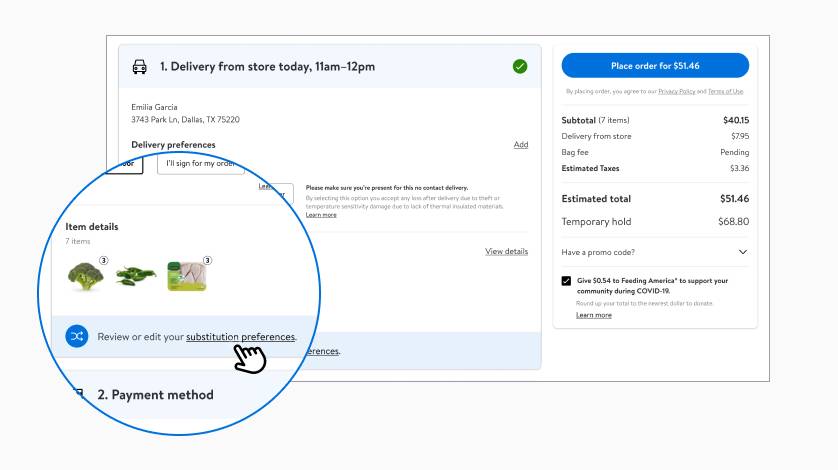
Review your order
Select “Review or edit your substitution preferences” to begin.Go to your cart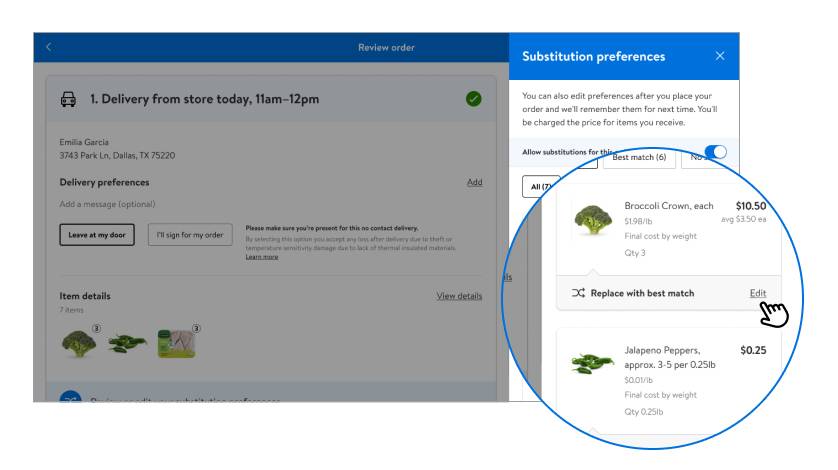
Edit your preferences
Select “Edit” next to each item to choose the next best match.Go to your cart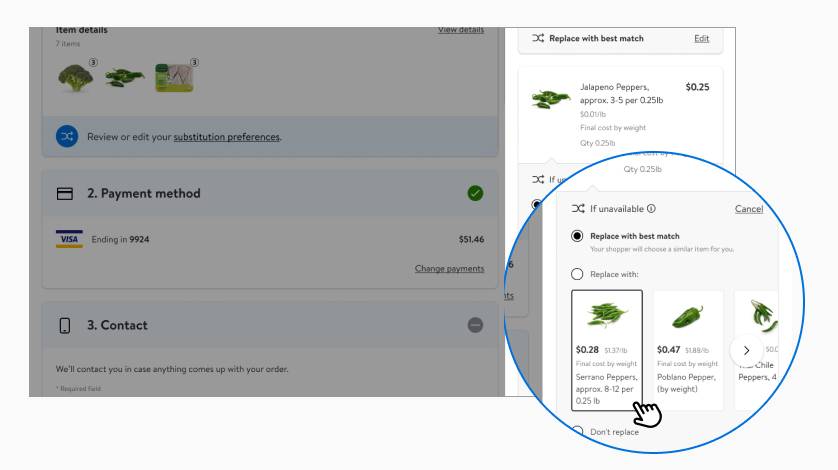
Choose your substitutions
Pick from suggested items, search for alternatives or opt out.Go to your cart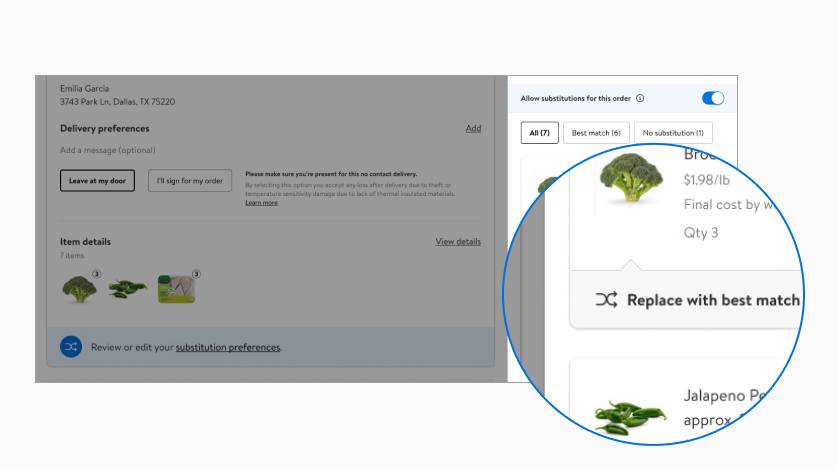
We’ll remember your picks!
When you reorder items, we’ll use your preferred substitutions.Start another order
Customer Choice FAQ
About Customer Choice - Walmart.com
How to control grocery delivery substitutions starts with clear choices in your Walmart account. You can set item preferences, review replacements, and keep your order closer to your plan.
If you use grocery delivery or pickup often, you need control before checkout and during shopping. You can use simple settings to avoid random replacements and keep your cart aligned with your list.
How to control grocery delivery substitutions with the right preference
You can choose substitution settings based on how each item fits your meals and routines. You can use best match, specific brand, no substitution, or refund for each item.
Each option gives your order a different level of flexibility. You may want best match for pantry basics, while your specific brand choice works for favorite staples.
If only the exact item works, you can select no substitution before checkout. If you would rather skip the item, you can choose a refund instead.
- You can use best match when you want a similar size, flavor, or type without extra back and forth.
- You can choose specific brand when your recipe, taste, or household routine depends on a familiar label.
- You can select no substitution when your meal plan depends on the exact item in your cart.
- You can choose refund when you would rather skip the item than review an alternate.
These settings help you avoid unexpected swaps like different cereal varieties or unfamiliar pasta shapes. The system attaches your preferences to the item itself, so you keep more control.
How do I communicate substitution preferences to my personal shopper?
You can communicate your substitution preferences through app notifications, text message updates, and shopper chat. You stay involved while your personal shopper picks your order, which helps you respond quickly.
Before checkout, you can add preferences to individual items and review your order notes. During shopping, you can watch for messages about unavailable items and approve or decline suggested replacements.
If you want fewer surprises, you should keep notifications on during your order window. You can use shopper chat to clarify details like brand, count, flavor, or package size.
This real-time communication matters when your order includes produce, dairy, frozen meals, or baby items. You can guide the final choice instead of leaving the decision to an automatic match.
How do online grocery substitutions work and how do I avoid getting lower quality replacements
Online grocery substitutions work by matching an unavailable item with a similar option you can accept, decline, or block. You can avoid weaker replacements by setting preferences before your order starts.
You should compare size, variety, count, and brand when you choose your preference. You can also check whether the substitute fits your recipe, lunch plan, or weekly routine.
If consistency matters, you may want specific brand for coffee pods, infant snacks, or sparkling water packs. If flexibility matters, you may want best match for bananas, sandwich bread, or canned beans.
You can reduce confusion by reviewing each item before checkout instead of relying on one default choice. You can also watch for in-app updates so your final order stays closer to expectations.
Choosing the right fulfillment type
Your fulfillment type changes how substitutions usually work. You can expect delivery and store pickup orders to offer substitution controls, while shipped orders often arrive without item-level replacement choices.
If you want full orders shipped without substitutions, shipping may fit that need for eligible items. You should check whether your cart includes shipping, pickup, or delivery because each path works differently.
Delivery works well when you want fast updates and direct approval options during shopping. Pickup can also give you control, especially when our team prepares the order after you set preferences.
You should look at your timeline and item mix before choosing a method. If your order includes frozen foods, produce, or same-day essentials, delivery or pickup may give you more active control.
Which online supermarkets allow substitutions for unavailable items?
You may notice that many online supermarkets allow substitutions for unavailable items, but the level of control can differ. You should compare whether the platform offers best match, brand preferences, refunds, and live communication.
At Walmart, you can manage substitutions through your order flow and shopper communication tools. You can review item choices, respond to updates, and adjust preferences for a more predictable order.
When you compare retailer platforms, you should look for clear item settings and order notifications. You also want a simple way to decline a replacement that does not fit your meal plan.
What to know about substituted item pricing
You may also want to know what happens when your order includes a substitute. You can review Walmart help information for billing details, and you can check your order summary as we update substitutions.
If price differences matter to your planning, you should monitor your order in the app or on Walmart.com. You can make clearer decisions when you see updates alongside your item preferences and approvals.
How to choose good substitutions for grocery delivery so I don’t get random stuff
You can prevent random stuff by choosing preferences based on how you actually use each item. You should reserve strict settings for brand-sensitive items and flexible settings for routine staples.
For example, you may want no substitution for exact coffee roast types, a specific pasta shape, or lunchbox favorites. You may allow best match for paper towels, bottled water, or basic canned vegetables.
You should also think in meal terms instead of item terms. If your taco night depends on corn tortillas, mild salsa, and shredded cheese, you can set each item carefully.
That approach gives you more predictable results across weekly shopping. You get replacements that make sense for your kitchen, your schedule, and your household habits.
When you understand how to control grocery delivery substitutions, you can shape your order before and during shopping. You get fewer mismatched replacements and a smoother grocery routine that fits your actual plans.