
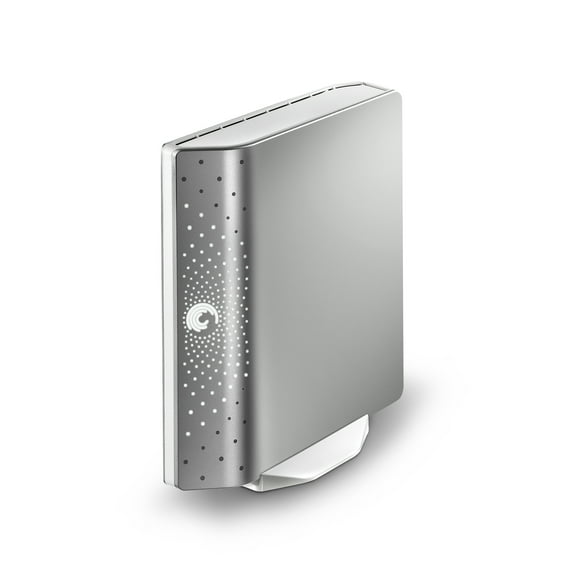
Seagate FreeAgent Desktop ST310005FDA2E1-RK 1 TB Hard Drive, 3.5" External
Hero image 0 of Seagate FreeAgent Desktop ST310005FDA2E1-RK 1 TB Hard Drive, 3.5" External, 0 of 5

Seagate FreeAgent Desktop ST310005FDA2E1-RK 1 TB Hard Drive, 3.5" External

4 stars out of 55 reviews
(4.0)|
55 ratings

Key item features

  • External Storage: This product is an external 3.5-inch hard drive, designed for desktop use, offering convenient storage expansion.
  • Generous Capacity: The Seagate FreeAgent Desktop provides a substantial 1 TB of storage, suitable for a wide range of digital content.
  • Seagate Heritage: Manufactured by Seagate, a company founded in 1979 and recognized as a leading provider of hard drives and storage solutions.
  • Digital Content Protection: Seagate products, including this hard drive, are designed to help users store, share, and protect valuable digital content.
  • Broad Portfolio: Seagate offers an extensive line of retail storage products for consumers and small businesses, in addition to its diverse range of hard drives.
Generated by AI
Current price is $119.99
Price when purchased online
  • Free shipping
Walmart Accident Plan by Allstate

(Only one option can be selected at a time)

How do you want your item?

How do you want your item?
Columbus, 43215
Arrives by Tue, Mar 10
|
Sold and shipped by Refind Wears LLC
4.928571428571429 stars out of 5, based on 14 seller reviews(4.9)
Report an issue with this seller

About this item

Product details

Specifications

Warranty

Warnings

Customer ratings & reviews

4 out of 5 stars
stars55 ratings42 reviews
How item rating is calculated
Filtered and sorted results would be available on the new 'Customer ratings & reviews' page.
Sort by |

Showing 1-3 of 42 reviews

Jun 16, 2009
Mystrius
5 out of 5 stars review

My opinion of the Seagate FreeAgent Desk Drive

The pre-installed software on the drive required very little input from me; the drive, once set up will operate autonomously if desired. The huge capacity of the drive plus the generously priced availablity is what sold me. As a backup for two active hard drives this unit should serve me well for a very long time considering it will be dormant for most of the time; I do weekly backups.

Helpful?2HLYP0YUIP6B10575415
Apr 11, 2010
Aikane
5 out of 5 stars review

Efficient, flawless

Seven external HDs under my belt over the last decade. Chose this for their reputation, warranty, comments online, my past experience. Efficient installation on XP Pro and Vista Ultimate machines, quiet, runs warm but not hot even with stand. Nice that is stackable when horizontal. Have used for two months without a problem. I think I will get a couple more to swap regularly for safety/security of data. Not as svelte as the ToGos, but the price point is hard to beat.

Helpful?2HLYP0YUIP6B10575415
Mar 9, 2010
cosmicpenguin
5 out of 5 stars review

Works Great With Linux!

Here's how to use the FreeAgent Desk USB drive with the Linux operating system: . Note: this procedure makes the drive unusable with MS-Windows and deletes the Seagate Windows software on it. . Using cfdisk, remove the only (NTFS) partition and make a new one. Then put an ext3 filesystem on it: . mkfs.ext3 -i 300000 -m 1 -j -v /dev/sdx1 . where sdx is the device name the system puts the USB drive on (/dev/sdb, /dev/sdc, whatever). I use 300K bytes/inode because most of my space is taken by large multi-megabyte files. . To use the disk, mount its partition on, e.g., /mnt. . I use the mc (Midnight Commander) program to back up all of my files, but for an incremental backup you'll want a specialized backup program. . It takes 5-6 hours for 500GB of files, and the drive stays cool, on its stand in a vertical position (at least if the room temperature is 70 degrees F.). There's no activity light, but when the drive is seeking you can feel a faint vibration in it if you put your hand on it. . BE SURE TO UNMOUNT THE DRIVE explicitly with the umount command before disconnecting the USB cable, unplugging the drive's power, turning off the computer, etc. Otherwise the files on the drive may be lost.

Helpful?2HLYP0YUIP6B10575415
