

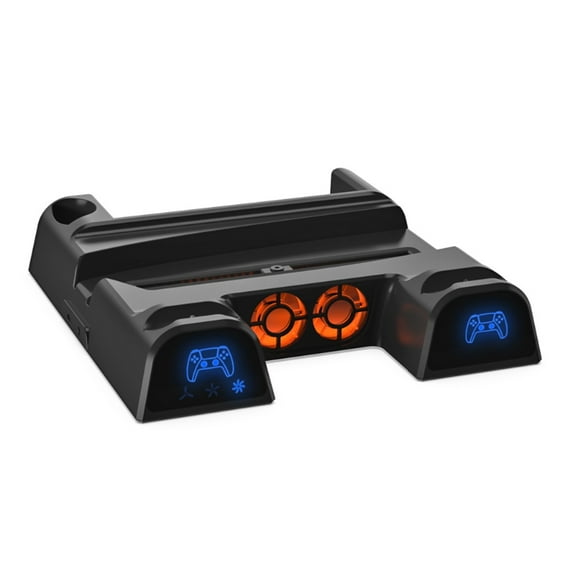
Disc Storage Rack Multi-function Fan Base Game Handle Charging Station for
(No ratings yet)
Key item features
- Cooling fan: Built-in 2 high-speed fans into the product, which can speed up the air circulation inside the console and achieve the purpose of heat dissipation.
- Fan speed switch:You can control the fan switch and adjust the fan speed. Each for time you press the switch, the working state of the fan will change: high-medium-low-off (the fan will be in high-speed working state by default after it is turned on)
- The fan speed indicator is blue. It is used to adjust the fan speed and quickly switch between different speeds. When switching between unused fan speeds, the fan indicator will also turn on, and the fan indicator will turn off.
- Controller charging: Put the controller on the left and right slots for charging, the corresponding window will display red, after charging is completed, it will display blue, (if the controller is charged while playing a game, the indicator light will display blue and white light ).
- Note: In order to prolong the service life of the controller, please do not unplug the controller while charging. When the power of the controller reaches more than 80%, if you disconnect the controller from the charger and try to reconnect, due to the controller With battery for protection function, it will not continue to charge. Only when the battery power is below 80%, the controller will continue to charge.
Specs
 BrandJOYTECAGE
 SizeBlack
Current price is USD$40.94
Price when purchased online
Out of stock
How do you want your item?
Out of stock
About this item
Product details
Features:
brand new and high quality
Cooling fan: Built-in 2 high-speed fans into the product, which can speed up the air circulation inside the console and achieve the purpose of heat dissipation.
Fan speed switch:You can control the fan switch and adjust the fan speed. Each for time you press the switch, the working state of the fan will change: high-medium-low-off (the fan will be in high-speed working state by default after it is turned on)
The fan speed indicator is blue. It is used to adjust the fan speed and quickly switch between different speeds. When switching between unused fan speeds, the fan indicator will also turn on, and the fan indicator will turn off.
Controller charging: Put the controller on the left and right slots for charging, the corresponding window will display red, after charging is completed, it will display blue, (if the controller is charged while playing a game, the indicator light will display blue and white light ).
Note: In order to prolong the service life of the controller, please do not unplug the controller while charging. When the power of the controller reaches more than 80%, if you disconnect the controller from the charger and try to reconnect, due to the controller With battery for protection function, it will not continue to charge. Only when the battery power is below 80%, the controller will continue to charge.
Specifications:
Specifications:
Item Type: Vertical Stand
Material: ABS
Input: for DC 5V 3A
Controller charging voltage: for DC 5.1V
Charging time: about 3 hours
Controller charging current: 1000MAx2
Fan speed: 4500±10% rpm
Compatible Models: for .
Quantity: 1 Pc
Note:
Note:
Transition: 1cm=10mm=0.39inch
Please allow 0-1cm error due to manual measurement. pls make sure you do not mind before you bid.
Due to the difference between different monitors, the picture may not reflect the actual color of the item. Thank you!
Package includes:
1 x Cooling Fan
- Cooling fan: Built-in 2 high-speed fans into the product, which can speed up the air circulation inside the console and achieve the purpose of heat dissipation.
- Fan speed switch:You can control the fan switch and adjust the fan speed. Each for time you press the switch, the working state of the fan will change: high-medium-low-off (the fan will be in high-speed working state by default after it is turned on)
- The fan speed indicator is blue. It is used to adjust the fan speed and quickly switch between different speeds. When switching between unused fan speeds, the fan indicator will also turn on, and the fan indicator will turn off.
- Controller charging: Put the controller on the left and right slots for charging, the corresponding window will display red, after charging is completed, it will display blue, (if the controller is charged while playing a game, the indicator light will display blue and white light ).
- Note: In order to prolong the service life of the controller, please do not unplug the controller while charging. When the power of the controller reaches more than 80%, if you disconnect the controller from the charger and try to reconnect, due to the controller With battery for protection function, it will not continue to charge. Only when the battery power is below 80%, the controller will continue to charge.
info:
We aim to show you accurate product information. Manufacturers, suppliers and others provide what you see here, and we have not verified it.
Specifications
Brand
JOYTECAGE
Size
Black
Has written warranty
No
Warranty
Warranty information
Please be aware that the warranty terms on items offered for sale by third party Marketplace sellers may differ from those displayed in this section (if any). To confirm warranty terms on an item offered for sale by a third party Marketplace seller, please use the 'Contact seller' feature on the third party Marketplace seller's information page and request the item's warranty terms prior to purchase.
Customer ratings & reviews
0 ratings|0 reviews
This item does not have any reviews yet
