

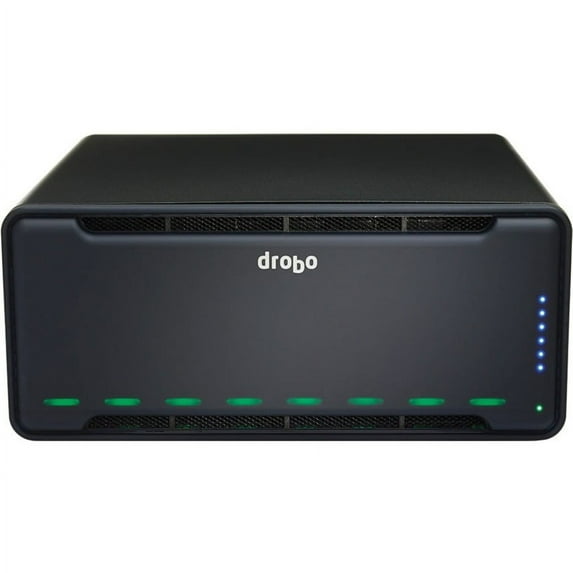
Hero image 0 of Drobo 8D 8-Bay Thunderbolt 3 Enclosure, 0 of 10
Drobo 8D 8-Bay Thunderbolt 3 Enclosure
Everyone
(No ratings yet)
Key item features
- Leave Your Limitations Behind? Go BeyondRAID® Built on award-winning BeyondRAID? technology, Drobo 8D simply protects your data against a single or dual disk drive failure. Drives can be added, hot-swapped and updated in real time for storage expansion with zero downtime. If you?re running low on space, the lights on the front provide guidance. Just add a drive in an empty bay, or remove a smaller drive and replace it with a larger one. In addition, Smart Volumes? are thinly provisioned volumes, that automatically utilize capacity as needed from a common pool of storage. Learn More
- SSD Acceleration Boosts Performance Most storage arrays use either all hard drives or all SSDs. The Drobo 8D delivers the best of both worlds by intelligently combining hard drives and SSDs to deliver both capacity and performance. The Drobo 8D gives you the option to enable Hot Data Caching through the Drobo Accelerator Bay on the rear slot. Using an SSD allows access to most frequently read data to deliver blazing fast speeds. This boosts performance of popular applications such as Apple?s Final Cut and Adobe Lightroom. SSDs can also be utilized in the front bays of the Drobo 8D for Data-Aware Tiering, allowing for transactional data to migrate to the SSDs. This ensures that both writes and reads are accelerated.
- Intelligent Volume Management New to the Drobo product line is the Intelligent Volume Management technology available on the 8D. This technology combines the flexibility of manual volume configuration with the convenience of Drobo?s legendary automation, allowing for separation of file systems as customer needs dictate. The 8D allows the creation of up to 16 volumes with a maximum 128TB volume size, and a 256TB storage pool.
- Power of ThunderboltTM Drobo 8D storage array offers a lightning fast ThunderboltTM 3 connection (macOS only) that is both fast and backwards compatible. This optimizes your performance when transferring large volumes of data. With the dual ports, the Drobo 8D connects up to six Thunderbolt devices or five devices and a monitor at the end of the chain. Supports one 5K or two 4K displays (with a Thunderbolt dock).
- Enhanced Backup for Time Machine Time Machine and Drobo: A Perfect Pairing Apple?s Time Machine was designed to make backing up your files simple and painless. Pairing Time Machine with Drobo improves your data protection by ensuring your data is safe in the event of hard drive failure.
- Control How Much Storage Time Machine Uses Apple?s guidelines are to set the storage space for Time Machine at twice the size of the Mac?s hard drive that is to be protected. Time Machine users know that it will gradually use all available disk space without an easy way to stop this from happening. With Drobo you can easily control the maximum storage space available for Time Machine backups through Drobo Dashboard. When you install a Drobo, Drobo Dashboard prompts to see if you want to create a dedicated storage volume for Time Machine?s use, allowing you to set the size of this volume.
Specs
- Data storage128 TB
- Number of drive bays8
- BrandDrobo
- Form factorDesktop
- Inputs/OutputsInputs - Thunderbolt 3
- ModelDRDR7A21
Current price is USD$1,600.20
Price when purchased online
Out of stock
How do you want your item?
Out of stock
About this item
Product details
Bigger. Better. Bolder. The Fastest Drobo Yet With Thunderbolt? 3 Speed Meet the bigger, better, and bolder Drobo 8D. Capable of supporting 16 volumes of up to 128TB, with a total storage pool of 256TB, 8D is designed to meet the need for data-intensive workflows. With lightning speed ThunderboltTM 3, the Drobo 8D is the fastest direct attached Drobo yet. The 8D comes equipped with a Drobo Accelerator Bay, and is the only Drobo with the new Intelligent Volume Management technology.
- Leave Your Limitations Behind? Go BeyondRAID® Built on award-winning BeyondRAID? technology, Drobo 8D simply protects your data against a single or dual disk drive failure. Drives can be added, hot-swapped and updated in real time for storage expansion with zero downtime. If you?re running low on space, the lights on the front provide guidance. Just add a drive in an empty bay, or remove a smaller drive and replace it with a larger one. In addition, Smart Volumes? are thinly provisioned volumes, that automatically utilize capacity as needed from a common pool of storage. Learn More
- SSD Acceleration Boosts Performance Most storage arrays use either all hard drives or all SSDs. The Drobo 8D delivers the best of both worlds by intelligently combining hard drives and SSDs to deliver both capacity and performance. The Drobo 8D gives you the option to enable Hot Data Caching through the Drobo Accelerator Bay on the rear slot. Using an SSD allows access to most frequently read data to deliver blazing fast speeds. This boosts performance of popular applications such as Apple?s Final Cut and Adobe Lightroom. SSDs can also be utilized in the front bays of the Drobo 8D for Data-Aware Tiering, allowing for transactional data to migrate to the SSDs. This ensures that both writes and reads are accelerated.
- Intelligent Volume Management New to the Drobo product line is the Intelligent Volume Management technology available on the 8D. This technology combines the flexibility of manual volume configuration with the convenience of Drobo?s legendary automation, allowing for separation of file systems as customer needs dictate. The 8D allows the creation of up to 16 volumes with a maximum 128TB volume size, and a 256TB storage pool.
- Power of ThunderboltTM Drobo 8D storage array offers a lightning fast ThunderboltTM 3 connection (macOS only) that is both fast and backwards compatible. This optimizes your performance when transferring large volumes of data. With the dual ports, the Drobo 8D connects up to six Thunderbolt devices or five devices and a monitor at the end of the chain. Supports one 5K or two 4K displays (with a Thunderbolt dock).
- Enhanced Backup for Time Machine Time Machine and Drobo: A Perfect Pairing Apple?s Time Machine was designed to make backing up your files simple and painless. Pairing Time Machine with Drobo improves your data protection by ensuring your data is safe in the event of hard drive failure.
- Control How Much Storage Time Machine Uses Apple?s guidelines are to set the storage space for Time Machine at twice the size of the Mac?s hard drive that is to be protected. Time Machine users know that it will gradually use all available disk space without an easy way to stop this from happening. With Drobo you can easily control the maximum storage space available for Time Machine backups through Drobo Dashboard. When you install a Drobo, Drobo Dashboard prompts to see if you want to create a dedicated storage volume for Time Machine?s use, allowing you to set the size of this volume.
info:
We aim to show you accurate product information. Manufacturers, suppliers and others provide what you see here, and we have not verified it.
Specifications
Data storage
128 TB
Number of drive bays
8
Brand
Drobo
Form factor
Desktop
Warranty
Warranty information
90 Day
Please be aware that the warranty terms on items offered for sale by third party Marketplace sellers may differ from those displayed in this section (if any). To confirm warranty terms on an item offered for sale by a third party Marketplace seller, please use the 'Contact seller' feature on the third party Marketplace seller's information page and request the item's warranty terms prior to purchase.
Please be aware that the warranty terms on items offered for sale by third party Marketplace sellers may differ from those displayed in this section (if any). To confirm warranty terms on an item offered for sale by a third party Marketplace seller, please use the 'Contact seller' feature on the third party Marketplace seller's information page and request the item's warranty terms prior to purchase.
Customer ratings & reviews
0 ratings|0 reviews
This item does not have any reviews yet

Related pages
- Wdc Wds240g2g0a-00jh30 Video Game Accessories
- Gtd65gbsj3ws Video Game Accessories
- Nerd Computer
- Cloud Drives
- Wd5000lpvx Video Game Accessories
- Wd40efax Smr Video Game Accessories
- Gaming Hard Drives
- All External Hard Drives
- WD External Hard Drives
- Seagate External Hard Drives
- 1TB External Hard Drives
- 2TB External Hard Drives