
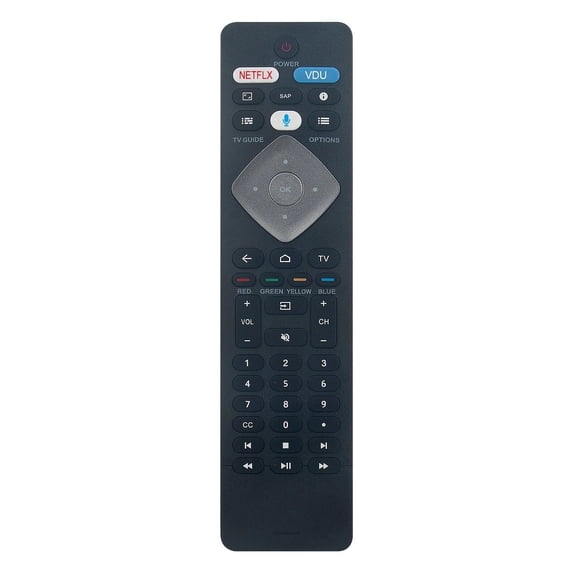
New BT800 Replacement Voice Remote Control BT800 for Philips Android TV 43PFL5766/F7 65PFL5602/F7 URMT47CND002
Hero image 0 of New BT800 Replacement Voice Remote Control BT800 for Philips Android TV 43PFL5766/F7 65PFL5602/F7 URMT47CND002, 0 of 5

New BT800 Replacement Voice Remote Control BT800 for Philips Android TV 43PFL5766/F7 65PFL5602/F7 URMT47CND002

(No ratings yet)

Key item features

  • Broad Compatibility:Remote Control Models: BT800, URMT47CND002.
  • Compatible with Philips Android TV Models: 43PFL5766/F7, 65PFL5602/F7, 65PFL5504/F7, 50PFL5604/F7, 43PFL5704/F7, 55PFL5704/F7, 65PFL5504/F6, 50PFL5704/F7, 55PFL5604/F7, 32PFL5505/F7, 43PFL5604/F7, 75PFL5604/F7, 65PFL5604/F7, 65PFL5704/F7, 75PFL5704/F7, 55PFL5604/F7A, 50PFL5604/F7A, 65PFL5604/F7A, 75PFL5604/F7A, 65PFL5504F7, 55PFL5704F7, 65PFL5504F6, 50PFL5766/F7, 50PFL5704F7, 55PFL5604F7, 43PFL5704F7, 50PFL5604F7, 43PFL5604F7, 75PFL5604F7, 65PFL5604F7, 32PFL5505F7, 75PFL5704F7, 65PFL5704F7, 50PFL5604F7A, 55PFL5604F7A, 75PFL5604F7A, 65PFL5604F7A.
  • Pairing Instructions:1. Turn on your TV. 2. Install 2 x AAA batteries (not included) into the remote. 3. Follow the on-screen instructions or your TV manual to pair the remote via Bluetooth. (Typically requires holding specific buttons near the TV until connected). Quantity: 1 x Voice Remote Control (Batteries are not included; requires 2 x AAA batteries). Disclaimer: This product is an AFTERMARKET replacement part, not an original product. It is not affiliated with, endorsed by, or sponsored by Philips. The use of brand names or model designations is strictly for demonstrating compatibility.
Price when purchased online
Not Available

How do you want your item?

How do you want your item?
Not available
Report an issue with this seller

About this item

Product details

Specifications

Customer ratings & reviews

0 ratings|0 reviews
This item does not have any reviews yet
