

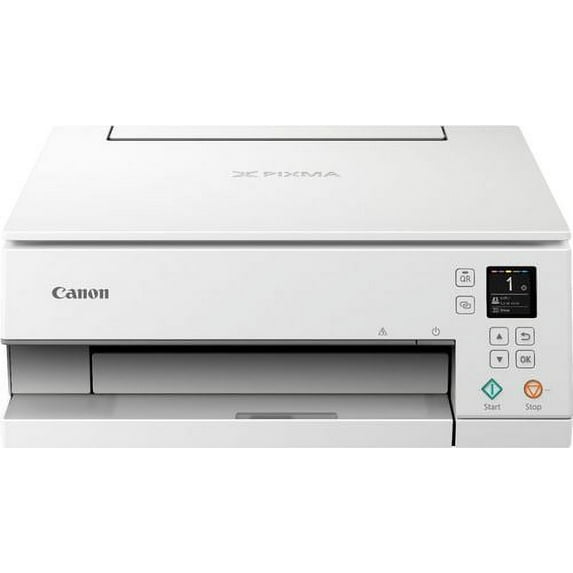
Canon PIXMA TS6320 White Wireless Inkjet All-In-One Printer
Key item features
- Stylish Design: The Canon PIXMA TS6320 is a sleek All-in-One printer crafted for a busy lifestyle and diverse printing needs.
- Intuitive Display: Features a unique 1.44" OLED screen and an LED Status Bar for quick and easy status checks.
- Automated Convenience: Includes an Auto Expandable Output Tray, allowing printing to commence remotely without manual intervention.
- Wireless Connectivity: Designed for smartphone printing with Wi-Fi and Bluetooth connections, enhancing accessibility.
- Smart Home Integration: Offers compatibility with smart home devices, enabling printing from almost anywhere in the house.
Specs
- BrandCanon
- Printing techInkjet
- Pages per min.15.00 ppm
- Mono colorColor
- Paper size1
- Maximum print resolution4800.00 dpi
How do you want your item?
About this item
Product details
Specifications
Brand
Printing tech
Pages per min.
Mono color
Warranty
Warranty information
Similar items you might like
Based on what customers bought
Best seller Canon PIXMA TS3722 All-In-One, Wireless Inkjet Printer for Home Office $53.00
Best seller $5300current price $53.00
Canon PIXMA TS3722 All-In-One, Wireless Inkjet Printer for Home Office
245534.2 out of 5 Stars. 24553 reviewsRollback Canon PIXMA TR4722 All-In-One, Wireless Color Inkjet Printer for Home Office Use $64.00 Was $75.00
Rollback $6400current price $64.00, Was $75.00$75.00
Canon PIXMA TR4722 All-In-One, Wireless Color Inkjet Printer for Home Office Use
97834.1 out of 5 Stars. 9783 reviewsCanon MegaTank PIXMA G4280 All-In-One, Wireless Color Inkjet Printer for Home Office Use $269.00
 $26900current price $269.00
Canon MegaTank PIXMA G4280 All-In-One, Wireless Color Inkjet Printer for Home Office Use
1284.2 out of 5 Stars. 128 reviewsEpson EcoTank ET-3943 Wireless All-in-One Color Supertank Printer – White $369.00
 $36900current price $369.00
Epson EcoTank ET-3943 Wireless All-in-One Color Supertank Printer – White
1274.3 out of 5 Stars. 127 reviewsEpson EcoTank ET-4950 Wireless All-in-One Color Supertank Printer – Black $449.00
 $44900current price $449.00
Epson EcoTank ET-4950 Wireless All-in-One Color Supertank Printer – Black
984.4 out of 5 Stars. 98 reviewsRollback Epson EcoTank ET-2803 Wireless All-in-One Cartridge-Free Printer $179.00 Was $199.99
Rollback $17900current price $179.00, Was $199.99$199.99
Epson EcoTank ET-2803 Wireless All-in-One Cartridge-Free Printer
57834.3 out of 5 Stars. 5783 reviewsCanon PIXMA iX6820 Wireless Inkjet Business Printer $244.00 Was $299.99
 $24400current price $244.00, Was $299.99$299.99
Canon PIXMA iX6820 Wireless Inkjet Business Printer
1763.6 out of 5 Stars. 176 reviewsimageCLASS MF662Cdw $429.99
 $42999current price $429.99
imageCLASS MF662Cdw
114.7 out of 5 Stars. 11 reviewsEpson EcoTank ET-3950 Wireless All-in-One Color Supertank Printer – White $409.00
 $40900current price $409.00
Epson EcoTank ET-3950 Wireless All-in-One Color Supertank Printer – White
864.4 out of 5 Stars. 86 reviewsCanon PIXMA TR160 Wireless Inkjet Printer 7069C002 $219.99
 $21999current price $219.99
Canon PIXMA TR160 Wireless Inkjet Printer 7069C002
354.3 out of 5 Stars. 35 reviewsCanon MAXIFY MB5420 Wireless Inkjet All-in-One Printer $349.99 $349.99/count
 $34999current price $349.99$349.99/count
Canon MAXIFY MB5420 Wireless Inkjet All-in-One Printer
723.9 out of 5 Stars. 72 reviewsCanon PIXMA TS6320 Wireless Inkjet All-In-One Printer - Black $399.99
 $39999current price $399.99
Canon PIXMA TS6320 Wireless Inkjet All-In-One Printer - Black
503.5 out of 5 Stars. 50 reviewsEpson EcoTank ET-4950 Wireless All-in-One Color Supertank Printer – White $449.00 Was $499.99
 $44900current price $449.00, Was $499.99$499.99
Epson EcoTank ET-4950 Wireless All-in-One Color Supertank Printer – White
1004.5 out of 5 Stars. 100 reviewsPIXMA TS6520 Wireless Multi-Function Home Printer $79.00
 $7900current price $79.00
PIXMA TS6520 Wireless Multi-Function Home Printer
274.4 out of 5 Stars. 27 reviewsCanon PIXMA TS8820 Wireless Printer, Best for Home Photo Printing, Copy and Scan, White $323.99
 $32399current price $323.99
Canon PIXMA TS8820 Wireless Printer, Best for Home Photo Printing, Copy and Scan, White
224.6 out of 5 Stars. 22 reviewsHP LaserJet Pro MFP 3101fdw Laser Printer, Black And White Mobile Print, Copy, $299.00 Was $379.00
 $29900current price $299.00, Was $379.00$379.00
HP LaserJet Pro MFP 3101fdw Laser Printer, Black And White Mobile Print, Copy,
594.2 out of 5 Stars. 59 reviewsCanon Color imageCLASS LBP632Cdw - Wireless, Duplex Laser Printer (Print Only), Home Office, Mobile Ready, 22 PPM, White $399.95
 $39995current price $399.95
Canon Color imageCLASS LBP632Cdw - Wireless, Duplex Laser Printer (Print Only), Home Office, Mobile Ready, 22 PPM, White
374.2 out of 5 Stars. 37 reviewsimageCLASS MF751Cdw II $648.99 Was $790.65
 $64899current price $648.99, Was $790.65$790.65
imageCLASS MF751Cdw II
134.5 out of 5 Stars. 13 reviewsPIXMA TR7120 Wireless Multi-Function Home Printer $114.99 Was $179.42
 $11499current price $114.99, Was $179.42$179.42
PIXMA TR7120 Wireless Multi-Function Home Printer
134.2 out of 5 Stars. 13 reviewsPIXMA TS4320 Wireless Multi-Function Home Printer $107.00
 $10700current price $107.00
PIXMA TS4320 Wireless Multi-Function Home Printer
214.4 out of 5 Stars. 21 reviews
Customer ratings & reviews
Filtered and sorted results would be available on the new 'Customer ratings & reviews' page.
Showing 1-3 of 6 reviews
Verified Purchase
Great Price , Great Quality Prints
I have been through numerous printers over the past couple years and this is by far my favorite! I love the quality of the prints especially photos and the price was very reasonable! I would recommend.
Excellent photo and text output. High print cost
I have worked in the IT industry for over 17 years (and even longer as the "family computer guy") and have come across a multitude of printers: Canon, Lexmark, Epson, Brother, Konica, HP, Ricoh, and all have their Pros and Cons. As a former, professional photographer, I also trusted Canon and Epson for accurate photo reproduction. Canon announced 4 new PIXMA printers in the summer of 2019, including the PIXMA TS6320, just in time for the back-to-school season. So, how does the TS6320 photo printer, which is geared towards students, fare? Pretty well! PROS - Update to its TS6220 predecessor with an easier setup process and updated user interface - 5 individual ink cartridges (Magenta, Black BK, Yellow, Black Pigment PGBK, Cyan), making more efficient use of colors, saving ink cost, and better output - Exceptional print quality, especially photos due to its 5-ink cartridge system - Text output is very sharp to about 6 pt font size - Can Print, Copy, and Scan (All-in-One) - Easy configuration - Fairly compact size at 14.9" x 14.2" x 5.6" - Print tray automatically opens and closes when printer is powered on/off, further keeping the footprint small - Auto paper width detection - Excellent, mobile device support, allowing you to print directly from your Apple iOS or Android phone/tablet - Push the QR code button on the printer, and it will link you directly to the mobile app for download - Multiple ways to print: Wi-Fi (including AirPrint, Google Cloud Print), Bluetooth, Ethernet wired network, and/or wired USB (cable not included) - Apple: Mac OS compatible - Sharp, easy to read 1.44" OLED display that provides printer and print job status - Auto Duplexing so you can print on BOTH sides, saving on paper and storage space - Dual paper feed trays so regular and photo papers can be loaded and ready at the same time - Very cool, LED status bar at the front to visually show a print job is actively being processed - Sample photo paper included - Sample ink cartridges are included, which is industry practice. Keep in mind that they will run out sooner than normal CONS - Built for quality, not for print volume - Although photo print quality is excellent, clipart graphics have barely-noticeable banding in dark areas - No automatic document feeder, making the printer more suitable for low-volume print and copy use - No support for USB thumbdrives or SD cards - High print cost - As with most printers, the cost of ink is high (about $65 for the complete set at the time of this writing) - Small-capacity paper tray that holds about 30 pages TIPS - The "Canon PRINT for Inkjet/SELPHY" mobile app can be downloaded from the Apple App Store and Google Play. The media leaflet and QR code on the ink cartridge also take you directly there - If an app on your phone or tablet supports it, you can select the Canon printer to print directly to - If you do not print for a while, your ink nozzle may dry up a bit. Once in a while, you may have to run a self-cleaning cycle to keep the ink flowing optimally Overall, like many inexpensive, family-oriented, consumer printers, the high cost of the ink cartridges makes the per-page print cost high. However, the PIXMA TS series is known for its excellent photo reproduction where images and colors pop. This printer produces great output for low-volume homes and small offices, and is quite suitable for students needing to print reports and presentations.
Good Product
Fine printer at a good price. Had it wirelessly connected to my laptop within 20 minutes; downloaded to app to my smartphone, and had no problems accessing the printer; my iPad recognized the printer without needed anything to be done. Printing is of good quality. Don't miss lack of a slot for an SD card, since I never used the one in my old printer. The printer will be used for non-photo printing, scanning, and copying (oh, I may sneak a picture in once in a while).
