

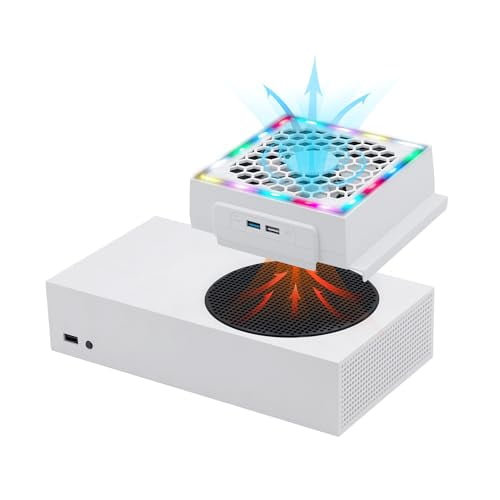
Mcbazel Cooling Fan for Xbox Series S,RGB LED Display,Low Noise,2 Extra USB Ports,3 Level Adjustable Speed External Cooler Fan for Xbox Series S Console Only - White
Key item features
-
Product Feature
•【Enhanced Cooling】As a core element of xbox series s accessories air cooling,three speed settings optimize airflow to maintain console temperature during extended gameplay
•【RGB Lighting】Four colors and three lighting modes (static,breathing,cycling) create immersive visual effects
•【Dual USB Ports】Additional USB 3.0 and 2.0 ports expand connectivity for peripherals or charging
•【Plug-and-Play Design】Installs in seconds without tools and draws power from the console’s USB port
•【Xbox Series S Exclusive】Precisely engineered to fit only the Xbox Series S dimensions and ventsPackage Include
1 x DISEN cooling fan
1 x User manualSpecifications
• Material: ABS plastic + aluminum fins
• Power: 5V USB (console-powered)
• Fan Cooling System: Xbox Series S fan cooling system with Low/Medium/High speeds
• Lighting Modes: Static,Breathing,Color Cycle
• Ports: 1 x USB 3.0,1 x USB 2.0
• Compatibility: Xbox Series S onlyNote
This cooling fan is not a replacement for the console’s internal fan but supplements airflow to reduce heat buildup.Unlike xbox series x cooling system,this product is tailored specifically for Series S.Ensure the Xbox Series S vents are unobstructed before installation.Avoid blocking the fan’s intake or exhaust areas during use.The RGB lighting and USB ports may slightly increase power draw from the console,though the impact is negligible under normal conditions.For optimal performance,clean the fan blades periodically with a dry cloth.How To Use
1.Align the xbox fan cooler series s with the console’s vents in either vertical or horizontal position.
2.Connect the fan’s USB cable to the console’s USB port.
3.Press the speed button to select Low,Medium,or High airflow.
4.Use the lighting button to toggle colors and modes.Why Choose DISEN
DISEN focuses on functional,no-frills accessories tailored to specific devices.This xbox series s accessories cooling kit addresses the Xbox Series S’s thermal management needs without requiring external power or complex setup.The added USB ports and lighting are practical extras,not gimmicks.Compatibility is rigorously tested to ensure seamless integration. - xbox series s accessories air cooling
- xbox series s accessories air cooling
- xbox series s accessories air cooling
- xbox series s accessories air cooling
Specs
- Computer cooling typeCPU Fans
- BrandSihohan
- Works withComputers
- ColorWhite
- Has written warrantyNo
- Weight1 lb
How do you want your item?
About this item
Product details
-
Product Feature
•【Enhanced Cooling】As a core element of xbox series s accessories air cooling,three speed settings optimize airflow to maintain console temperature during extended gameplay
•【RGB Lighting】Four colors and three lighting modes (static,breathing,cycling) create immersive visual effects
•【Dual USB Ports】Additional USB 3.0 and 2.0 ports expand connectivity for peripherals or charging
•【Plug-and-Play Design】Installs in seconds without tools and draws power from the console’s USB port
•【Xbox Series S Exclusive】Precisely engineered to fit only the Xbox Series S dimensions and ventsPackage Include
1 x DISEN cooling fan
1 x User manualSpecifications
• Material: ABS plastic + aluminum fins
• Power: 5V USB (console-powered)
• Fan Cooling System: Xbox Series S fan cooling system with Low/Medium/High speeds
• Lighting Modes: Static,Breathing,Color Cycle
• Ports: 1 x USB 3.0,1 x USB 2.0
• Compatibility: Xbox Series S onlyNote
This cooling fan is not a replacement for the console’s internal fan but supplements airflow to reduce heat buildup.Unlike xbox series x cooling system,this product is tailored specifically for Series S.Ensure the Xbox Series S vents are unobstructed before installation.Avoid blocking the fan’s intake or exhaust areas during use.The RGB lighting and USB ports may slightly increase power draw from the console,though the impact is negligible under normal conditions.For optimal performance,clean the fan blades periodically with a dry cloth.How To Use
1.Align the xbox fan cooler series s with the console’s vents in either vertical or horizontal position.
2.Connect the fan’s USB cable to the console’s USB port.
3.Press the speed button to select Low,Medium,or High airflow.
4.Use the lighting button to toggle colors and modes.Why Choose DISEN
DISEN focuses on functional,no-frills accessories tailored to specific devices.This xbox series s accessories cooling kit addresses the Xbox Series S’s thermal management needs without requiring external power or complex setup.The added USB ports and lighting are practical extras,not gimmicks.Compatibility is rigorously tested to ensure seamless integration. - xbox series s accessories air cooling
- xbox series s accessories air cooling
- xbox series s accessories air cooling
- xbox series s accessories air cooling
