

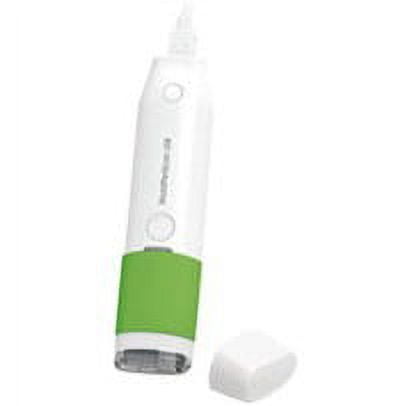
WorldPenScan USB SE(Win/Mac)
(No ratings yet)
Key item features
WorldPenScan USB SE is a pen scanner and translator for Windows PC and Mac. Users can instantly scan and digitize horizontal or vertical documents without typing any word. WorldPenScan USB SE recognizes multiple languages and provides sentence translation for business or learning demands. It also facilitates users to edit scanned data in various applications, such as Microsoft Word, Excel, Outlook, etc.
Scan and input data instantly
Support multilingual translation
Boost your office productivity
Take a partial screenshot for translation and further applications
Get more details of a book by scanning the ISBN code
Scan and input data instantly
- Without typing any word, users can scan and digitize documents in seconds.
- Recognize English, Japanese, Korean, French, German, Italian, Spanish, Arabic, Vietnamese, Traditional Chinese, Simplified Chinese, Traditional Chinese (Hong Kong), etc.
- Freely scan and recognize horizontal or vertical documents per user's requirements
Support multilingual translation
- Provide multi-language translation for business applications or learning demands.
- Easy to check vocabulary, pronunciation, extended queries in the dictionaries.
- Support importing offline dictionaries, such as StarDict and Lingoes format.
Boost your office productivity
- Support barcodes and bank fonts (OCR-A, OCR-B, MICR) recognition.
- Directly edit scanned data in Word, Excel, PowerPoint, Outlook and browsers.
- Image mode" facilitates to scan and save the original images into documents.
Take a partial screenshot for translation and further applications
- You can extract texts from screenshots and send the texts to Microsoft Word/ Excel/ Line/ Skype for further applications. Besides, WorldPenScan software allows you to translate the digitized texts into multiple languages.
- It is quite convenient to capture a formula, form and chart from web pages or PDF, and send the images to Microsoft Word / PowerPoint instantly. (Only for Windows)
- When you view a web page, you can look up any word and get its definition with just one click.
Get more details of a book by scanning the ISBN code
- You can easily find book details and reviews on Google Books by scanning the ISBN code (texts).
Specs
- BrandPenpower
- Computer scanner typeHandheld Document Scanner
- Model nameWorldPenScan USB SE
- Has automatic document feederN
- ColorMulticolor
- Inputs/OutputsUSB
Current price is USD$96.96
Price when purchased online
Out of stock
How do you want your item?
Out of stock
About this item
Product details
Penpower WorldPenScan USB SE(Win/Mac)
WorldPenScan USB SE is a pen scanner and translator for Windows PC and Mac. Users can instantly scan and digitize horizontal or vertical documents without typing any word. WorldPenScan USB SE recognizes multiple languages and provides sentence translation for business or learning demands. It also facilitates users to edit scanned data in various applications, such as Microsoft Word, Excel, Outlook, etc.
Scan and input data instantly
Support multilingual translation
Boost your office productivity
Take a partial screenshot for translation and further applications
Get more details of a book by scanning the ISBN code
Scan and input data instantly
- Without typing any word, users can scan and digitize documents in seconds.
- Recognize English, Japanese, Korean, French, German, Italian, Spanish, Arabic, Vietnamese, Traditional Chinese, Simplified Chinese, Traditional Chinese (Hong Kong), etc.
- Freely scan and recognize horizontal or vertical documents per user's requirements
Support multilingual translation
- Provide multi-language translation for business applications or learning demands.
- Easy to check vocabulary, pronunciation, extended queries in the dictionaries.
- Support importing offline dictionaries, such as StarDict and Lingoes format.
Boost your office productivity
- Support barcodes and bank fonts (OCR-A, OCR-B, MICR) recognition.
- Directly edit scanned data in Word, Excel, PowerPoint, Outlook and browsers.
- Image mode" facilitates to scan and save the original images into documents.
Take a partial screenshot for translation and further applications
- You can extract texts from screenshots and send the texts to Microsoft Word/ Excel/ Line/ Skype for further applications. Besides, WorldPenScan software allows you to translate the digitized texts into multiple languages.
- It is quite convenient to capture a formula, form and chart from web pages or PDF, and send the images to Microsoft Word / PowerPoint instantly. (Only for Windows)
- When you view a web page, you can look up any word and get its definition with just one click.
Get more details of a book by scanning the ISBN code
- You can easily find book details and reviews on Google Books by scanning the ISBN code (texts).
info:
We aim to show you accurate product information. Manufacturers, suppliers and others provide what you see here, and we have not verified it.
Specifications
Brand
Penpower
Computer scanner type
Handheld Document Scanner
Model name
WorldPenScan USB SE
Has automatic document feeder
N
Warranty
Warranty information
See Description
Please be aware that the warranty terms on items offered for sale by third party Marketplace sellers may differ from those displayed in this section (if any). To confirm warranty terms on an item offered for sale by a third party Marketplace seller, please use the 'Contact seller' feature on the third party Marketplace seller's information page and request the item's warranty terms prior to purchase.
Please be aware that the warranty terms on items offered for sale by third party Marketplace sellers may differ from those displayed in this section (if any). To confirm warranty terms on an item offered for sale by a third party Marketplace seller, please use the 'Contact seller' feature on the third party Marketplace seller's information page and request the item's warranty terms prior to purchase.
Customer ratings & reviews
0 ratings|0 reviews
This item does not have any reviews yet
