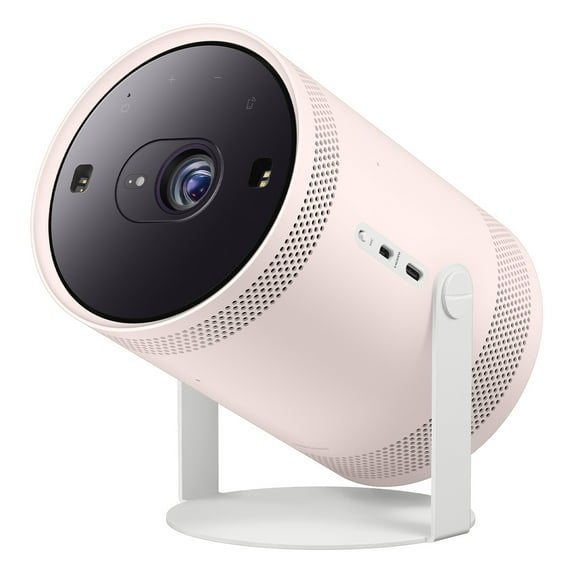
Samsung The Freestyle Skins for Smart Projector (Blossom Pink)
Hero image 0 of Samsung The Freestyle Skins for Smart Projector (Blossom Pink), 0 of 4

Samsung The Freestyle Skins for Smart Projector (Blossom Pink)

2.3 stars out of 3 reviews
(2.3)|
3 ratings
Video Game Platform:N/A-Out of stock
Actual Color:Blossom Pink-Out of stock
selected, Blossom Pink, Out of stock

Key item features

  • Vibrant Color Options: The Freestyle Skins are available in three distinct colors – Blossom Pink, Forest Green, and Coyote Beige – allowing users to personalize their projector's appearance.
  • Effortless Customization: Crafted from flexible rubber material, these skins enable quick and easy changes, facilitating seamless customization to match various preferences or moods.
  • Dedicated Compatibility: Specifically designed for The Freestyle Samsung Smart Projector (LSP3B), ensuring a perfect fit and integration with the device.
  • Personalized Aesthetic: Offers the ability to customize The Freestyle projector, allowing users to blend it with their decor or make it stand out according to their style.
  • Included Component: Each package contains one Freestyle Skin, providing the chosen color option for immediate personalization.
  • Material Composition: The skins are constructed from durable rubber, contributing to their flexibility and ease of application.
Generated by AI
Current price is $27.99
Price when purchased online
Out of stock

How do you want your item?

How do you want your item?
Out of stock
Report an issue with this seller

About this item

Product details

Specifications

Warranty

Customer ratings & reviews

2.3 out of 5 stars
stars3 ratings3 reviews
How item rating is calculated
Filtered and sorted results would be available on the new 'Customer ratings & reviews' page.
Sort by |

Showing 1-3 of 3 reviews

Oct 24, 2022
Tbty
5 out of 5 stars review

Easy

So easy to use and put on and take off would recommend

Review from Samsung US
Helpful?3XFVEJADNGZW376216722
Jul 20, 2022
Jo Oak
1 out of 5 stars review

Impossible to get on and off

these skins are so tight is absolutely impossible to get them on and off. i finally got the white one it came with off so i could put the new color on and now i can't get either of them back on. i've tried everything and its just naked and not protected at all. at whatever cost do not attemp to change the skin, you woll regret it.

Review from Samsung US
Helpful?3XFVEJADNGZW376216722
reply from Supplier Response

Hi Jo Oak, I’m very sorry to hear of the difficulties you’re having with removing and replacing The Freestyle Skin. You can find instructions in the Installation Guide; make sure you’re using both the double-sided tape and dedicated tool for disassembly/reassembly. You can also try the below steps: Removing the Skin: 1. Use the included tool to loosen the 2 screws by turning counterclockwise, then lift the unit out of the cradle 2. Use the tool to also loosen the double-sided tape on the current skin, as this will allow for an easier removal 3. Starting from the bottom, gently push the skin towards the top of the unit until it is fully removed Putting on the Skin: 1. Attach the tape to your unit, ensuring the double-sided portion is placed next to the input panel and the non-sticky flaps are intact and accessible. 2. Align the new skin with the input connections and cradle holes. Starting from the top, gently slide it on the unit and make sure it’s snug. 3. Pull the non-sticky tape flaps out from around the input panel. This will remove the backing from the double-sided tape and allow you to secure the skin around the inputs. When replacing The Freestyle Skin, please keep in mind the following: - Not using the double-sided tape can cause air gaps between the skin and body. - Do not impact the lens or the speaker and grille on the projector, as this could result in damage. - Do not apply chemical agents containing alcohol, solvent, or surfactant, and do not use wax, benzene, thinner, insecticide, air freshener, lubricant, or detergent on the product surface or to remove the double-sided tape. I hope these tips help. For further assistance, please contact Samsung Support at 1-800-SAMSUNG, 8AM - 12AM EST, 7 days a week. Or visit us on the Samsung website and click on the ‘Support’ link for: • LiveChat • Manuals, Software, & Warranty Info ~ Samsung Specialist

Oct 27, 2022
Bobc
1 out of 5 stars review

Skin change

I am finding it impossible to remove the supplied skin, not alone replacing with new colour skin 🤷🏼‍♂️

Review from Samsung US
Helpful?3XFVEJADNGZW376216722
reply from Supplier Response

Hi Bobc, We appreciate you sharing your experience with removing and replacing The Freestyle Skin. You can find instructions in the Installation Guide; please make sure you’re also using both the double-sided tape and dedicated tool for disassembly/reassembly. Then try the below steps: Removing the Skin: 1. Use the included tool to loosen the 2 screws by turning counterclockwise, then lift the unit out of the cradle 2. Use the tool to also loosen the double-sided tape on the current skin, as this will allow for an easier removal 3. Starting from the bottom, gently push the skin towards the top of the unit until it is fully removed Putting on the Skin: 1. Attach the tape to your unit, ensuring the double-sided portion is placed next to the input panel and the non-sticky flaps are intact and accessible. 2. Align the new skin with the input connections and cradle holes. Starting from the top, gently slide it on the unit and make sure it’s snug. 3. Pull the non-sticky tape flaps out from around the input panel. This will remove the backing from the double-sided tape and allow you to secure the skin around the inputs. When replacing The Freestyle Skin, please keep in mind the following: - Not using the double-sided tape can cause air gaps between the skin and body. - Do not impact the lens or the speaker and grille on the projector, as this could result in damage. - Do not apply chemical agents containing alcohol, solvent, or surfactant, and do not use wax, benzene, thinner, insecticide, air freshener, lubricant, or detergent on the product surface or to remove the double-sided tape. I hope these tips help. For further assistance, please contact Samsung Support at 1-800-SAMSUNG, 8AM - 12AM EST, 7 days a week. Or visit us on the Samsung website and click on the ‘Support’ link for: • LiveChat • Manuals, Software, & Warranty Info ~ Samsung Specialist