

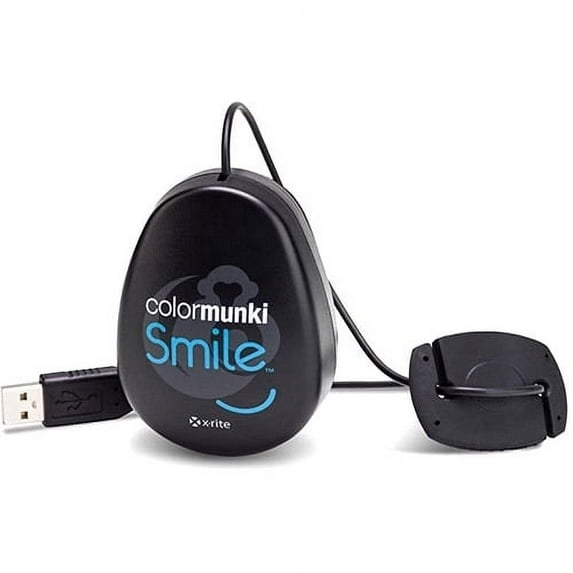
Hero image 0 of X-Rite ColorMunki Smile, 0 of 2
X-Rite ColorMunki Smile
(No ratings yet)
Key item features
Features:Calibrate LCD & LED displays laptop or desktopSuper easy and intuitive wizard driven software no color science knowledge requiredCalibrate one or multiple monitors for color consistency everywhereUses the same color engine technology found in X-Rites professional level color calibration solutionsBefore and after image shows instant results Calibration reminder notifies you when it is time to re-calibrate your displayEasy to follow on-line help videos - no extra manuals neededCalibrate. Share. Smile.Every wonder why the pictures you took at the beach, graduation or your kids game dont look the same on your monitor as you remember them? Well, monitors arent perfect. Color can vary from monitor to monitor or change over time. (Sometimes a whole lot.) Even the conditions where you view the monitor can have an effect on what the color looks like on the screen. If only there was a cure? Smile there is.ColorMunki Smile delivers super simple monitor calibration for your laptop or desktop monitor. Calibration is just a fancy way of saying adjust your computer screen to show the colors correctly. Sound complicated? Smile it isnt.Actually, its really easy. Simply plug the device into your USB port and follow the on-screen instructions. ColorMunki Smile does all the work with a few clicks of the mouse. When the process is done youll see before and after results and your new color settings automatically start working. So whether you are viewing, editing or sharing your images, youll know your colors are right. Even if youre gaming or web browsing youll get truer colors. It couldnt be simpler.Specifications:MacintoshMacOS X 10.6, 10.7, or 10.8 (with latest upgrades installed)Intel Core 2 Duo CPU or better CPU 500MB RAM500MB of available disk spacePowered USB portDisplay resolution of 1024 x 768 pixels or higherUser must have Administrator rights to install and uninstall the applicationInternet connection required for software update WindowsMicrosoft Windows XP 32 bit, Microsoft Windows Vista 32 bit, or Microsoft Windows 7 32 or 64 bit. All operating systems should have latest Service Pack installedIntel Core 2 Duo or AMD Athlon 64 X2 or better CPU500MB RAM500MB of available disk spacePowered USB portDisplay resolution of 1024 x 768 pixels or higherUser must have Administrator rights to install and uninstall the applicationInternet connection required for software update
Specs
- BrandX-Rite
- CompatibilityMacintosh, Windows
- ConnectionUSB
- MaterialPlastic
- CompatibilityApple
- Inputs/OutputsUSB
Current price is USD$95.09
Price when purchased online
Out of stock
How do you want your item?
Out of stock
About this item
Product details
Amazingly Simple Monitor CalibrationFor photo hobbyists, design enthusiasts, gamers and web viewing, ColorMunki Smile is a super simple way to get more accurate color from your monitor. The process is easy. The results are amazing.
Features:Calibrate LCD & LED displays laptop or desktopSuper easy and intuitive wizard driven software no color science knowledge requiredCalibrate one or multiple monitors for color consistency everywhereUses the same color engine technology found in X-Rites professional level color calibration solutionsBefore and after image shows instant results Calibration reminder notifies you when it is time to re-calibrate your displayEasy to follow on-line help videos - no extra manuals neededCalibrate. Share. Smile.Every wonder why the pictures you took at the beach, graduation or your kids game dont look the same on your monitor as you remember them? Well, monitors arent perfect. Color can vary from monitor to monitor or change over time. (Sometimes a whole lot.) Even the conditions where you view the monitor can have an effect on what the color looks like on the screen. If only there was a cure? Smile there is.ColorMunki Smile delivers super simple monitor calibration for your laptop or desktop monitor. Calibration is just a fancy way of saying adjust your computer screen to show the colors correctly. Sound complicated? Smile it isnt.Actually, its really easy. Simply plug the device into your USB port and follow the on-screen instructions. ColorMunki Smile does all the work with a few clicks of the mouse. When the process is done youll see before and after results and your new color settings automatically start working. So whether you are viewing, editing or sharing your images, youll know your colors are right. Even if youre gaming or web browsing youll get truer colors. It couldnt be simpler.Specifications:MacintoshMacOS X 10.6, 10.7, or 10.8 (with latest upgrades installed)Intel Core 2 Duo CPU or better CPU 500MB RAM500MB of available disk spacePowered USB portDisplay resolution of 1024 x 768 pixels or higherUser must have Administrator rights to install and uninstall the applicationInternet connection required for software update WindowsMicrosoft Windows XP 32 bit, Microsoft Windows Vista 32 bit, or Microsoft Windows 7 32 or 64 bit. All operating systems should have latest Service Pack installedIntel Core 2 Duo or AMD Athlon 64 X2 or better CPU500MB RAM500MB of available disk spacePowered USB portDisplay resolution of 1024 x 768 pixels or higherUser must have Administrator rights to install and uninstall the applicationInternet connection required for software update
info:
We aim to show you accurate product information. Manufacturers, suppliers and others provide what you see here, and we have not verified it.
Specifications
Brand
X-Rite
Compatibility
Macintosh, Windows
Connection
USB
Material
Plastic
Warranty
Warranty information
N/A
Please be aware that the warranty terms on items offered for sale by third party Marketplace sellers may differ from those displayed in this section (if any). To confirm warranty terms on an item offered for sale by a third party Marketplace seller, please use the 'Contact seller' feature on the third party Marketplace seller's information page and request the item's warranty terms prior to purchase.
Please be aware that the warranty terms on items offered for sale by third party Marketplace sellers may differ from those displayed in this section (if any). To confirm warranty terms on an item offered for sale by a third party Marketplace seller, please use the 'Contact seller' feature on the third party Marketplace seller's information page and request the item's warranty terms prior to purchase.
Customer ratings & reviews
0 ratings|0 reviews
This item does not have any reviews yet
