


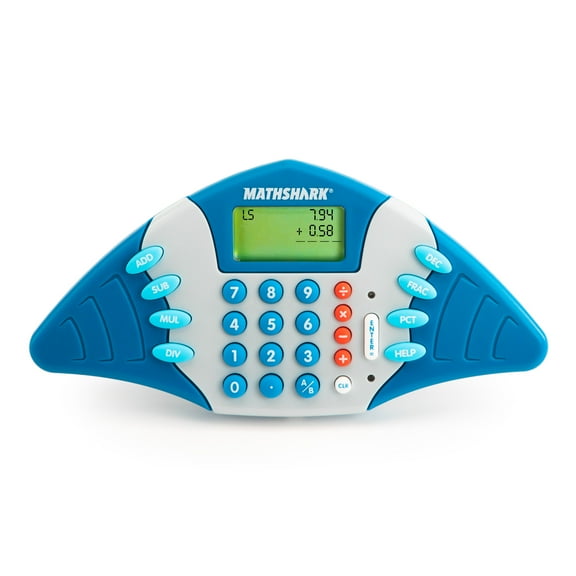
Educational Insights MathShark Electronic Math Game, Electronic Learning Toy, Ages 6+
Key item features
- SPARK MORE LEARNING! Whether you're inside the classroom or teaching at home, these tools can help spark their passion for learning!
- BUILD A STRONG FOUNDATION: Way more fun than flashcards, MathShark quizzes kids at eight different skill levels in addition, subtraction, multiplication, division, fractions, decimals, and percentages, turning math practice into a challenging solo game
- HOW TO PLAY: Just read the question on the screen and punch in the answer – it's that easy! Kids can practice their math facts in the car, airplane, or doctor's office with this portable, handheld quiz game; Requires 2 AA batteries (not included)
- FUN FEATURES: MathShark features a crystal-clear LCD screen that displays problems horizontally and vertically, provides helpful hints when kids get stuck, and converts to a full-function calculator, too
- TIMED GAMES OFFER MOTIVATION: Each math quiz is timed, challenging kids to conquer math facts and beat their own times
- KIDS' GIFT IDEAS: Choose from preschool games, puzzle games, electronic games, sensory toys, and more to find the perfect holiday gifts for boys and girls.
Specs
- Edu focusMath & Counting, Reading & Writing
- Minimum recommended age6 years
- BrandEducational Insights
- FeaturesInteractive
- Power typeBattery
- Battery sizeAA
Reviews summary
Pros
- : Ideal for car trips and small outings due to its size.
- : Combines calculator and learning tool in one device.
- : Offers various subjects and levels for kids of different ages.
- : Ideal for small spaces.
- : Has an intuitive design that is easy to navigate.
How do you want your item?
About this item
Product details
At Educational Insights we've been helping kids learn through play for over 60 years. Our award-winning, best-selling toys and games introduce new interests, unleashing limitless possibilities and passions including Playfoam, Kanoodle, and Brain Bolt.
- SPARK MORE LEARNING! Whether you're inside the classroom or teaching at home, these tools can help spark their passion for learning!
- BUILD A STRONG FOUNDATION: Way more fun than flashcards, MathShark quizzes kids at eight different skill levels in addition, subtraction, multiplication, division, fractions, decimals, and percentages, turning math practice into a challenging solo game
- HOW TO PLAY: Just read the question on the screen and punch in the answer – it's that easy! Kids can practice their math facts in the car, airplane, or doctor's office with this portable, handheld quiz game; Requires 2 AA batteries (not included)
- FUN FEATURES: MathShark features a crystal-clear LCD screen that displays problems horizontally and vertically, provides helpful hints when kids get stuck, and converts to a full-function calculator, too
- TIMED GAMES OFFER MOTIVATION: Each math quiz is timed, challenging kids to conquer math facts and beat their own times
- KIDS' GIFT IDEAS: Choose from preschool games, puzzle games, electronic games, sensory toys, and more to find the perfect holiday gifts for boys and girls.
Specifications
Edu focus
Minimum recommended age
Brand
Features
Warranty
Warranty information
Warnings
State Chemical Disclosure
Similar items you might like
Based on what customers bought
SaveJoy Baby Activity Toy with Music,6 in 1 Learning Toys for Toddlers,Educational Gift for Kids Infants Busy House 6-12 Months $38.59 Was $62.99
 SponsoredNow$3859current price Now $38.59, Was $62.99$62.99You save $24.40You save$24.40
SaveJoy Baby Activity Toy with Music,6 in 1 Learning Toys for Toddlers,Educational Gift for Kids Infants Busy House 6-12 Months
1144.2 out of 5 Stars. 114 reviewsSave with Shipping, arrives tomorrow
15 in 1 Talking Sound Books, 470 Words Learning & Education Kids Toys, Interactive Electronic Audio Books for Boys and Girls Gifts $16.19 Was $35.98
 3 optionsAvailable in additional 3 options$1619current price $16.19, Was $35.98$35.98
15 in 1 Talking Sound Books, 470 Words Learning & Education Kids Toys, Interactive Electronic Audio Books for Boys and Girls Gifts
1164.5 out of 5 Stars. 116 reviewsChuckle & Roar The Pop It! Learning Book for Children Ages 1-4 and up with 3 Modes of Play by Buffalo Games $24.97
 $2497current price $24.97
Chuckle & Roar The Pop It! Learning Book for Children Ages 1-4 and up with 3 Modes of Play by Buffalo Games
2594.6 out of 5 Stars. 259 reviewsEducational Insights Math Whiz Electronic Math Game, Elementary School Learning Toy, Gift for Kids Ages 6 and up $25.59
 $2559current price $25.59
Educational Insights Math Whiz Electronic Math Game, Elementary School Learning Toy, Gift for Kids Ages 6 and up
604.2 out of 5 Stars. 60 reviewsEducational Insights Hot Dots Kindergarten Reading Set, Interactive Workbooks for Kids, Ages 5 $20.51 Was $26.99 $20.51/count
 $2051current price $20.51, Was $26.99$26.99$20.51/count
Educational Insights Hot Dots Kindergarten Reading Set, Interactive Workbooks for Kids, Ages 5
1754.5 out of 5 Stars. 175 reviewsEducational Insights Hot Dots Interactive Workbook for First Grade Kids Age 6 $15.50 Was $22.49
 $1550current price $15.50, Was $22.49$22.49
Educational Insights Hot Dots Interactive Workbook for First Grade Kids Age 6
94.8 out of 5 Stars. 9 reviewsEducational Insights MathShark Electronic Math Game, Children's Learning Toy, Gift for Kids Ages 6 $25.49
 $2549current price $25.49
Educational Insights MathShark Electronic Math Game, Children's Learning Toy, Gift for Kids Ages 6
274.3 out of 5 Stars. 27 reviewsSpeak and Spell - The Original Spelling Computer $30.90
 $3090current price $30.90
Speak and Spell - The Original Spelling Computer
1904.4 out of 5 Stars. 190 reviewsEducational Insights Hot Dots Let's Learn Preschool Math Workbook with Interactive Pen, Kids 3 $20.24
 $2024current price $20.24
Educational Insights Hot Dots Let's Learn Preschool Math Workbook with Interactive Pen, Kids 3
614.7 out of 5 Stars. 61 reviewsStoryPhones with 4 Educational Screen Free Audio Disks: For Ages 3-12 Reading Learning $21.99
 $2199current price $21.99
StoryPhones with 4 Educational Screen Free Audio Disks: For Ages 3-12 Reading Learning
Educational Phone Toy, Touch and Learn Smart Device with Music and Lights, Early Learning Machine for Ages 3 Years, ABC Songs, Numbers, Animal Sounds $12.81
 $1281current price $12.81
Educational Phone Toy, Touch and Learn Smart Device with Music and Lights, Early Learning Machine for Ages 3 Years, ABC Songs, Numbers, Animal Sounds
15 out of 5 Stars. 1 reviewsLearning Resources Minute Math Electronic Flash Card Classroom Must Haves $19.99 Was $29.99
 $1999current price $19.99, Was $29.99$29.99
Learning Resources Minute Math Electronic Flash Card Classroom Must Haves
803.4 out of 5 Stars. 80 reviewsClearance Educational Learning Tablet Interactive Light Up Sound Toy Alphabet Numbers Math Spelling Quiz Story Music LED Activity Electronic Device Portable Training Tool for 3-4 Years 4-5 Years $8.42 Was $9.42
Clearance

 $842current price $8.42, Was $9.42$9.42
Educational Learning Tablet Interactive Light Up Sound Toy Alphabet Numbers Math Spelling Quiz Story Music LED Activity Electronic Device Portable Training Tool for 3-4 Years 4-5 Years
23.5 out of 5 Stars. 2 reviewsVTech Toddler 1-Pack Learning Friends Style Plastic Interactive Learning Book Bilingual English & French 18-48 Months $43.00
 $4300current price $43.00
VTech Toddler 1-Pack Learning Friends Style Plastic Interactive Learning Book Bilingual English & French 18-48 Months
2054.8 out of 5 Stars. 205 reviewsRechargeable Learning Toy Phone, Educational Touch Music Device with LED Lights, English Learning Machine for 3-4 Years, Early Education Device with Multiple Modes, Interactive Light-Up Toy $5.70


 $570current price $5.70
Rechargeable Learning Toy Phone, Educational Touch Music Device with LED Lights, English Learning Machine for 3-4 Years, Early Education Device with Multiple Modes, Interactive Light-Up Toy
Clearance Learning Laptop Toy with Projection Mouse Erasable Brush ABC Numbers Music Educational for 3-8 Years Interactive Play Gift $7.00 Was $8.41
Clearance
 $700current price $7.00, Was $8.41$8.41
Learning Laptop Toy with Projection Mouse Erasable Brush ABC Numbers Music Educational for 3-8 Years Interactive Play Gift
15 out of 5 Stars. 1 reviewsLevel Up and Learn Controller, Blue $25.99
 $2599current price $25.99
Level Up and Learn Controller, Blue
English Alphabet Reading Book Finger Touch Audio Toy for Early Education Letter Recognition A-Z with Vocabulary for 2-5 Years Interactive Learning Tool $9.95

 $995current price $9.95
English Alphabet Reading Book Finger Touch Audio Toy for Early Education Letter Recognition A-Z with Vocabulary for 2-5 Years Interactive Learning Tool
English Number Reading Book Finger Touch Audio Toy for Early Learning Number Recognition 1-20 with Vocabulary for 2-5 Years Interactive Sound Book $9.95
 $995current price $9.95
English Number Reading Book Finger Touch Audio Toy for Early Learning Number Recognition 1-20 with Vocabulary for 2-5 Years Interactive Sound Book
Smart Learning Laptop with Bilingual Phonics Training Educational Storytelling for Early Cognitive Development $11.78
$1178current price $11.78Smart Learning Laptop with Bilingual Phonics Training Educational Storytelling for Early Cognitive Development
23 out of 5 Stars. 2 reviews

Customer ratings & reviews
Reviews summary
Pros
- : Ideal for car trips and small outings due to its size.
- : Combines calculator and learning tool in one device.
- : Offers various subjects and levels for kids of different ages.
- : Ideal for small spaces.
- : Has an intuitive design that is easy to navigate.
Showing 1-3 of 36 reviews
Math Shark for swimmingly smart kids
Having been a teacher for 23 years and knowing the importance of learning your math facts, this game was a must for my grandkids. This Math Shark gives your kids practice in learning all 4 types of math facts, decimals, and percentages in a fun way and efficient way. This game can be used by teachers as an assessment for students and would be great in a learning center. It gives you their scores and shows their improvement. It recycles the problems the student misses and has them practice those more than others. It can be played in a silent mode or with sounds. It can be used as a calculator for student or adult use and can also be used as a learning game. It has increased levels of proficiency as they master their skills. A green light comes on if their answer is correct and red if they miss it. If they do miss it there is a help button that they can push. It then displays 2 different ways to do the problem, which accommodates different learning styles. It is rated for grades 1+ and ages 6+. Which makes sense because you have to be a good reader to follow the directions printed on the screen. I do however think if you demonstrated it to a younger child they would still be able to do it easily once they see how to use it. Kids are so technological savvy nowadays that I don’t see this as a problem. The only problem I see with this game is the problems read left to right instead of above and below. This is a great learning tool for this generation.
Excellent device
I choose the Educational Insights Math Shark because I thought it would be a wonderful device to use to help my daughter with her arithmetic. I was not disappointed by the product at all. Once we started using the Educational Insights Math Shark, it has been nothing but a blessing for my daughter. She enjoys using to help with her homework and also when she is asked to pick something to do for awhile during the time I am making dinner or lunch. She'll go and get the Educational Insights Math Shark. She totally loves it. What I like most, as a parent, about the Educational Insights Math Shark is that it is not limited to just one age level or math level. The device will grow with my daughter as we use it in our home to help her. And, as a parent who has not had to do math for years, it has been great for me to refresh my math skills so that I am able to help her more. I find it fun to play with myself. That is another great point, we not only see it as something to use for and educational supporter but my daughter also sees it as something fun to play with not only something to help her with her homework and studies.
Be Rewarded for Learning Math
I'm doing a review on the MathShark. It is for ages six and up. It will help you practice with your adding, subtraction, multiplying, dividing, decimals, fractions and percents. It has a button for each one of these. After you turn it on it will tell you what to do on the lcd screen. Let's do it! 1. Turn on. 2. It says MathShark. 3. Then it say Sounds. It will ask you if you want the sound on or off. Choose Enter if you want the sound on and Clear if you want the sound off. I'm going to click the Enter button to hear the sounds. 4. Then it says to Choose a skill. If will go through all of your options. Choose add, sub, mul, div, dec, frac, pct. These are the abbreviations of adding, subtraction, multiply, division, decimal, fraction and percent. I'm going to press the button Add. 5. Then it reads Add, Press 1-8 for level. There are 8 skill levels. I'm going to choose the number one because it is the easiest and then hit enter. 6. An example shows up with 1 + 2 = 3. 7. Then it reads Start ? with a yes or no. Click on enter for yes and Clear for no. I'm going to click enter. 8. In the left hand corner it says L 1. That means Level One. To the right is 0 + 2. I'm going to press the answer as 2. The Green light comes on with some sort of sound. That tells you it is the correct answer. 9. It has changed to the next screen with a different adding problem. It says 1 + 2. I'm going to press 1 and see what happens because this is the wrong answer. The Red light flashes on and makes a sound. This is to tell you it was the wrong answer. Then the next problem shows up. It continues in this way. It sounds like a lot of steps but it's really not. There is one thing that parents will really like about this toy. The two sounds it make are very low volume. I can see kids really liking and playing with this toy. To me it looks like it is in the shape of a video game which makes it more appealing. It is very easy to learn. I forgot to tell you that there is a button that you press to choose Calculator or Learning. You press the top or bottom to choose which one. The calculator works the same as any other calculator. The sounds work with it also. I highly recommend this product. Give you kids a chance to lean Math early so they have something to build on.
