

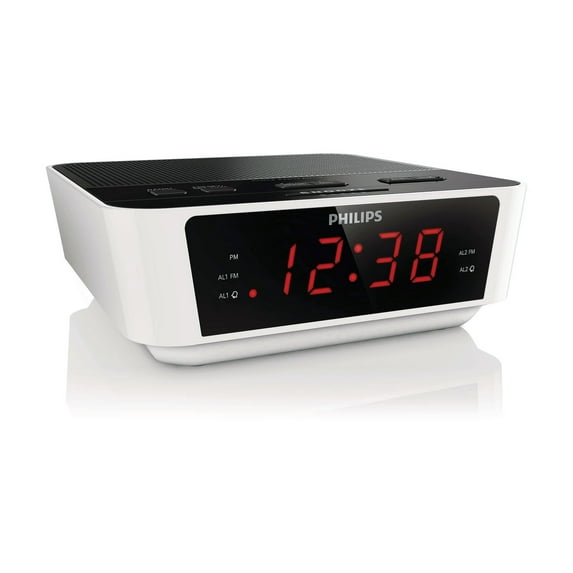
Hero image 0 of Phillips Digital Tuning Clock Radio, 0 of 1
Phillips Digital Tuning Clock Radio
(No ratings yet)
Key item features
Start your day, your way!
This stylish Philips clock radio looks nice and wakes you in time. It has built-in FM radio and gives you a choice of waking up to your favorite station or the buzzer.
Wake up to sounds from your favorite radio station or a buzzer. Simply set the alarm on your Philips Clock radio to wake you with the radio station you last listened to or choose to wake up with a buzzer sound. When the wake up time is reached, your Philips Clock radio will automatically turn on that radio station or trigger the buzzer to sound.
Digital FM radio offers you additional music options to your music collection on your Philips audio system. Simply tune into the station that you want to preset, press and hold the preset button to memorize the frequency. With preset radio stations that can be stored, you can quickly access your favorite radio station without having to manually tune the frequencies each time.
Start your day right by waking up gently to a gradually escalating alarm volume. Normal alarm sounds with a preset volume are either too low to wake you up or are so uncomfortably loud that you are rudely jolted awake. Choose to wake up to your favorite music, radio station or buzzer alarm. Gentle wake's alarm volume gradually increases from subtly low to reasonably high in order to gently rouse you.
To counter oversleeping, the Philips Clock radio has a snooze feature. Should the alarm ring and you wish to continue sleeping a bit longer, simply press the Repeat Alarm button once and go back to sleep. Nine minutes later the alarm will ring again. You can continue to press the Repeat Alarm button every nine minutes until you turn off the alarm altogether.
Sleep timer lets you decide how long you want to listen to music, or a radio station of your choice, before falling asleep. Simply set a time limit (up to 1hour) and choose a radio station to listen to while you drift off to sleep. The Philips radio set will continue to play for the selected duration and then automatically switch to a power-efficient and silent stand-by mode. Sleep Timer lets you fall asleep to your favourite radio DJ without counting sheep, or worrying about wasting power
The Philips audio system comes with two alarm times. Set one alarm time to wake you up and the other time to wake up your partner.
This stylish Philips clock radio looks nice and wakes you in time. It has built-in FM radio and gives you a choice of waking up to your favorite station or the buzzer.
Wake up to sounds from your favorite radio station or a buzzer. Simply set the alarm on your Philips Clock radio to wake you with the radio station you last listened to or choose to wake up with a buzzer sound. When the wake up time is reached, your Philips Clock radio will automatically turn on that radio station or trigger the buzzer to sound.
Digital FM radio offers you additional music options to your music collection on your Philips audio system. Simply tune into the station that you want to preset, press and hold the preset button to memorize the frequency. With preset radio stations that can be stored, you can quickly access your favorite radio station without having to manually tune the frequencies each time.
Start your day right by waking up gently to a gradually escalating alarm volume. Normal alarm sounds with a preset volume are either too low to wake you up or are so uncomfortably loud that you are rudely jolted awake. Choose to wake up to your favorite music, radio station or buzzer alarm. Gentle wake's alarm volume gradually increases from subtly low to reasonably high in order to gently rouse you.
To counter oversleeping, the Philips Clock radio has a snooze feature. Should the alarm ring and you wish to continue sleeping a bit longer, simply press the Repeat Alarm button once and go back to sleep. Nine minutes later the alarm will ring again. You can continue to press the Repeat Alarm button every nine minutes until you turn off the alarm altogether.
Sleep timer lets you decide how long you want to listen to music, or a radio station of your choice, before falling asleep. Simply set a time limit (up to 1hour) and choose a radio station to listen to while you drift off to sleep. The Philips radio set will continue to play for the selected duration and then automatically switch to a power-efficient and silent stand-by mode. Sleep Timer lets you fall asleep to your favourite radio DJ without counting sheep, or worrying about wasting power
The Philips audio system comes with two alarm times. Set one alarm time to wake you up and the other time to wake up your partner.
Item Dimensions: 2.28" x 5.39" x 6.45"
Item Weight: 2.00lbs
Specs
- FeaturesDual Alarm
- Power typeCorded Electric
- Alarm clock typeClock Radios
- DisplayLED
- BrandPhillips'
- ShapeSquare
Current price is USD$21.35
Price when purchased online
Out of stock
How do you want your item?
Out of stock
About this item
Product details
Wake up to your favorite music with the Phillips Digital Tuning Clock Radio.
Start your day, your way!
This stylish Philips clock radio looks nice and wakes you in time. It has built-in FM radio and gives you a choice of waking up to your favorite station or the buzzer.
Wake up to sounds from your favorite radio station or a buzzer. Simply set the alarm on your Philips Clock radio to wake you with the radio station you last listened to or choose to wake up with a buzzer sound. When the wake up time is reached, your Philips Clock radio will automatically turn on that radio station or trigger the buzzer to sound.
Digital FM radio offers you additional music options to your music collection on your Philips audio system. Simply tune into the station that you want to preset, press and hold the preset button to memorize the frequency. With preset radio stations that can be stored, you can quickly access your favorite radio station without having to manually tune the frequencies each time.
Start your day right by waking up gently to a gradually escalating alarm volume. Normal alarm sounds with a preset volume are either too low to wake you up or are so uncomfortably loud that you are rudely jolted awake. Choose to wake up to your favorite music, radio station or buzzer alarm. Gentle wake's alarm volume gradually increases from subtly low to reasonably high in order to gently rouse you.
To counter oversleeping, the Philips Clock radio has a snooze feature. Should the alarm ring and you wish to continue sleeping a bit longer, simply press the Repeat Alarm button once and go back to sleep. Nine minutes later the alarm will ring again. You can continue to press the Repeat Alarm button every nine minutes until you turn off the alarm altogether.
Sleep timer lets you decide how long you want to listen to music, or a radio station of your choice, before falling asleep. Simply set a time limit (up to 1hour) and choose a radio station to listen to while you drift off to sleep. The Philips radio set will continue to play for the selected duration and then automatically switch to a power-efficient and silent stand-by mode. Sleep Timer lets you fall asleep to your favourite radio DJ without counting sheep, or worrying about wasting power
The Philips audio system comes with two alarm times. Set one alarm time to wake you up and the other time to wake up your partner.
This stylish Philips clock radio looks nice and wakes you in time. It has built-in FM radio and gives you a choice of waking up to your favorite station or the buzzer.
Wake up to sounds from your favorite radio station or a buzzer. Simply set the alarm on your Philips Clock radio to wake you with the radio station you last listened to or choose to wake up with a buzzer sound. When the wake up time is reached, your Philips Clock radio will automatically turn on that radio station or trigger the buzzer to sound.
Digital FM radio offers you additional music options to your music collection on your Philips audio system. Simply tune into the station that you want to preset, press and hold the preset button to memorize the frequency. With preset radio stations that can be stored, you can quickly access your favorite radio station without having to manually tune the frequencies each time.
Start your day right by waking up gently to a gradually escalating alarm volume. Normal alarm sounds with a preset volume are either too low to wake you up or are so uncomfortably loud that you are rudely jolted awake. Choose to wake up to your favorite music, radio station or buzzer alarm. Gentle wake's alarm volume gradually increases from subtly low to reasonably high in order to gently rouse you.
To counter oversleeping, the Philips Clock radio has a snooze feature. Should the alarm ring and you wish to continue sleeping a bit longer, simply press the Repeat Alarm button once and go back to sleep. Nine minutes later the alarm will ring again. You can continue to press the Repeat Alarm button every nine minutes until you turn off the alarm altogether.
Sleep timer lets you decide how long you want to listen to music, or a radio station of your choice, before falling asleep. Simply set a time limit (up to 1hour) and choose a radio station to listen to while you drift off to sleep. The Philips radio set will continue to play for the selected duration and then automatically switch to a power-efficient and silent stand-by mode. Sleep Timer lets you fall asleep to your favourite radio DJ without counting sheep, or worrying about wasting power
The Philips audio system comes with two alarm times. Set one alarm time to wake you up and the other time to wake up your partner.
Item Dimensions: 2.28" x 5.39" x 6.45"
Item Weight: 2.00lbs
info:
We aim to show you accurate product information. Manufacturers, suppliers and others provide what you see here, and we have not verified it.
Specifications
Features
Dual Alarm
Power type
Corded Electric
Alarm clock type
Clock Radios
Display
LED
Warranty
Warranty information
Y
Please be aware that the warranty terms on items offered for sale by third party Marketplace sellers may differ from those displayed in this section (if any). To confirm warranty terms on an item offered for sale by a third party Marketplace seller, please use the 'Contact seller' feature on the third party Marketplace seller's information page and request the item's warranty terms prior to purchase.
Please be aware that the warranty terms on items offered for sale by third party Marketplace sellers may differ from those displayed in this section (if any). To confirm warranty terms on an item offered for sale by a third party Marketplace seller, please use the 'Contact seller' feature on the third party Marketplace seller's information page and request the item's warranty terms prior to purchase.
Customer ratings & reviews
0 ratings|0 reviews
This item does not have any reviews yet
