
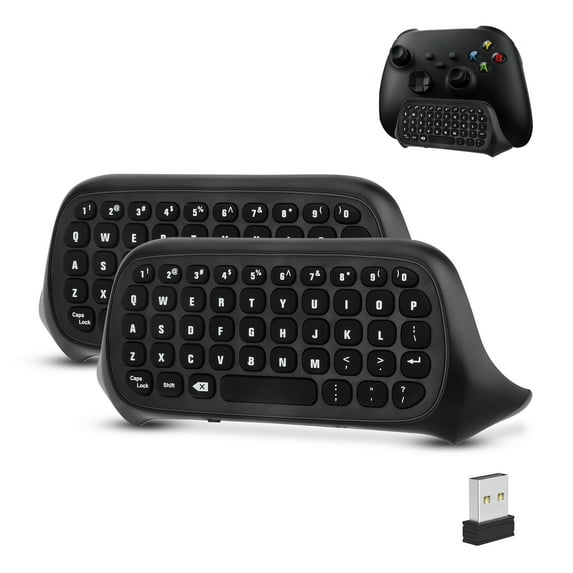
Wireless Game Controller Keyboards Fit for Xbox Series S/X, Xbox One/S, TSV 2.4G Mini QWERTY Keyboard Gaming Message Chatpad with USB Receiver, 3.5mm Audio Jack
Hero image 0 of Wireless Game Controller Keyboards Fit for Xbox Series S/X, Xbox One/S, TSV 2.4G Mini QWERTY Keyboard Gaming Message Chatpad with USB Receiver, 3.5mm Audio Jack, 0 of 8

Wireless Game Controller Keyboards Fit for Xbox Series S/X, Xbox One/S, TSV 2.4G Mini QWERTY Keyboard Gaming Message Chatpad with USB Receiver, 3.5mm Audio Jack

4.2 stars out of 59 reviews
(4.2)|
59 ratings

Key item features

TSV 2.4Ghz Wireless Gaming Chat Board Fit for Xbox Series S/X, Xbox One/S Controller, 2PCS:
  • Wireless Chatpad Message Keyboard: sensitive key response, fast and accurate input, and improved game interaction efficiency
  • 2.4G Wireless Technology: Ensures stable and reliable signal transmission, allowing you to say goodbye to the constraints of cables and enjoy the fun of games
  • QWERTY Keyboard Layout: For typing, emailing, texting, and entering codes, perfect for group chats while playing games
  • Dual Audio Jack: Original earphone jack and 3.5mm Audio jack port for Xbox Series S/X, Xbox One/S
  • Portable Mini Wireless Gaming Keyboard: Provides clear audio output and input, allowing you to communicate with your teammates more smoothly
  • Ergonomic Design: Mini Game Keyboard Fit for Xbox Series S/X/One S allows you to stay comfortable and not tired during long-term games
  • Power Connection: 3.5mm audio jack for Xbox Series S/X/One S or original headset jack for Xbox One
  • Package Included: 2 x Wireless Controller Keyboard; 2 x USB Receiver; 2 x User Manual
    Material: ABS + Silicone
    Working Current (Press the buttons): 0.8mA
    Sleeping Current (No button pressing): 8uA

  • User Instructions:
    1. Connect the Xbox One console power first, then connect the HDMI cable to the display device, turn on the Xbox One console power, and the corresponding power indicator will light up.
    2. Connect the Xbox One controller to the Xbox One console (if you don’t understand, read the console manual).
    3. Align the two connecting posts of the keyboard with the holes of the controller, align the Xbox One headphone head on the seat behind the wireless controller, and then gently and gently push the keyboard towards the controller until it is stuck.
    4. The Xbox One controller needs to close the 3.5 headphone plug; the Xbox Series X/S and Xbox One S need to open the 3.5 headphone plug.
    5. When the controller is connected to the machine, plug the 2.4G receiver into any USB port of the Xbox One host, and press the pairing button on the back of the wireless controller keyboard within 15 seconds. The blue light of the keyboard will flash, and the wireless controller keyboard will automatically pair, and go out indicating that the keyboard can work normally. (Note: ①When pairing, the distance between the handle keyboard and the receiver head should be within 0.5 meters; if the pairing fails, repeat this step. ②If there is no successful pairing, the blue pairing light will be on for 12 seconds and it will automatically turn off, indicating that the keyboard enters the sleep power saving mode).
    6. The Portable Mini Wireless Gaming Keyboard Chatpad and the 2.4G receiver only need to be paired once. For subsequent use, you only need to turn on the host to wake up the handle to automatically connect and use it directly.
    7. When the Xbox One controller is in sleep mode, this Wireless Chatpad Gaming Keypad will also go into sleep mode. Press the "X" button on the Xbox One controller to wake up the controller and keyboard.
Price when purchased online
Not Available

How do you want your item?

How do you want your item?
Not available
Report an issue with this seller

About this item

Product details

Specifications

Warnings

Customer ratings & reviews

4.2 out of 5 stars
stars59 ratings25 reviews
How item rating is calculated

Customer images

Filtered and sorted results would be available on the new 'Customer ratings & reviews' page.
Sort by |

Showing 1-3 of 25 reviews

Apr 3, 2025
ronni
Item details
Color: 1pcs
Sold byWOWPartsDelivered byWalmart
5 out of 5 stars review

Verified Purchase

So thankful for this key pad

I bought this because I dropped my Xbox controller and the stick you use to move would jump when trying to put my password in. With this I can just type it in and it's so much easier and saved money from having to get a new controller. I was a little confused with putting it on my controller. It like didn't fit, but once I realized the piece that you needed to put in the Xbox console was blocking it. It went right into place.

Helpful?7A303FXRF013505453418
Mar 14, 2025
Nicholas
Item details
Color: 2pcs
Sold byWOWPartsDelivered byWalmart
5 out of 5 stars review

Verified Purchase

A Useful Tool

It does what it's needed for. I play minecraft often, and hate having to use the xbox menu keyboard to type commands in, so I got this. It IS missing a few things. Like for instance, it doesn't have a “-“ symbol on it. If you're using it for minecraft like me, then you'll still need to use the menu keyboard to type that symbol, which is a bit of a hassle, but manageable. Overall, good product. Would buy again (and probably will once mine breaks)

Incentivized Review
Helpful?7A303FXRF013505453418
Jan 27, 2025
Janessa
Item details
Color: 1pcs
Sold byWOWPartsDelivered byWalmart
5 out of 5 stars review

Verified Purchase

Chat pad for Xbox

I love this chat pad.. I use it all the time.. when getting a chat pad you just have to find the right one.. and Make sure it will connect to your controller and you can talk to your friends.. it's always nice to have.

Helpful?7A303FXRF013505453418
