

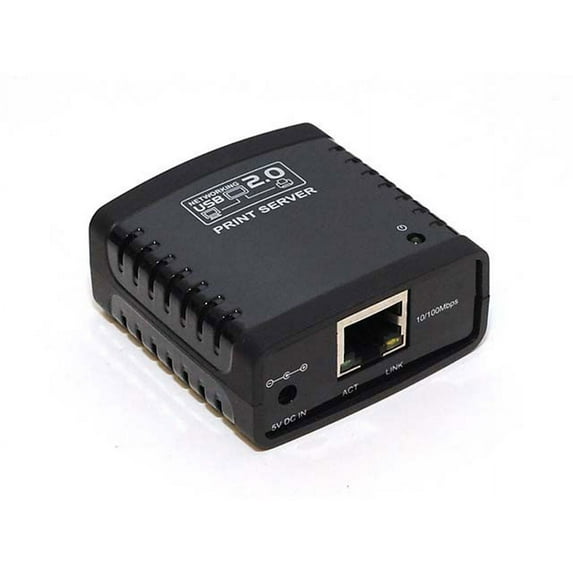
Networking USB 2.0 Print Server - Black
Key item features
- Easily connect your USB printer to a network Allows multiple computers to share one USB printer on the network
- Print from any computer on your network
- Supports DHCP Client and multiple network protocols 10Base-T / 100Base-TX auto-sensing
- Supports Telnet and Web Management software
- NOTE: While the print functions on a compatible multifunction printer may work, other functions such as scanning may not. Compatible Operating Systems: Windows XP/Vista/7 (32-bit and 64-bit)
Specs
- CompatibilityMonoprice
- WirelessEthernet, Fast Ethernet
- Transfer rate100 Mbps
- Number of ports1
- BrandMonoprice
- Internal/externalExternal
- Free shipping
 Free 30-day returns
How do you want your item?


About this item
Product details
- Easily connect your USB printer to a network Allows multiple computers to share one USB printer on the network
- Print from any computer on your network
- Supports DHCP Client and multiple network protocols 10Base-T / 100Base-TX auto-sensing
- Supports Telnet and Web Management software
- NOTE: While the print functions on a compatible multifunction printer may work, other functions such as scanning may not. Compatible Operating Systems: Windows XP/Vista/7 (32-bit and 64-bit)
Specifications
Compatibility
Wireless
Transfer rate
Number of ports
Warranty
Warranty information
Please be aware that the warranty terms on items offered for sale by third party Marketplace sellers may differ from those displayed in this section (if any). To confirm warranty terms on an item offered for sale by a third party Marketplace seller, please use the 'Contact seller' feature on the third party Marketplace seller's information page and request the item's warranty terms prior to purchase.
Warnings
 WARNING: WARNING: This product can expose you to chemicals including Phthalates, which is known to the State of California to cause cancer and birth defects or other reproductive harm. For more information go to www.P65Warnings.ca.gov
Similar items you might like
Based on what customers bought
Transform Your Usb Printer Into A Wifi Network Printer With Print Server Adapter Ideal For Home Office Use $25.60
 $2560current price $25.60
Transform Your Usb Printer Into A Wifi Network Printer With Print Server Adapter Ideal For Home Office Use
QHUDLV BBASILIYSD Hot Professional Mini NP330 Network USB 2.0 Print Server WirelessNetwork/WIFI/BT/WIFI Version cloud printing $27.56
$2756current price $27.56QHUDLV BBASILIYSD Hot Professional Mini NP330 Network USB 2.0 Print Server WirelessNetwork/WIFI/BT/WIFI Version cloud printing
Print Server Wired 3-port USB Printer Sharer For Mobile Computer Phone Pri $46.49
 $4649current price $46.49
Print Server Wired 3-port USB Printer Sharer For Mobile Computer Phone Pri
Portable NAS Printer Server Phone Backup Tool Wireless TF Memory Card Reader TF Card LAN Sharer US Plug,1 x Wireless Print Server 1set Charger,black $47.99
 $4799current price $47.99
Portable NAS Printer Server Phone Backup Tool Wireless TF Memory Card Reader TF Card LAN Sharer US Plug,1 x Wireless Print Server 1set Charger,black
IOGEAR USB 2.0 Print Server, 1-Port, Gray $67.93
 $6793current price $67.93
IOGEAR USB 2.0 Print Server, 1-Port, Gray
173.6 out of 5 Stars. 17 reviewsClearance USB Networking Printer Server Computer Sharing Print RJ45 Print Server Device Sharer $37.13 Was $41.72
Clearance $3713current price $37.13, Was $41.72$41.72
USB Networking Printer Server Computer Sharing Print RJ45 Print Server Device Sharer
NP330 Network Print Server One-to-many Server Bluetooth Wireless Server Print C3L0 $26.15
 $2615current price $26.15
NP330 Network Print Server One-to-many Server Bluetooth Wireless Server Print C3L0
JetDirect 150X Print Server $39.99
 $3999current price $39.99
JetDirect 150X Print Server
1PCS NP330 Network USB 2.0 Print Server USB2.0 Mini Printer Server 100Mbps RJ45 Connection for Androids Phones US Plug $29.51
 $2951current price $29.51
1PCS NP330 Network USB 2.0 Print Server USB2.0 Mini Printer Server 100Mbps RJ45 Connection for Androids Phones US Plug
StarTech 1-Port USB Wireless N Network Print Server w/ Ethernet Port $86.80
 $8680current price $86.80
StarTech 1-Port USB Wireless N Network Print Server w/ Ethernet Port
233.2 out of 5 Stars. 23 reviewsREADY STOCK NP330 Network Print Server One-to-many Wireless Print Server Server Bluetooth L5A8 R5H7 F0P7 $28.29
 $2829current price $28.29
READY STOCK NP330 Network Print Server One-to-many Wireless Print Server Server Bluetooth L5A8 R5H7 F0P7
11 out of 5 Stars. 1 reviewsOffice Networking Print Server Sharing Computer Sharing USB Printer ServerW1re1essUSBW1re1essNetworking Printer Server Computer Sharing Print Sharing RJ45 Print $58.11
 $5811current price $58.11
Office Networking Print Server Sharing Computer Sharing USB Printer ServerW1re1essUSBW1re1essNetworking Printer Server Computer Sharing Print Sharing RJ45 Print
Office Networking Print Server Sharing Computer USB Printer Server Networking Device RJ45 $41.21
 $4121current price $41.21
Office Networking Print Server Sharing Computer USB Printer Server Networking Device RJ45
Clearance USB Wireless Print Server 10/100Mbps Convert Printer To Wireless WiFi Ethernet Networking Printer Sharing Device $41.51 Was $49.27
Clearance $4151current price $41.51, Was $49.27$49.27
USB Wireless Print Server 10/100Mbps Convert Printer To Wireless WiFi Ethernet Networking Printer Sharing Device
USB Wireless Networking Printer Server Computer Sharing Print RJ45 Print Server Device Sharer $45.21
$4521current price $45.21USB Wireless Networking Printer Server Computer Sharing Print RJ45 Print Server Device Sharer
Yammee 10/100Mbps Wireless Networking Printer Server Printer USB Device Sharer Computer Sharing Print Sharing RJ45 Print Server $37.97
 $3797current price $37.97
Yammee 10/100Mbps Wireless Networking Printer Server Printer USB Device Sharer Computer Sharing Print Sharing RJ45 Print Server
3 Usb Ports Network Print Server Np332 Multi-interface Network Wifi Server Server Print Support J1x8 Bt40 Connection $40.24 Was $45.40
 $4024current price $40.24, Was $45.40$45.40
3 Usb Ports Network Print Server Np332 Multi-interface Network Wifi Server Server Print Support J1x8 Bt40 Connection
PLGEBR Print Server Transform Your USB Printer into a WiFi Network Printer Port 2 Adapter C Server Print USB Type $27.56
$2756current price $27.56PLGEBR Print Server Transform Your USB Printer into a WiFi Network Printer Port 2 Adapter C Server Print USB Type
Office Networking Print Server Sharing Computer USB Printer Server Wireless Networking Device RJ45 $39.30
 $3930current price $39.30
Office Networking Print Server Sharing Computer USB Printer Server Wireless Networking Device RJ45
StarTech.com StarTech.com 1-Port Wireless N USB 2.0 Network Print Server - 10/100 Mbps Ethernet USB Printer Server Adapter - Windows 10 - 802.11 b/g/n (PM1115UW) $116.59
 $11659current price $116.59
StarTech.com StarTech.com 1-Port Wireless N USB 2.0 Network Print Server - 10/100 Mbps Ethernet USB Printer Server Adapter - Windows 10 - 802.11 b/g/n (PM1115UW)
Customer ratings & reviews
Filtered and sorted results would be available on the new 'Customer ratings & reviews' page.
Showing 1-3 of 22 reviews
Works with Beeprt BY-426 Label Printer
Just wanted to post here so people know that this can be used for label printers. I made it work with Beeprt BY-426 thermal printer. I got the driver from Seagull. Connect everything and start driver installation. it asks for the connection type and you have to select LAN and then create a new TCP/IP port as per Mark L's review above. Once those steps are complete, you just continue to finish the installation and the printer should work fine. Just as others have mentioned, reserve the IP, disable DHCP from print server web portal and you should be all set.
Works Reliably / Configure it Manually / Don't Use the Software CD
I set up this print server to work with a Brother HL-2240 printer. Although my model is not in the list of compatible printers, the print server has worked reliably for me. First, connect everything up as follows. Printer -> (USB cable) -> (Print Server) -> (wired network cable) -> Router The print server will request a dynamic IP address from the DHCP server within your router. For reliable printing to this print server, it is best to configure your router to always provide the same dynamic IP address to the print server. This is done by creating an address reservation in the DHCP settings of your router. Each router model and manufacturer will have its own way of doing this, but the procedure is generally similar. Consult your router's user manual to determine the exact steps. Log into your router and look for a list of devices that have requested an IP address. Within that list, you should see a device with a "MAC" that begins with 803F5D (it may be listed as 80:3F:5D or 80-3F-5D in your router). This is the print server. For the next step, write down the print server's full 12-character MAC as well as the IP address it was assigned by your router. Now, create an Address Reservation in the DHCP settings, which tells the router to always assign that same IP address to that same MAC. (If your web interface provides a box for specifying the device name or description, you can use something generic like "printer" or whatever you like.) You will probably need to click a "Save" or "Apply" button in the router web page to save your change. Next, unplug the print server's power plug. Wait a few seconds, then plug it back in. Wait a minute, then refresh the DHCP settings web page on your router to confirm that the print server is listed and has the same IP address. I should point out that this print server provides 2 different protocols that computers can use to print to it -- Bonjour and LPR. I have found Bonjour to be unreliable for me. Therefore, I have opted to use LPR, which works best when the print server is assigned a reserved IP address. It is assumed that you previously used this printer as a local USB printer, attached directly to your computer. If so, your computer should already have the printer driver installed. If not, you may need to download and install the printer driver from the manufacturer's web site, before proceeding. In Mac OS, add the printer using the LPR protocol. 1. Go into "System Preferences" > "Printers & Scanners". 2. At the bottom of the list of printers, click the "+" icon. 3. On the Add screen, click "IP". 4. In the "Address" field, enter the IP address of the print server. (This will be the DHCP reserved IP address you configured above.) 5. In the "Protocol" drop-down list, click "Line Printer Daemon – LPD". 6. Change the "Name" field to something more descriptive of your printer (e.g. Brother HL-2240 LPR). 7. I left the Queue and Location fields empty. 8. In the "Use" drop-down list, select the driver for the printer attached to the print server. You will probably want to choose "Select Software", then select the manufacturer and model of printer attached to the print server, then click OK. 9. Finally, click the "Add" button. To test the printer you have just added, select it in the list of Printers, click "Options & Supplies", choose the "Utility" tab, click "Print Test Page", then click "OK". If all went well, a test page should print. Some additional tips and bits of information follow. I did NOT install any software from the CD that came with the print server. The software is not required on MacOS. The user manual that came bundled with the print server is pretty much useless. I think the manual tries to cover both this "USB LPR Print Server" (Monoprice #5342) and the "USB Server - 4 USB Devices" (Monoprice #5344), but it's mostly written for the latter (#5344). And so, the manual will probably confuse most people. This print server makes only the printing function of a printer accessible over the network. If your printer has a built-in scanner, the scan function will NOT be accessible over the network. The print server does NOT make your printer into a wireless printer. The print server must be physically connected into the back of your router with an Ethernet cable. However, computers that connect to your network over WiFi will be able to print to the printer over wifi. This print server is tiny (2" x 2"). I keep my Brother HL-2240 turned on all the time, but it goes into a low-power sleep mode after about 10 minutes. I have NOT had any issues with the printer waking up from sleep mode for printing. Some caveats: I only send small print jobs to this print server (approximately 20 pages or less). I cannot say how well it performs with large print jobs (e.g. 100 pages). Only one user accesses this print server at a given time. I have not tried to send multiple print jobs from multiple users at the same time.
Easy installation and saved my old printer
I had an older Brother HL-L2320D laser printer that I needed to convert to a network printer to use with my Windows 10 computer. I followed the instructions and used the included installation software. It took me about 15 minutes to make sure that all the pieces were talking to each other, and the printer has worked flawlessly as a wireless printer ever since. This Monoprice Networking Print Server helped me to upgrade a perfectly good printer.
