

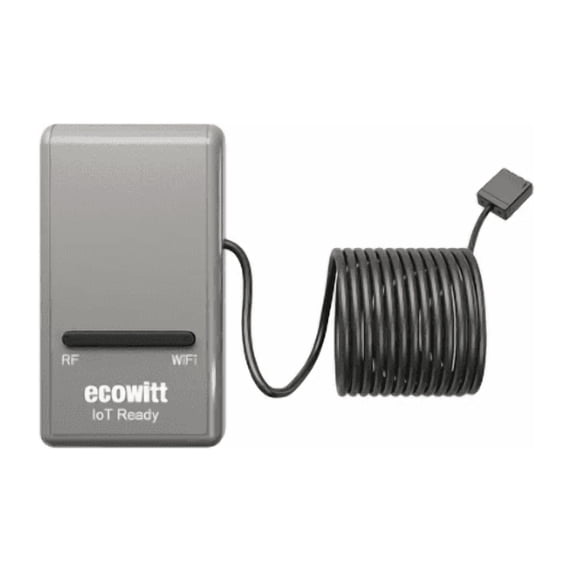
Hero image 0 of ECOWITT GW1200 IoT Wi-Fi Gateway with Built-in 3-in-1 Temperature, Humidity and Barometric Pressure Sensor, 0 of 7
ECOWITT GW1200 IoT Wi-Fi Gateway with Built-in 3-in-1 Temperature, Humidity and Barometric Pressure Sensor
(No ratings yet)
Key item features
- ECOWITT Wi-Fi Gateway Weather Station: With built-in temperature, humidity, and barometric pressure 3-in-1 sensor, the Ecowitt GW1200 Wi-Fi gateway could not only be an indoor weather station but also be a Wi-Fi gateway to connect to Ecowitt all developed sensors/subdevices. An additional 1.5m/3ft USB extension cable for powering the gateway, allowing you to measure more accurate values at any location.
- IOT Ready: Ecowitt GW1200 Wi-Fi gateway could not only pair with all ecowitt-developed sensors and upload their data to the Internet after Wi-Fi configuration but also could pair with ecowitt smart control devices, such as WFC01 watering timer and AC1100. After Wi-Fi configuration, you can control these smart control devices on the Ecowitt APP, realizing APP control watering timers and switches.
- Various Sensors Supported: GW1200 WiFi weather station gateway can collect sensor data from various Ecowitt-developed sensors(sold separately), such as WN32 outdoor temperature and humidity sensor, WH40 rain gauge sensor, WS68 wireless anemometer, WS90 outdoor sensor array, up to 8 WN31 thermo-hygrometer sensors, up to 8 WH51/WH51L soil moisture sensors, up to 8 WN34L/WN34D pool thermometers, up to 4 WH41/WH43 PM2.5 air quality sensors, WH45/WH46 air quality sensor, WH55 Water leak sensors, and WH57 Lightning sensor, up to 16 Iot devices, such as WFC01/AC1100.
- Easy to Install & Easy Wi-Fi Configuration: Ecowitt GW1200 is powered by USB(2.0 or later). With a cable clip and a USB extension cable, you can place it anywhere in your home. There are 2 methods to finish the Wi-Fi configuration: The Ecowitt APP or the website. It is recommended that you download the Ecowitt APP and finish the Wi-Fi configuration. The details about how to configure Wi-Fi are on the Quick Start Guide.
- Upgrade Firmware: According to your needs decide whether to automatically update the firmware. With the firmware update, you can use the latest function of GW1200. Besides, the original data can be retained. This option is unchecked as a default setting, which means the device will not upgrade firmware by itself. If this option is enabled, it will upgrade firmware automatically (precondition: gateway GW1200 connected to your router with internet access from the network).
- View Live Data & Publish to Internet Weather Services: You can use the Ecowitt APP to view collected live data, manage sensor calibration setup, and manage sensor selection. Besides, After the Wi-Fi configuration is successful, data can be uploaded to the following weather station servers: A. ecowitt.net (Default upload to this server); B. wunderground.com; C. weather cloud.net27; D. wow.metoffice.gov.uk; E. Customized servers.
- RF Frequency: 915 MHz
Specs
- Household sensor & alarm typeLight Sensors
- Rec locationIndoor and Outdoor
- Power typeCorded Electric
- BrandECOWITT
- Colorgray
- Batteries inclN
Current price is USDNow $22.39
You save $9.60
was $31.99$31.99
You save$9.60
Price when purchased online
- Free shipping
 Free 30-day returns

Walmart Protection Plan by Allstate
(Only one option can be selected at a time)
How do you want your item?
Columbus, 43215
Arrives between Apr 21 - Apr 23
|
Sold and shipped by FINE OFFSET

Free 30-day returns - in store or online
About this item
Product details
Ecowitt GW1200 IoT WiFi Gateway with built-in 3-in-1 temperature/humidity/barometric pressure sensor. Connect to your mobile device via WiFi for real-time data monitoring on the Ecowitt Cloud or Ecowitt APP from anywhere. Sturdy, durable, compact and portable, it allows you to easily set up your own personal home weather station.
- ECOWITT Wi-Fi Gateway Weather Station: With built-in temperature, humidity, and barometric pressure 3-in-1 sensor, the Ecowitt GW1200 Wi-Fi gateway could not only be an indoor weather station but also be a Wi-Fi gateway to connect to Ecowitt all developed sensors/subdevices. An additional 1.5m/3ft USB extension cable for powering the gateway, allowing you to measure more accurate values at any location.
- IOT Ready: Ecowitt GW1200 Wi-Fi gateway could not only pair with all ecowitt-developed sensors and upload their data to the Internet after Wi-Fi configuration but also could pair with ecowitt smart control devices, such as WFC01 watering timer and AC1100. After Wi-Fi configuration, you can control these smart control devices on the Ecowitt APP, realizing APP control watering timers and switches.
- Various Sensors Supported: GW1200 WiFi weather station gateway can collect sensor data from various Ecowitt-developed sensors(sold separately), such as WN32 outdoor temperature and humidity sensor, WH40 rain gauge sensor, WS68 wireless anemometer, WS90 outdoor sensor array, up to 8 WN31 thermo-hygrometer sensors, up to 8 WH51/WH51L soil moisture sensors, up to 8 WN34L/WN34D pool thermometers, up to 4 WH41/WH43 PM2.5 air quality sensors, WH45/WH46 air quality sensor, WH55 Water leak sensors, and WH57 Lightning sensor, up to 16 Iot devices, such as WFC01/AC1100.
- Easy to Install & Easy Wi-Fi Configuration: Ecowitt GW1200 is powered by USB(2.0 or later). With a cable clip and a USB extension cable, you can place it anywhere in your home. There are 2 methods to finish the Wi-Fi configuration: The Ecowitt APP or the website. It is recommended that you download the Ecowitt APP and finish the Wi-Fi configuration. The details about how to configure Wi-Fi are on the Quick Start Guide.
- Upgrade Firmware: According to your needs decide whether to automatically update the firmware. With the firmware update, you can use the latest function of GW1200. Besides, the original data can be retained. This option is unchecked as a default setting, which means the device will not upgrade firmware by itself. If this option is enabled, it will upgrade firmware automatically (precondition: gateway GW1200 connected to your router with internet access from the network).
- View Live Data & Publish to Internet Weather Services: You can use the Ecowitt APP to view collected live data, manage sensor calibration setup, and manage sensor selection. Besides, After the Wi-Fi configuration is successful, data can be uploaded to the following weather station servers: A. ecowitt.net (Default upload to this server); B. wunderground.com; C. weather cloud.net27; D. wow.metoffice.gov.uk; E. Customized servers.
- RF Frequency: 915 MHz
info:
We aim to show you accurate product information. Manufacturers, suppliers and others provide what you see here, and we have not verified it.
Specifications
Household sensor & alarm type
Light Sensors
Rec location
Indoor and Outdoor
Power type
Corded Electric
Brand
ECOWITT
Warranty
Warranty information
Please be aware that the warranty terms on items offered for sale by third party Marketplace sellers may differ from those displayed in this section (if any). To confirm warranty terms on an item offered for sale by a third party Marketplace seller, please use the 'Contact seller' feature on the third party Marketplace seller's information page and request the item's warranty terms prior to purchase.
Warranty url
Customer ratings & reviews
0 ratings|0 reviews
This item does not have any reviews yet
