

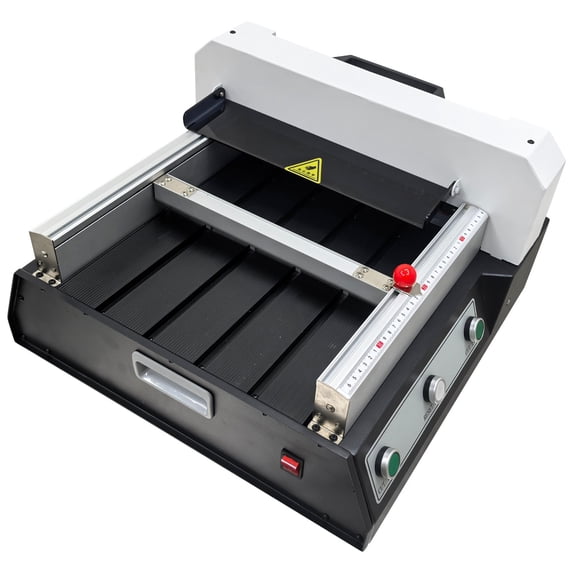
320mm Electric Paper Cutter Desktop Paper Cutting Machine
Key item features
- The paper cutter is equipped with dual sensing protection of infrared photoelectric and protective cover. Opening the protective cover will stop the machine. Avoid incorrect operations and personnel injuries.
- The paper cutter is equipped with infrared positioning, which can accurately cut paper without worrying about the cutting blade, saving time and effort.
- Turning the red knob counterclockwise will loosen it, allowing you to adjust the front and rear positions according to the size of the cutting paper. Turning it clockwise will lock it.
- When cutting paper, press both "CUT" keys simultaneously with both hands, and the machine will automatically press the paper and then cut it.
- Its infrared photoelectric protection, two-hand cutting operation and multiprotection make operation safer.
Specs
- BrandTechtongda
- MaterialPaper
- Height11.81 in
- ColorBlack
- Weight62.9 lb
- Pack quantity1
- Free shipping
 Free 30-day returns
How do you want your item?


About this item
Product details
Product Overview:
Its infrared photoelectric protection, two-hand cutting operation and multiprotection make operation safer. It can be applied to small and medium sized printing enterprises, photocopies, offices and cut papers, books, pictures, documents, files as well as other non-metal materials. Safety, reliability, high quality and low price make the machine an ideal product for your cutting.
Product Parameters:
Cutting size: 12.6in/320mm
Paper cutting thickness: 1.65in/42mm
Cutting accuracy: ±0.02in/0.5mm
Paper pushing method: Manual
Paper pressing method: Electric
Voltage: 110V
Power: 120W
Product dimensions: 19.29x18.9x11.81in/49x48x30cm
Net weight: 62LB/28KG
Attention:
1. Two-Hand Start Operation
Always press the two green "Cut" buttons simultaneously. Never operate with one hand or use foreign objects to press the buttons, to prevent accidental activation and personal injury.
2. No Hand Entry
In the cutting process or before the knife carriage has fully returned to its home position, never insert your hands or any part of your body into the cutting area or under the paper clamp.
3. Prohibited Improper Cutting
Only cut specified materials such as paper and cardboard. Never cut non-paper materials such as metal, plastic, or hardwood, to avoid damaging the blade and the machine.
4. No Overloading
Do not exceed the rated maximum cutting thickness in a single pass, to prevent motor overload or uneven cutting.
Basic Operation
1.Insert the power plug into AC110V socket. Power on the machine, if the power indicator is on, it means electricity connection is normal.
2.Open the red paper push lock button, move the push plate, and push the paper or book to the side of the scale, aligning it with the measuring scale. Fix the position of the paper and then close the push lock button to prevent the paper from moving and cutting inaccurately.
3.After adjusting the cutting size, press the Cut buttons by two hands.
Item included(122174):
Techtongda 320mm Desktop Electric Paper Cutter
- The paper cutter is equipped with dual sensing protection of infrared photoelectric and protective cover. Opening the protective cover will stop the machine. Avoid incorrect operations and personnel injuries.
- The paper cutter is equipped with infrared positioning, which can accurately cut paper without worrying about the cutting blade, saving time and effort.
- Turning the red knob counterclockwise will loosen it, allowing you to adjust the front and rear positions according to the size of the cutting paper. Turning it clockwise will lock it.
- When cutting paper, press both "CUT" keys simultaneously with both hands, and the machine will automatically press the paper and then cut it.
- Its infrared photoelectric protection, two-hand cutting operation and multiprotection make operation safer.
Specifications
Brand
Material
Height
Color
Warranty
Warranty information
Please be aware that the warranty terms on items offered for sale by third party Marketplace sellers may differ from those displayed in this section (if any). To confirm warranty terms on an item offered for sale by a third party Marketplace seller, please use the 'Contact seller' feature on the third party Marketplace seller's information page and request the item's warranty terms prior to purchase.
