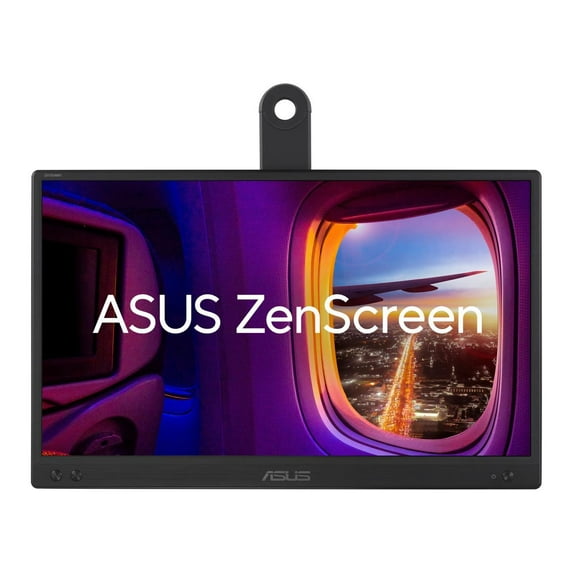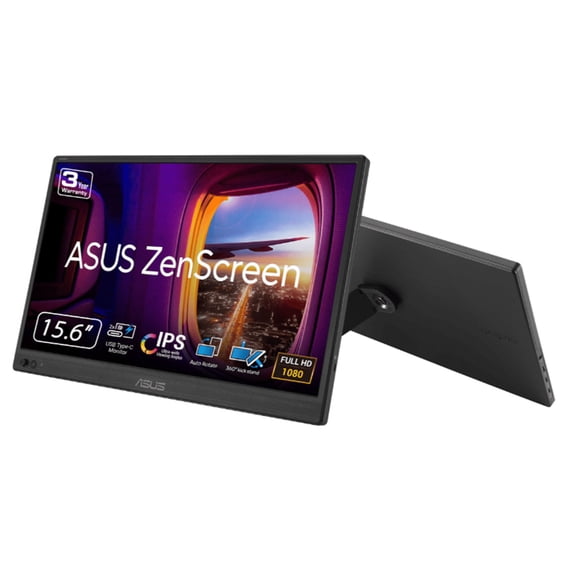
ASUS ZenScreen 16" Portable USB Monitor (MB169CK) - Full HD, IPS, Dual USB-C, Eye Care, Flicker Free, Blue Light Filter, Anti-glare Surface, 360° Kickstand
Hero image 0 of ASUS ZenScreen 16" Portable USB Monitor (MB169CK) - Full HD, IPS, Dual USB-C, Eye Care, Flicker Free, Blue Light Filter, Anti-glare Surface, 360° Kickstand, 0 of 15

ASUS ZenScreen 16" Portable USB Monitor (MB169CK) - Full HD, IPS, Dual USB-C, Eye Care, Flicker Free, Blue Light Filter, Anti-glare Surface, 360° Kickstand

Key item features

  • Vivid Visuals: Features a 15.6-inch Full HD (1920x1080) IPS anti-glare panel with 178-degree viewing angles, 250cd/m² brightness, and 800:1 contrast for crisp images and vibrant colors.
  • Ultra-Portable Design: Weighing only 1.72 lbs and 0.47" thin, this monitor is designed for easy transport and on-the-go use, fitting effortlessly into a travel bag.
  • Flexible Connectivity: Equipped with dual USB-C ports (supporting DP Alt Mode) and a Mini-HDMI port, ensuring broad compatibility with various devices for seamless setup.
  • Enhanced Productivity: Supports dual-monitor setups and automatically switches between landscape and portrait modes via DisplayWidget Center software, boosting efficiency for professionals.
  • Comfortable Viewing: Incorporates TV Rheinland-certified ASUS Flicker-Free and Low Blue Light technologies to reduce eye strain during extended usage sessions.
  • Adaptable Positioning: Includes a built-in 360-degree kickstand for versatile viewing angles and a 1/4" tripod socket for additional placement flexibility.
Generated by AI
Current price is $109.00
Price when purchased online
  • Free shipping
  • Free 30-day returns
Walmart Protection Plan by Allstate

(Only one option can be selected at a time)

How do you want your item?

How do you want your item?
Ships to
Arrives by Wed, Jun 24
|
Sold and shipped by ASUS
4.555555555555555 stars out of 5, based on 81 seller reviews(4.6)
Free 30-day returns
Other sellers
$109.00
+Free shipping
Shipping, arrives by Wed, Jun 24 to Columbus, 43215
Sold and shipped by Newegg Inc.
Free 15-day returns

About this item

Product details

Specifications

Warranty

Warnings

Customer ratings & reviews

4.5 out of 5 stars
stars17 ratings13 reviews
How item rating is calculated

Customer photos

Filtered and sorted results would be available on the new 'Customer ratings & reviews' page.
Sort by |

Showing 1-3 of 13 reviews

Sep 10, 2025
Tony_S
5 out of 5 stars review

Seller Verified Purchase

Versatile Main Display

The display is compatible with the NUC 14 Pro Thunderbolt 4.0 port and protocol. It is DP Alt and supplies power to run the display. I was plesantly surprised when the display immediately worked upon NUC startup. No need to download drivers. The MB169CK is the NUC's main screen. I use an ASUS Proart display to extend the desktop.

Review from https://www.asus.com
Helpful?3MITV9TX8DHT15444767645
Mar 7, 2026
Saschaberkenpas
5 out of 5 stars review

Seller Verified Purchase

Basic monitor

My only complaint is the monitor controls not working in inverted physical orientation...apparently the monitor has speakers I've never used....quality of the image is flawless and seemless interface. No weird setting defaults...perfect for secure systems, easily portable between secure stations. Great for better security practices...easy to incorporate onto projector multi desktop set up or multiple monitors.

International review
Review from https://www.asus.com
Helpful?3MITV9TX8DHT15444767645
Jun 4, 2026
Walmart customer
5 out of 5 stars review

Seller Verified Purchase

Great option for M-series MacBook laptops

This is a very full-featured display, especially considering the bargain price. I'm using it with an M2 MacBook Air and it integrates flawlessly with the laptop, even auto-rotating and, thanks to the DisplayWidget Center software, brightness and volume (for connected headphones or speakers) can be adjusted via the function keys as long as the cursor sits somewhere on the ZenScreen. My experience with portable displays on Macs has typically been poor integration and either Windows-only software, or worse, badly-coded "Mac" software that doesn't work as advertised. So this ZenScreen is a very pleasant surprise.

Review from https://www.asus.com
Helpful?3MITV9TX8DHT15444767645