

Manufacturer offers
Walmart Cash
Manufacturer offers
Access over $1,000 in Walmart Cash with manufacturer offers.

Claim manufacturer offers to get Walmart Cash on eligible everyday items.
Access 1,000s of eligible items across groceries, essentials & your favorite brands.
Redeem Walmart Cash towards future Walmart purchases, or for cash out in-store.
*Offer quantities & eligible items are limited & subject to change. Restrictions apply. See Walmart Cash terms below.
How to use in-store

Find & claim offers
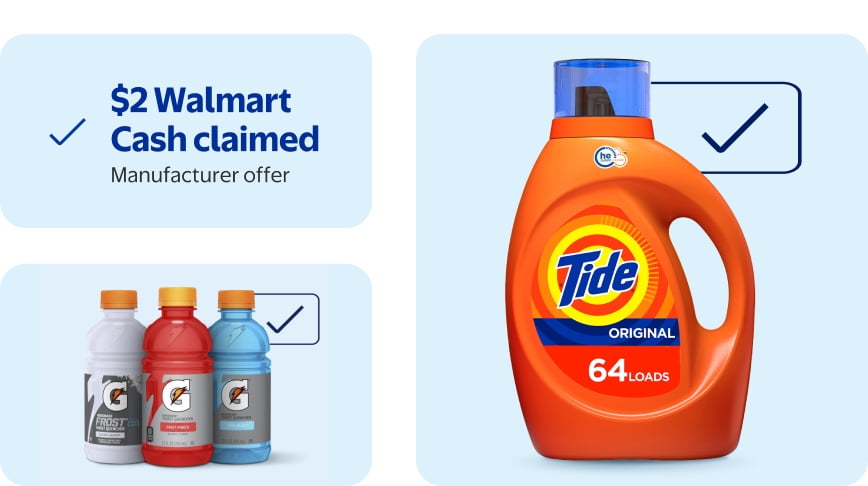
Tap the "Get Walmart Cash" box on items to claim & save offers.

Scan checkout QR code
Claimed offers will be applied at checkout to eligible items.

Buy eligible items
Walmart Cash will be added to your account to use after purchase.
How to use online

Find & claim offers
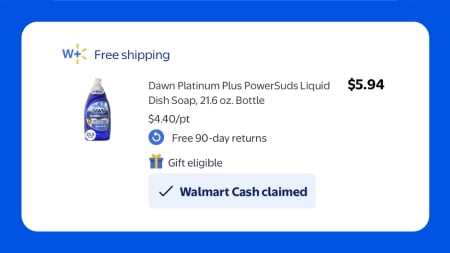
Tap the "Get Walmart Cash" box on items to claim & save offers.

Purchase eligible items
Add eligible items to your cart & place your order

Get Walmart Cash
Once your order is delivered or picked up from the store, Walmart Cash will be added to your account.
Ways to use Walmart Cash
In-store purchases
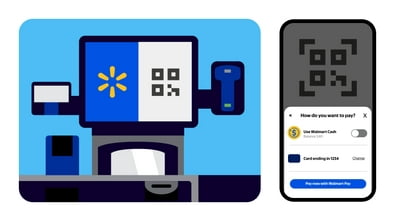
Scan the QR at checkout & tap "Use Walmart Cash" to redeem.

Online purchases
Tap "Apply" to use your Walmart Cash & save on your purchase.


FAQ
What are manufacturer offers?
All customers with a valid Walmart.com account can get Walmart Cash through manufacturer offers on eligible items.
When you’re visiting Walmart.com or using the Walmart app, eligible items will display the amount of Walmart Cash associated with a relevant product & any purchasing requirements. These manufacturer offers will be identified with a checkbox labeled “Get Walmart Cash” or similar terminology.
Once you claim a manufacturer offer & the associated product is purchased, delivered or picked up, Walmart will add the value of the specific offer to your Walmart Cash balance.
You can redeem this balance on future purchases in Walmart stores or Walmart.com, or cash it out in-store.
See full terms: https://www.walmart.com/help/article/walmart-rewards-for-members-terms-of-use/a51d3371c4264f22ae008831dac08185
Who is eligible to get Walmart Cash on manufacturer offers?
All customers are eligible. To participate in the program, you need a Walmart.com account.
How do I find & save manufacturer offers?
Sign in to your Walmart account on Walmart.com or the Walmart app.
You can find manufacturer offers from the Walmart Cash page, search bar or product page. Find & select the “Get Walmart Cash” box associated with individual products on Walmart.com or in the Walmart app. In store, you can also find & claim manufacturer offers using the barcode scanner in "Store mode" in the Walmart app.
Tap “Get Walmart Cash” to claim a manufacturer offer & save it to your account.
How do I get Walmart Cash on manufacturer offers?
In-store:
1. Using the Walmart app in store, sign in to your Walmart account where you have claimed manufacturer offers.
2. At the register or self-checkout, scan the on-screen QR code OR enter your phone number to connect your account and the saved manufacturer offers. To scan you may either use the scanner in the Walmart app located in the search bar, Walmart Pay, or if you have the Walmart app, you can scan with your native phone camera
3. Purchase the associated item.
Once you have completed the transaction & purchased the associated item, the value of the relevant manufacturer offer you selected will be added to your Walmart Cash account. Nothing further is required from you.
Online:
1. On Walmart or the Walmart app, sign in to your Walmart account where you have claimed manufacturer offers. Add the eligible item to your cart.
2. Place your order.
Once your order is delivered or picked up from the store, the value of the relevant manufacturer offer you selected will be added to your Walmart Cash balance.
Nothing further is required from you.
How do I redeem Walmart Cash for purchases?
You can redeem your Walmart Cash on purchases in-store and online. Restrictions apply. See Walmart Cash terms.
In-store:
1. Using the Walmart app in store, sign in to your Walmart account.
2. At the register or self-checkout, scan the on-screen QR code to connect your account.
3. Select “Use Walmart Cash” as a payment method.
4. Select a payment method for the remaining balance, if any. We won’t charge your payment method if you have more Walmart Cash than your basket total.
Online:
1. Sign into your Walmart account.
2. At checkout, select “Apply” next to your Walmart Cash balance in the Payment Method section.
3. Select a payment method for the remaining balance, if any. We won’t charge your payment method if you have more Walmart Cash than your basket total.
What if I forget to connect my account at checkout?
If you forget to scan the Walmart Pay QR Code or enter your phone number at checkout, you can still earn Walmart Cash on manufacturer offers if you scan your receipt barcode within 7 days of purchase.
We’ll check to make sure you haven’t already received Walmart Cash on that transaction. If not, we’ll credit your account with the relevant Walmart Cash value of the manufacturer offer you selected.
To do this:
1. Download the Walmart app & sign in to your Walmart account.
2. Go to Walmart Cash page tools & tap “Submit your receipt.” You can submit up to 5 receipts in a 24-hour period.
3. Scan the barcode on your store receipt.
To redeem your Walmart Cash balance in-store, you need to scan the Walmart Pay QR code at the register prior to completing the purchase.
How long does it take for Walmart Cash to show up in my balance?
It may take a few minutes & up to 24 hours for the manufacturer offer value to be reflected in your Walmart Cash balance after your in-store transaction.
For online orders, Walmart Cash will be reflected in your Walmart Cash balance after the order is delivered or picked up.
Your Walmart Cash balance can be found in your Walmart account wallet & on the Walmart Cash page.
Why did I not receive Walmart Cash for an item?
There are a few reasons why you may not receive Walmart Cash for an item:
· The item was out of stock, so the purchase of the item could not be completed.
· The item you selected was unavailable & had to be substituted with another item that was not eligible for the manufacturer offer.
· The manufacturer offer was not correctly saved or added to your account prior to purchase.
· The manufacturer offer had expired prior to purchase. See offer details for expiration dates.
Do manufacturer offers expire?
Yes, manufacturer offers have expiration dates & the associated item must be purchased before that expiration date. Manufacturer offers that have expired will be removed from your saved manufacturer offers on the Walmart Cash page. See offer details for expiration dates.
Can I get & redeem Walmart Cash in the same purchase?
Yes. You can get Walmart Cash on manufacturer offers & redeem your existing Walmart Cash balance on the same transaction. However, the Walmart Cash you receive in that transaction can only be applied towards future transactions.
Can I use paper coupons & receive Walmart Cash on manufacturer offers for the same item?
No. If you use a paper coupon in-store & have also added a manufacturer offer to your account, the paper coupon will be honored & you will not get Walmart Cash on the manufacturer offer for that item.
Do I forfeit the Walmart Cash I received if I return an item?
When an item for which you received Walmart Cash through a manufacturer offer is returned & the purchase price is refunded, the Walmart Cash for that item will be reversed & deducted from your balance. That is, unless there is another item in your transaction to which the original manufacturer offer could be applied.
If your Walmart Cash balance is not sufficient to cover the deduction, your balance will be negative. You will not be able to redeem any future earned Walmart Cash until you reach a positive balance.
If the item with the manufacturer offer I selected is substituted or out of stock, will I still receive Walmart Cash?
No. Only substituted items that also qualify will earn Walmart Cash.
Does Walmart Cash expire?
No.
